

Kamaji + HAMi in Practice: Sharing and Scheduling GPUs in Multitenant Kubernetes
 Engineering
A kind, Kamaji, and HAMi mock-device experiment validates GPU scheduling across tenant control planes without physical GPUs. It covers Webhook connectivity, resource sharing and exhaustion, and isolation of API resource visibility.
On this page
In Kubernetes, balancing tenant isolation with GPU utilization is an important part of AI infrastructure design.
Deploying a separate Kubernetes cluster for each team provides relatively independent control planes, but increases infrastructure and operations costs. Sharing one cluster requires additional attention to resource isolation, access control, and interference between workloads.
GPU allocation presents a similar challenge. When a task needs only part of a GPU's memory or compute capacity, assigning the entire card may leave resources idle. How can multiple workloads share a GPU while maintaining resource boundaries?
Kamaji and HAMi address different layers of this problem:
- Kamaji hosts the Kubernetes control planes of multiple tenant clusters in a management cluster, reducing the complexity of managing multiple control planes.
- HAMi provides GPU sharing and fine-grained scheduling, allowing workloads to request memory and compute resources as needed.
Can GPU scheduling work when they are combined?
Using kind, Kamaji, and HAMi's mock device plugin, this article builds a two-tenant test environment on a machine without a physical GPU. It tests cross-control-plane Webhook communication, GPU scheduling, insufficient-resource handling, and isolation of resource visibility between tenants.
All eight tests produced the expected results. The following sections describe the architecture, deployment, key results, and issues encountered, and distinguish what the mock environment can verify from what still requires real GPU hardware.
1. Architecture: Shared Management Plane, Separate Tenant Clusters
The setup consists of one kind management cluster and two tenant clusters. The management cluster hosts Kamaji and both tenant control planes. Each tenant's worker node runs in a separate container, joins its corresponding cluster through the kind network, and runs HAMi.
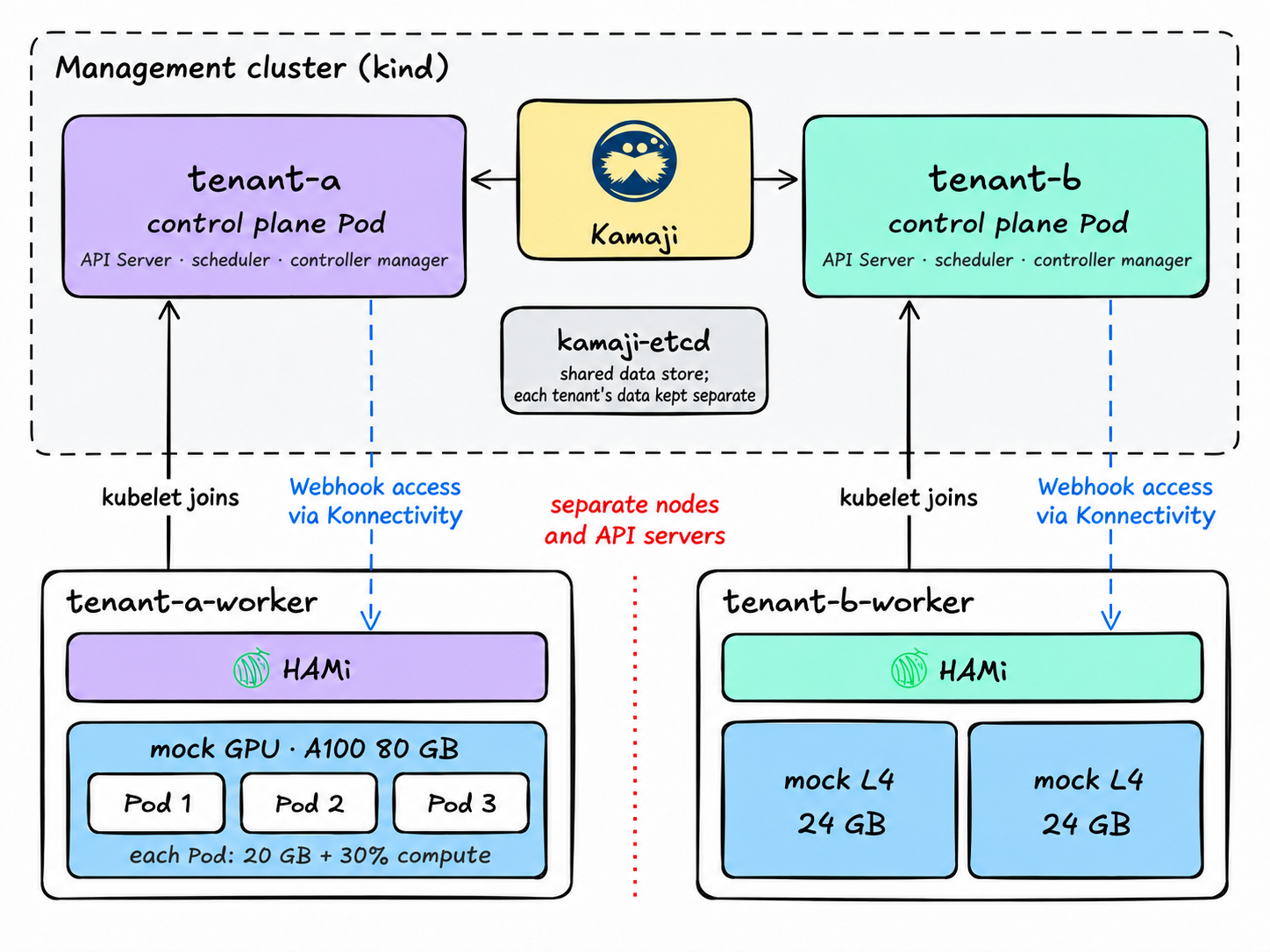
The tenants do not share worker nodes or a Kubernetes API Server. They share the underlying management cluster and the kamaji-etcd storage service, where each tenant's data is stored separately.
2. Key Check: GPU Scheduling Across Control Planes
Kamaji manages the tenant control planes, letting each tenant have its own Kubernetes API Server without deploying an entire control-plane infrastructure for every tenant. HAMi runs inside each tenant cluster and handles GPU sharing, allocation, and scheduling. They operate at different layers and complement each other.
A key question is whether an API Server in the management cluster can reach the HAMi Webhook deployed inside a tenant cluster.
Here, the tenant API Server runs in the management cluster while the HAMi Webhook runs on a tenant worker node. When a GPU Pod is created, the admission request must travel through Kamaji's Konnectivity tunnel.
The experiment therefore checks both whether GPU resources can be allocated and whether the communication path between the control plane and worker node supports HAMi's scheduling process.
3. Test Environment: Mocking Devices Without a GPU
All components run in Docker containers on one Linux host. The experiment requires four CPU cores, 8 GB of available memory, and 20 GB of disk space.
How can GPU sharing be tested without a GPU?
HAMi's real device plugin interacts with the NVIDIA driver and cannot start normally without GPU hardware. The mock plugin bypasses hardware discovery: a node Annotation describing a mock GPU lets it register capacities such as gpumem and gpucores.
The underlying machine has no GPU, but HAMi's Webhook, scheduler, and quota logic can still follow the scheduling process used on a real node.
The two tenants use different mock GPUs:
- tenant-a: one NVIDIA A100 80 GB, with 81,920 MB of memory and 100 cores of compute capacity.
- tenant-b: two NVIDIA L4 24 GB cards, with 49,152 MB of total memory and 200 total cores.
Here, cores measure GPU compute resources in the experiment; they are not physical CPU cores.
4. Deployment: Five Steps to a Multitenant Test Environment
Deployment has five main steps. Step 3 creates both tenants at once; steps 4 and 5 are repeated for each tenant.
Note that plain kubectl commands target the management cluster. Specify --kubeconfig tenant-a.kubeconfig to access the corresponding tenant cluster.
Step 1: Deploy the Management Cluster, cert-manager, and MetalLB
First create the kind cluster:
kind create cluster --name kamaji
Then deploy cert-manager:
kubectl apply -f https://github.com/cert-manager/cert-manager/releases/download/v1.21.2/cert-manager.yaml
kubectl -n cert-manager wait pod --all --for=condition=Ready --timeout=180s
Deploy MetalLB:
kubectl apply -f https://raw.githubusercontent.com/metallb/metallb/v0.16.1/config/manifests/metallb-frr-k8s.yaml
kubectl -n metallb-system wait pod --all --for=condition=Ready --timeout=180s
Find the IPv4 subnet in the kind network, then allocate a high address range within that subnet to MetalLB:
docker network inspect kind | grep Subnet
cat <<EOF | kubectl apply -f -
apiVersion: metallb.io/v1beta1
kind: IPAddressPool
metadata:
  name: kind-ip-pool
  namespace: metallb-system
spec:
  addresses:
  - 172.18.255.200-172.18.255.250
---
apiVersion: metallb.io/v1beta1
kind: L2Advertisement
metadata:
  name: empty
  namespace: metallb-system
EOF
Step 2: Install Kamaji
Add the Helm repository and install Kamaji:
helm repo add clastix https://clastix.github.io/charts
helm upgrade --install kamaji clastix/kamaji \
  --namespace kamaji-system --create-namespace \
  --set 'resources=null' --version 0.0.0+latest
Check the Kamaji components:
kubectl -n kamaji-system get pods
Step 3: Create Two Tenant Control Planes
Once the management cluster and Kamaji components are ready, create independent control planes for tenant-a and tenant-b.
This step uses Kamaji's TenantControlPlane resource to specify the Kubernetes version, control-plane deployment, network settings, and Konnectivity component for each tenant.
The following configuration creates both tenant control planes at once:
export TENANT_VERSION=v1.36.4
kubectl create namespace tenants

for t in tenant-a tenant-b; docat <<EOF | kubectl apply -f -
apiVersion: kamaji.clastix.io/v1alpha1
kind: TenantControlPlane
metadata:
  name: ${t}
  namespace: tenants
  labels:
    tenant.clastix.io: ${t}
spec:
  controlPlane:
    deployment:
      replicas: 1
    service:
      serviceType: LoadBalancer
  kubernetes:
    version: "${TENANT_VERSION}"
    kubelet:
      configurationJSONPatches:
        - op: add
          path: /cgroupDriver
          value: systemd
  networkProfile:
    port: 6443
    podCidr: 10.244.0.0/16
  addons:
    coreDNS: {}
    kubeProxy: {}
    konnectivity:
      server:
        port: 8132
      agent:
        mode: DaemonSet
EOFdone
After applying the configuration, wait for both control-plane Pods to reach Running, then export each tenant's kubeconfig:
for t in tenant-a tenant-b; do  kubectl -n tenants get secret ${t}-admin-kubeconfig -o jsonpath='{.data.admin\.conf}' | base64 -d > ${t}.kubeconfig
  kubectl --kubeconfig ${t}.kubeconfig cluster-info
done
Each tenant control plane runs as a single Pod in the management cluster's tenants namespace, on the kamaji-control-plane node.
A control-plane Pod showing READY as 4/4 means that all four containers are ready:
kube-apiserver: provides the tenant's Kubernetes API and exposes it through an IP assigned by MetalLB.kube-scheduler: the tenant cluster's default scheduler.kube-controller-manager: runs built-in Kubernetes controllers for the tenant.konnectivity-server: handles the management-cluster side of the tunnel, allowing the API Server to reach tenant worker nodes.
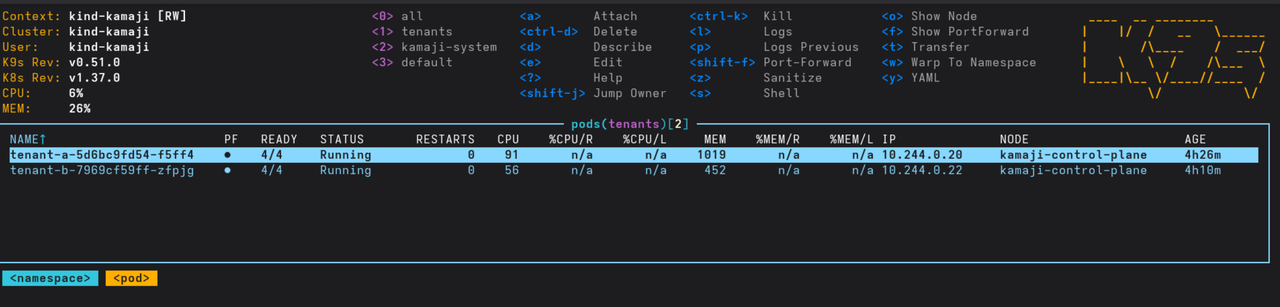
Both tenant control planes are now ready. Next, attach worker nodes to give each tenant the ability to run workloads.
Step 4: Attach Tenant Worker Nodes
Kamaji does not provide a dedicated tool for adding kind worker nodes. In this experiment, a kindest/node container runs on the kind network and joins the tenant cluster through standard kubeadm. The worker-node version must match the tenant's Kubernetes version.
docker run -d --name tenant-a-worker --hostname tenant-a-worker \
  --network kind --privileged \
  --security-opt seccomp=unconfined --security-opt apparmor=unconfined \
  --tmpfs /tmp --tmpfs /run -v /var -v /lib/modules:/lib/modules:ro \
  kindest/node:v1.36.4@sha256:099e049362a1526b2db71494e1947aae99bd16290d7c895f2b7ea312e3cbfaed
sleep 15
docker exec -i tenant-a-worker sh -c 'cat > /root/tenant-a.kubeconfig' < tenant-a.kubeconfig
JOIN_CMD=$(docker exec tenant-a-worker kubeadm token create --print-join-command \
  --kubeconfig /root/tenant-a.kubeconfig)
echo "$JOIN_CMD"
docker exec tenant-a-worker bash -c "${JOIN_CMD} --ignore-preflight-errors=all"
Next, install Calico in the tenant cluster, not the management cluster, and set its address pool to the tenant's podCidr:
curl -sLO https://raw.githubusercontent.com/projectcalico/calico/v3.31.2/manifests/calico.yaml
sed -i 's|# - name: CALICO_IPV4POOL_CIDR|- name: CALICO_IPV4POOL_CIDR|; s|#   value: "192.168.0.0/16"|  value: "10.244.0.0/16"|' calico.yaml
kubectl --kubeconfig tenant-a.kubeconfig apply -f calico.yaml
Confirm that the worker node joined the cluster:
kubectl --kubeconfig tenant-a.kubeconfig get nodes
Step 5: Deploy HAMi and a Mock GPU in Each Tenant
One important precaution: do not set the gpu=on label on the worker node. That would start HAMi's real NVIDIA device plugin, which cannot run without a GPU driver in this environment.
export KUBECONFIG=$PWD/tenant-a.kubeconfig

helm repo add hami-charts https://project-hami.github.io/HAMi/
helm install hami hami-charts/hami -n kube-system
# wait for hami-scheduler Running, and the hami-scheduler-device ConfigMap to exist
kubectl apply -f https://raw.githubusercontent.com/Project-HAMi/mock-device-plugin/master/k8s-mock-rbac.yaml
kubectl apply -f https://raw.githubusercontent.com/Project-HAMi/mock-device-plugin/master/k8s-mock-plugin.yaml
Next, configure a mock GPU on the node. This example models one A100 80 GB card:
# Simulate 1 x A100 80 GBNODE=tenant-a-worker
kubectl patch node $NODE --subresource=status --type=json \
  -p '[{"op":"add","path":"/status/capacity/nvidia.com~1gpu","value":"10"}]'
kubectl annotate node $NODE \
  'hami.io/node-nvidia-register=[{"id":"GPU-MOCK-0","count":10,"devmem":81920,"devcore":100,"type":"NVIDIA-A100-SXM4-80GB","health":true,"numa":0,"mode":"hami-core"}]'
After about 30 seconds, the node reports the following mock GPU resource capacities:
{ "nvidia.com/gpu": "10", "nvidia.com/gpucores": "100", "nvidia.com/gpumem": "81920", "nvidia.com/gpumem-percentage": "100"}
Repeat steps 4 and 5 for tenant-b, using its names. Its Annotation describes two mock GPUs, GPU-MOCK-B0 and GPU-MOCK-B1, each with 24,576 MB of memory and 100 cores; set its nvidia.com/gpu capacity to 20.
5. Scheduling Flow: How a GPU Pod Is Scheduled
When a GPU Pod is submitted to a tenant cluster, scheduling crosses between the management cluster and the tenant worker node. This is central to how Kamaji and HAMi work together.
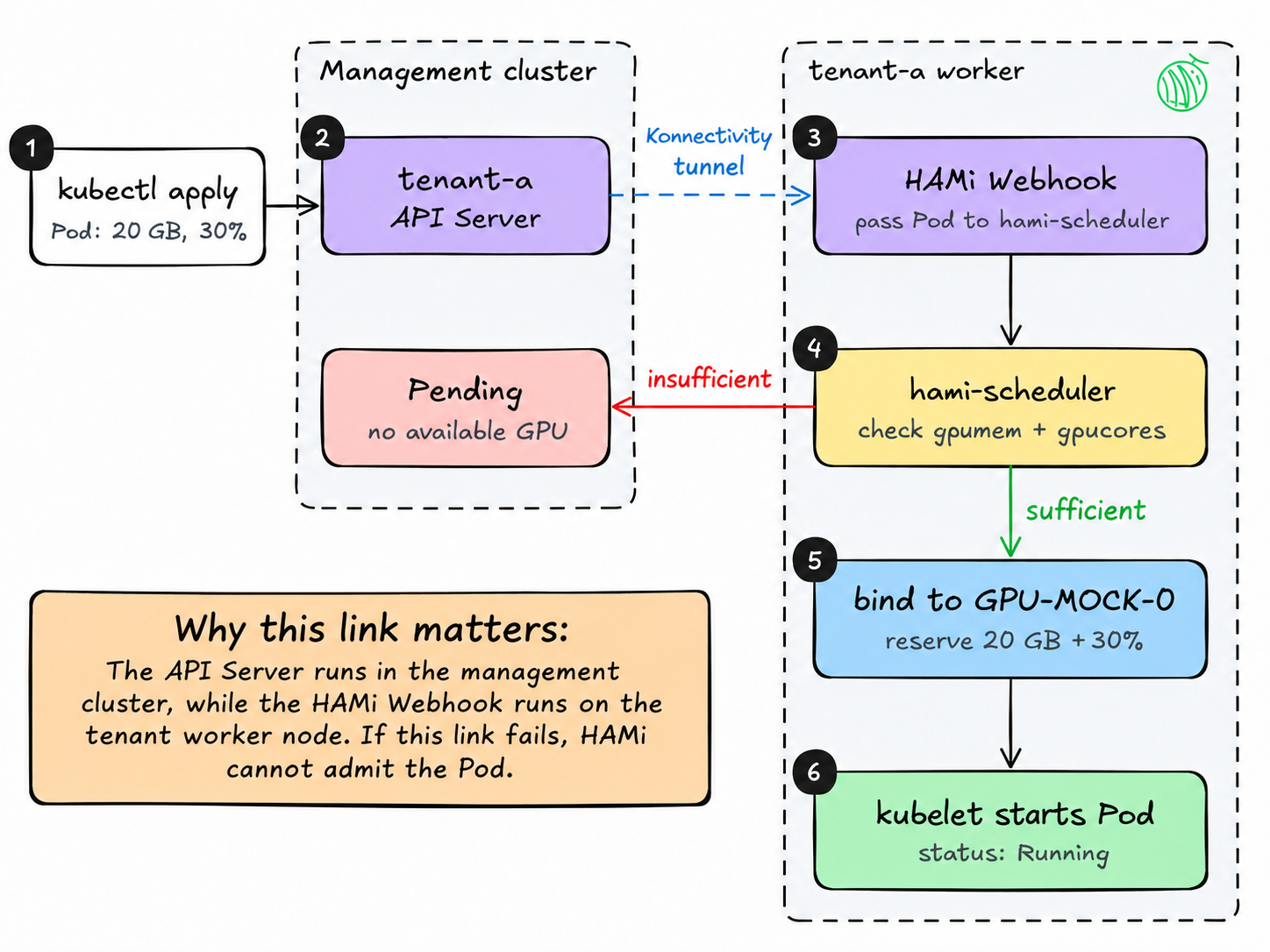
The API Server runs in the management cluster, while the HAMi Webhook runs on the tenant worker node. The admission request therefore passes through Kamaji's Konnectivity tunnel. If this path fails, the GPU Pod may not enter HAMi's scheduling process as expected.
Verifying the path is therefore an important part of the experiment.
6. Results: GPU Sharing, Resource Constraints, and Tenant Isolation
The experiment ran eight tests, all of which passed. The following results show several key checks.
TC-03 and TC-05: Three Pods Share One GPU
Each Pod requests 20,000 MB of memory and 30% of GPU compute capacity. The following loop creates three Pods.
The mock plugin does not release the node lock as the real device plugin would, so the HAMi node lock must be removed manually after each Pod is scheduled. The reason is explained under “Issues and Fixes” below.
export KUBECONFIG=$PWD/tenant-a.kubeconfig

for i in 1 2 3; docat <<EOF | kubectl apply -f -
apiVersion: v1
kind: Pod
metadata:
  name: gpu-share-${i}
spec:
  containers:
    - name: app
      image: busybox
      command: ["sleep", "infinity"]
      resources:
        limits:
          nvidia.com/gpu: 1
          nvidia.com/gpumem: 20000   # MB
          nvidia.com/gpucores: 30    # % of one card
EOF  kubectl wait pod/gpu-share-${i} --for=condition=PodScheduled --timeout=120s
  kubectl annotate pod gpu-share-${i} hami.io/bind-phase=success --overwrite
  kubectl annotate node tenant-a-worker hami.io/mutex.lock-
done
The Webhook directs the Pod to the HAMi scheduler, which places it on the mock GPU:
$ kubectl get pod gpu-share-1 -o jsonpath='{.spec.schedulerName}'
hami-scheduler

Annotations:  hami.io/vgpu-devices-allocated: GPU-MOCK-0,NVIDIA,20000,30:;
              hami.io/vgpu-node: tenant-a-worker
Events:
  Normal  FilteringSucceed  hami-scheduler  find fit node(tenant-a-worker), 0 nodes not fit, 1 nodes fit
  Normal  BindingSucceed    hami-scheduler  Successfully binding node [tenant-a-worker] to default/gpu-share-1
All three Pods eventually run on the same mock GPU, requesting a total of 60,000 MB of memory and 90% of compute capacity.
NAME          READY   STATUS    NODE
gpu-share-1   1/1     Running   tenant-a-worker
gpu-share-2   1/1     Running   tenant-a-worker
gpu-share-3   1/1     Running   tenant-a-worker
This verifies HAMi's fine-grained GPU-sharing scheduling under the mock resource model.
TC-06 and TC-07: Reject Scheduling When Resources Run Out
A fourth Pod requesting another 30% compute would bring total demand to 120%, exceeding the mock card's capacity of 100 cores.
cat <<EOF | kubectl apply -f -
apiVersion: v1
kind: Pod
metadata:
  name: gpu-share-4
spec:
  containers:
    - name: app
      image: busybox
      command: ["sleep", "infinity"]
      resources:
        limits:
          nvidia.com/gpu: 1
          nvidia.com/gpumem: 20000   # MB
          nvidia.com/gpucores: 30    # % of one card
EOF
The Pod remains Pending. HAMi provides a clear reason for the scheduling failure:
$ kubectl describe pod gpu-share-4 | sed -n '/Events/,$p'
Events:
  Type     Reason            Age                From            Message
  ----     ------            ----               ----            -------
  Warning  FailedScheduling  15s                hami-scheduler  0/1 nodes are available: 1 1/1 CardInsufficientCore. no new claims to deallocate, preemption: 0/1 nodes are available: 1 No preemption victims found for incoming pod.
  Warning  FilteringFailed   15s (x2 over 15s)  hami-scheduler  1 nodes CardInsufficientCore(tenant-a-worker)
  Warning  FilteringFailed   15s (x2 over 15s)  hami-scheduler  no available node, 1 nodes do not meet
Next, test insufficient memory: create a Pod requesting 90,000 MB, above the mock A100's 81,920 MB capacity.
cat <<EOF | kubectl apply -f -
apiVersion: v1
kind: Pod
metadata:
  name: gpu-mem-big
spec:
  containers:
    - name: app
      image: busybox
      command: ["sleep", "infinity"]
      resources:
        limits:
          nvidia.com/gpu: 1
          nvidia.com/gpumem: 90000   # MB, more than the whole card
          nvidia.com/gpucores: 10    # % of one card, fits in the free 10%
EOF
This Pod also remains Pending, with CardInsufficientMemory reported.
Together these results show that, given mock GPU resource data, HAMi can detect whether compute or memory demand exceeds allocatable capacity and make the corresponding scheduling decision.
TC-08: Isolated Resource Visibility Between Tenants
Run the same queries against each tenant's API Server and compare nodes, Pods, and allocatable GPU resources:
for t in a b; do  echo "===== tenant-$t ====="  kubectl --kubeconfig tenant-$t.kubeconfig get nodes
  kubectl --kubeconfig tenant-$t.kubeconfig get pods -A | grep -E 'gpu-|NAME'  kubectl --kubeconfig tenant-$t.kubeconfig get nodes -o json \
    | jq '.items[].status.allocatable | with_entries(select(.key|test("gpumem|gpucores")))'done
The test output follows:
===== tenant-a =====
NAME              STATUS   ROLES    AGE   VERSION
tenant-a-worker   Ready    <none>   29m   v1.36.4
NAMESPACE     NAME          READY   STATUS    RESTARTS   AGE
default       gpu-share-1   1/1     Running   0          14m
default       gpu-share-2   1/1     Running   0          12m
default       gpu-share-3   1/1     Running   0          12m
{
  "nvidia.com/gpucores": "100",
  "nvidia.com/gpumem": "81920",
  "nvidia.com/gpumem-percentage": "100"
}
===== tenant-b =====
NAME              STATUS   ROLES    AGE     VERSION
tenant-b-worker   Ready    <none>   5m28s   v1.36.4
NAMESPACE     NAME          READY   STATUS    RESTARTS   AGE
{
  "nvidia.com/gpucores": "200",
  "nvidia.com/gpumem": "49152",
  "nvidia.com/gpumem-percentage": "200"
}
tenant-a sees only its own worker node, three running GPU Pods, and 100 cores / 81,920 MB of mock GPU resources. tenant-b sees only its own worker node and 200 cores / 49,152 MB of mock resources.
Although both control planes run in the same management cluster, querying through each tenant's API Server does not return the other tenant's nodes, Pods, or GPU resources.
This verifies isolation of tenant API resource visibility in the test architecture.
7. Troubleshooting: MetalLB Addresses and the HAMi Node Lock
Two noteworthy issues arose during the experiment, and both had relatively direct fixes.
Issue 1: IPv6 Information in the kind Network Affected the MetalLB Address Pool
Following the Kamaji guide to query the gateway produced a combined IPv6 and IPv4 result such as fc00:f853:ccd:e793::1172.18.0.1, causing an invalid address-pool configuration.
Fix: Use docker network inspect kind | grep Subnet to read the IPv4 subnet explicitly, then configure 172.18.255.200-172.18.255.250 as the address range.
Issue 2: A GPU Pod Stayed Pending Because of Node-Lock Contention
After the first GPU Pod was scheduled, subsequent Pods showed this warning:
Warning BindingFailed hami-scheduler node tenant-a-worker has been locked within 5m0s: node lock contention
HAMi temporarily locks the node during Pod binding and sets hami.io/bind-phase: allocating. On a real node, the HAMi device plugin completes allocation and releases the lock. The mock plugin does not do this, so the lock would otherwise time out after five minutes.
Fix in this experiment: Manually emulate the device plugin's final steps by updating the Pod's binding phase and removing the node lock:
kubectl annotate pod gpu-share-1 hami.io/bind-phase=success --overwrite
kubectl annotate node tenant-a-worker hami.io/mutex.lock-
The next Pod was bound soon afterward.
This is a difference caused by the mock device plugin, not evidence of a defect in Kamaji or HAMi.
8. Experiment Limits: What Still Requires a Real GPU?
The experiment verifies communication between cluster components and GPU scheduling decisions; it does not verify runtime isolation on real GPU hardware.
- Actual memory and compute limits were not verified. HAMi-core relies on a real runtime, including an NVIDIA driver, to enforce GPU resource limits. A mock GPU has no hardware to enforce them.
- No performance measurements were collected. The experiment ran no CUDA workload, so it cannot establish throughput, performance overhead, or “noisy neighbour” interference.
- Device data was mocked manually. In a real environment, HAMi's device plugin normally registers node Annotations and completes resource allocation. Those steps required manual intervention here.
- The worker-node attachment method is not the officially recommended path.
kindest/nodecontainers work for this experiment, but Kamaji's usual supported path is to attach real machines using kubeadm or Cluster API.
Conclusion
Using Kamaji and HAMi, the experiment built a multitenant Kubernetes test environment without a physical GPU and verified GPU scheduling functionality.
The results show that a tenant API Server hosted by Kamaji can reach the tenant's HAMi Webhook through a Konnectivity tunnel, allowing GPU Pods to pass through admission and scheduling. Mock-resource tests also verified how HAMi handles GPU-sharing requests, insufficient resources, and isolation of API resource visibility between tenants.
The value of this setup is that it moves integration testing of multitenant control planes and GPU scheduling paths to a stage that does not require physical GPU hardware.
The mock plugin cannot verify real GPU memory isolation, compute limits, or runtime performance. Teams planning to use this architecture in production still need tests on real GPU hardware with actual workloads.
For developers exploring Kubernetes multitenancy, GPU sharing, or HAMi scheduling, the experiment provides a starting point.
Original article: https://anishbista.org/blog/multi-tenant-gpu-kubernetes-on-a-laptop-kamaji-hami/#why-kamaji--hami
Author: Kubernetes software engineer Anish Bista