

Why GPUs Became the Foundation of AI: A GPU Primer for K8s Veterans
 Engineering
A GPU primer for Kubernetes engineers covering parallel computing, Tensor Cores, HBM, Transformers, KV Cache, and the different resource needs of training and inference. It also explores multi-GPU systems, cluster scheduling, and GPU resource management.
On this page
This GPU primer for Kubernetes engineers follows Ameen Alam's three-part series on GPU architecture and draws on material from TrendForce, NVIDIA (Slinky/Slurm and GPUDirect data paths), Mirantis, and others on GPU infrastructure and agentic AI.
If you know K8s but have not worked with GPUs or trained and served a model, I hope this article helps you build a foundation.
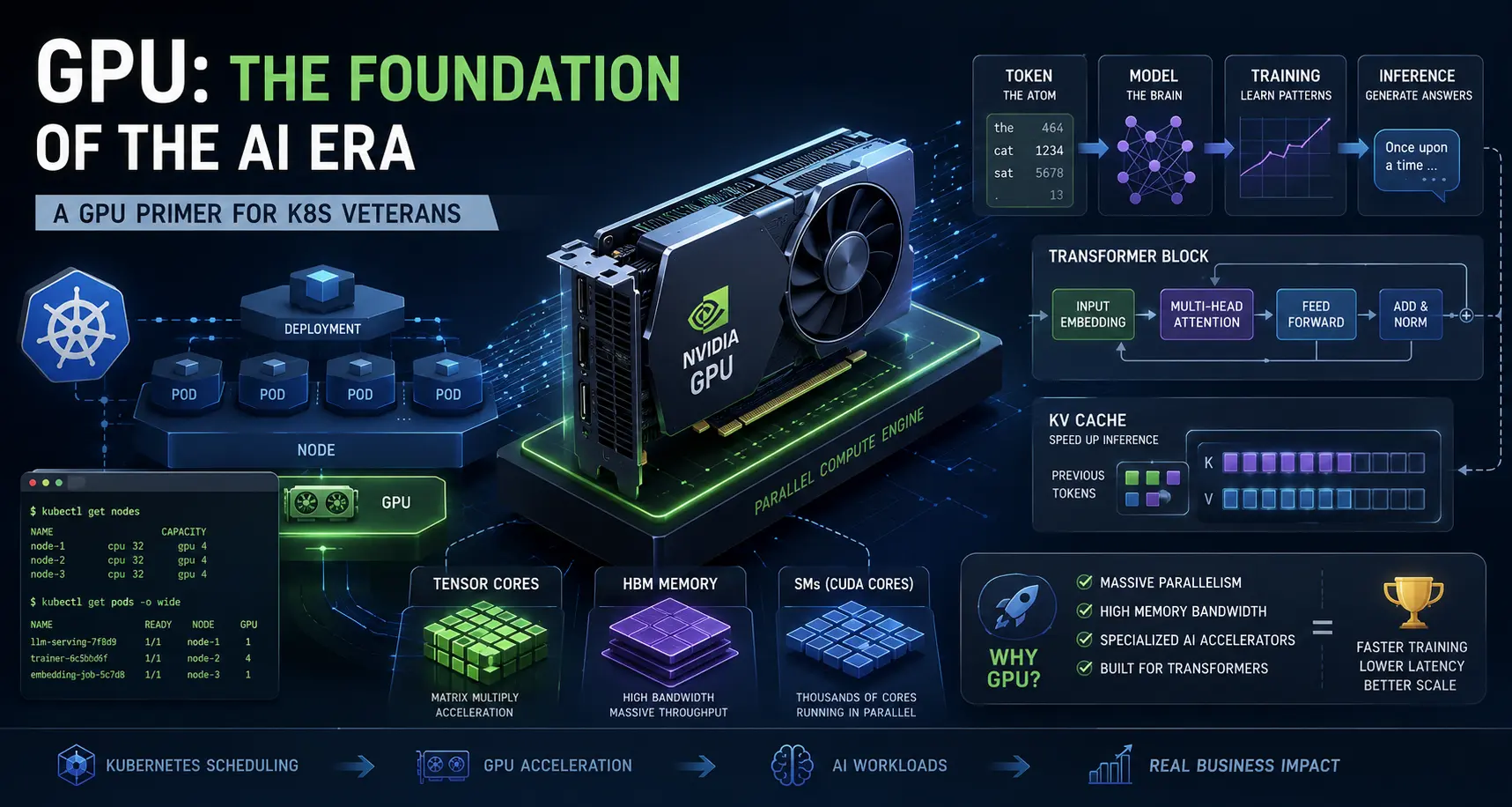
Before We Begin
For the past decade, my work has centered on containers and Kubernetes. From service meshes to the broader cloud native ecosystem, I have spent most days thinking about scheduling, networking, storage, and observability—but on the CPU side. Last year I moved into AI infrastructure.
Once I started, I realized how many concepts I needed to learn. Token, Transformer, Tensor Core, HBM, and KV Cache came one after another, while many technical documents assumed readers already knew them. It is difficult for engineers who have never trained a model or deployed an inference service.
I eventually found a useful learning method: start with familiar cloud native concepts and use them to understand corresponding ideas in AI infrastructure.
Kubernetes engineers already know scheduling, Jobs, Deployments, controllers, caching, utilization, and multitenancy, as well as microservices, service meshes, distributed systems, event-driven systems, and highly available architectures. Some AI infrastructure concepts can be understood by analogy with these ideas.
Once I made those connections, unfamiliar technologies became easier to understand. I am sharing my learning process for others with a similar background.
This first article answers a basic question: Why is GPU computing so widely used in AI?
Later articles will cover GPU resource management, scheduling, and observability—topics more familiar to K8s engineers.
When you type a sentence and AI returns an answer one word at a time, a natural K8s analogy is that AI is a “workload” running on a GPU, while the GPU is a specialized “node.”
Translating the Jargon into K8s Terms
AI infrastructure has many specialized terms that can be hard to understand without experience in model training or inference. This comparison table introduces the concepts explained later.
| AI concept | In plain language | Analogy for a K8s engineer |
|---|---|---|
| Token | The basic unit of text a model processes; it may be a character, word, or part of a word | A small piece of text in a log: a basic unit of information |
| Model | Parameters and computational structure produced through training to process input and generate output | An application and the data it needs; it provides a service once deployed |
| Training | Repeated computation over large datasets to adjust parameters and teach a model a task | A long-running Job that produces a deployable model |
| Inference | Using a trained model to process requests and generate predictions or answers | An online service deployed with a Deployment that receives requests and returns results |
| Transformer | An attention-based neural network architecture underlying many large language models | A controller loop can help explain stepwise generation, although the mechanisms differ |
| Tensor Core | A GPU compute unit specialized for accelerating matrix multiply-accumulate operations | A worker optimized for a particular kind of task |
| HBM | High-bandwidth memory used by a GPU to hold model weights, KV Cache, and other data | Node-local memory, but with much higher bandwidth |
| KV Cache | Cached Keys and Values from earlier tokens that avoid repeated computation during generation | Locally stored session state that grows with the context |
With those basics in place, we can look at why GPUs fit AI computation.
A Question Most People Skip
GPUs are widely used for AI training and inference. We often discuss which GPU to rent, which framework to use, and which model to deploy. But a more basic question gets less attention: Why a GPU rather than a more general-purpose CPU? How did a processor originally designed mainly for graphics become central to AI computing?
To answer it, we need to understand the architectural differences between CPUs and GPUs and the computational characteristics of neural networks.
CPU vs GPU
We know CPUs well. K8s control planes, etcd, schedulers, and many other components depend on them. A CPU is good at complex instructions and control flow. It has relatively few cores, but each one is powerful, with an emphasis on individual task efficiency and response latency.
Think of a CPU as an experienced craftsperson doing complex, detailed work independently.
A GPU takes a different approach. It has many compute cores that execute similar operations across large amounts of data in parallel. Rather than the speed of one task, it emphasizes overall throughput: completing as much computation as possible in a given time.
If the CPU is a craftsperson, the GPU is a large factory. Many workers perform similar operations at once, increasing total output through parallel work. Both have strengths.
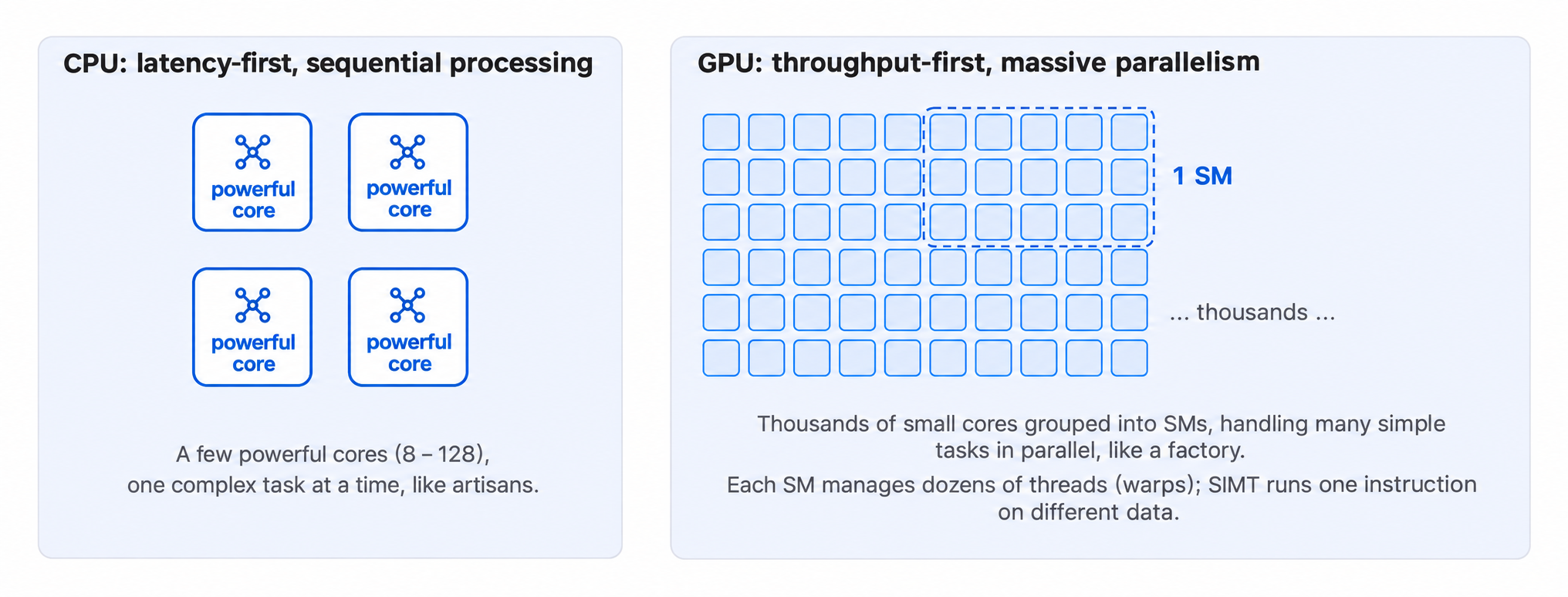
A CPU is usually better for complex control logic, frequent branches, or sequential dependencies. A GPU can provide higher throughput for large volumes of structurally similar, parallelizable computation.
Traditional web services, databases, and operating systems contain substantial control logic and therefore rely mainly on CPUs. Deep learning performs many matrix operations, and much of that work can run in parallel, matching a GPU's design.
Why AI Overwhelms CPUs
Neural networks perform many matrix multiplications: in simple terms, batches of numbers are multiplied and accumulated according to defined rules.
Processing tokens requires many such operations, and many of them can happen at the same time. This highly parallel work is where GPUs excel.
Consider a CPU with 128 cores. It must process a large matrix computation in batches. A GPU with thousands of compute cores can split the matrix into parts and run them on different units in parallel, raising total throughput.
The advantage is not that each GPU core is faster than a CPU core. It is that the GPU can engage many units simultaneously on work with a similar computational structure.
Many matrix operations in neural networks have this parallel structure. GPUs can therefore make fuller use of their parallel hardware and have become a primary computing platform for AI training and inference.
Three Key Concepts in GPU and AI Computing
Tensor Core: A Sidecar for Batch Multiplication
Take NVIDIA GPUs as an example. They have general CUDA Cores and Tensor Cores specialized for matrix operations.
CUDA Cores handle many kinds of computation. Tensor Cores are optimized for matrix multiply-accumulate operations and can process matrix tiles efficiently, delivering higher throughput with suitable data types and workloads.
As noted above, neural networks perform many matrix multiplications, which lets Tensor Cores shine.
In K8s terms, CUDA Cores are like general workers handling varied jobs; Tensor Cores are like specialized sidecars dedicated to “batch multiplication.” Each has a role, and Tensor Cores are more efficient for the matrix work they support.
HBM: Fast Local Memory for the Node
Even the fastest GPU needs a sufficiently fast supply of data.
Like a CPU, a GPU uses several storage levels, including registers, shared memory, caches, and device memory. Each has different capacity, latency, and bandwidth characteristics.
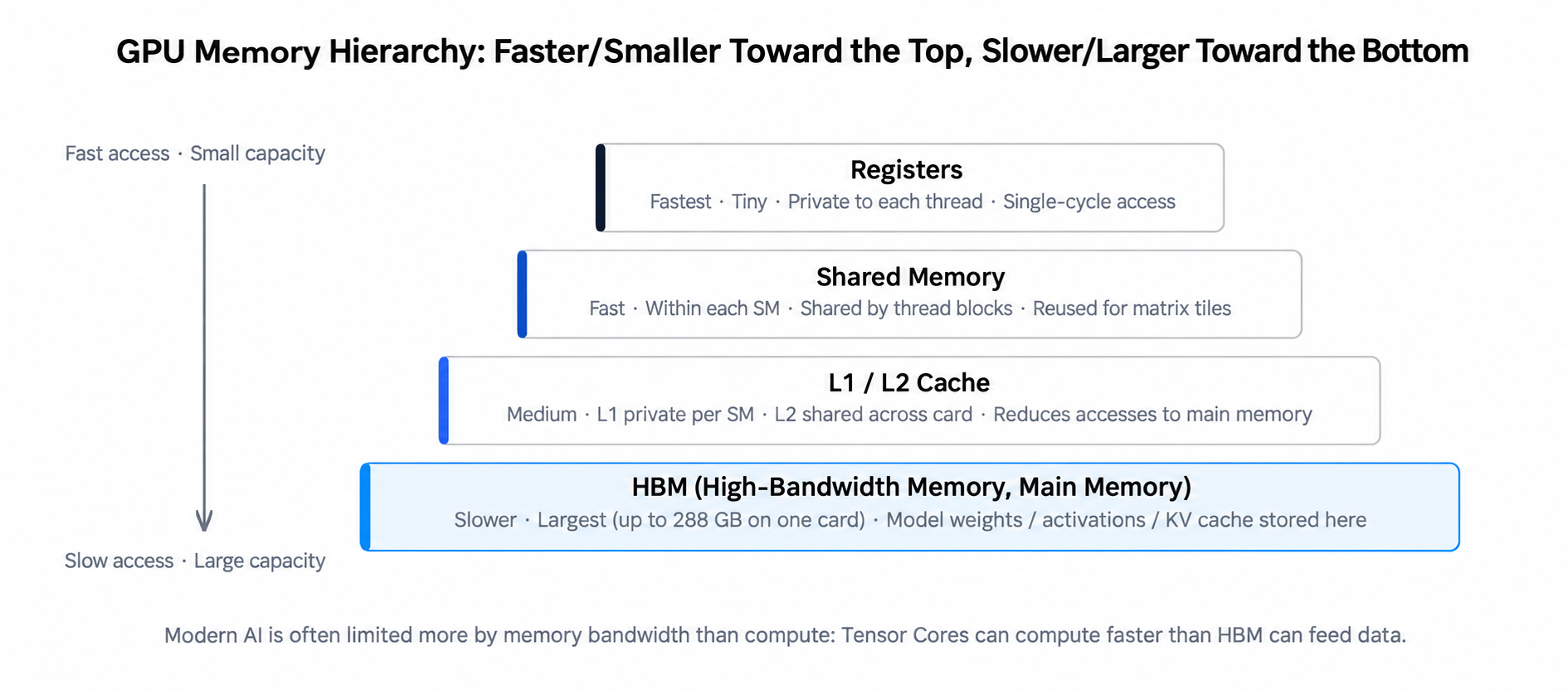
HBM (High Bandwidth Memory) is a common device-memory technology in high-performance GPUs. It can store model weights, intermediate results, KV Cache, and other data. Its main advantage is high memory bandwidth, letting the GPU obtain the data it needs for large computations more quickly.
Conventional GDDR memory is usually distributed as separate chips on a circuit board. As bandwidth demands rise, interface width, routing, and power consumption impose constraints.
HBM stacks memory vertically, connects layers through through-silicon vias (TSVs), and uses dense packaging to integrate memory stacks near the GPU chip. This provides a wider memory interface in a smaller package and higher transfer bandwidth.
As an analogy, conventional device memory is like warehouses scattered around a workshop. HBM places the warehouses next door and uses more parallel transport lanes to deliver materials.
Why does bandwidth matter so much? A GPU cannot compute a matrix until it has the data. If device memory cannot supply it quickly enough, compute units wait instead of reaching their potential performance.
This is especially noticeable in some AI inference workloads. Memory bandwidth, rather than compute capability, can become the main limit on inference speed.
HBM bandwidth has therefore remained an important metric in NVIDIA's GPU evolution. From H200 through Blackwell to Vera Rubin, products have continued to increase device-memory bandwidth to meet growing AI workloads.
NVIDIA also optimizes data transfers between GPUs and external devices:
- GPUDirect Storage enables a more direct path from storage to GPU memory, reducing staging in host memory and related CPU overhead.
- GPUDirect RDMA enables direct exchanges between GPU memory and RDMA-capable network devices, reducing unnecessary copies and CPU involvement in cross-node communication.
- NVLink provides a high-speed interconnect between GPUs, accelerating data exchange in multi-GPU systems.
These technologies work at different points in the data path, but all help GPUs acquire and exchange data efficiently. K8s engineers can think of them as reducing unnecessary hops and moving data as directly as possible to its destination.
NVIDIA's position in AI computing is also closely tied to this ecosystem of GPU memory and high-speed interconnects.
Transformer and Token: How an LLM Generates an Answer
A Transformer is not hardware. It is a neural network architecture. GPT, Claude, LLaMA, and other large language models use Transformer-based designs.
For common autoregressive language models, text generation can be understood simply as predicting the next token from the existing token sequence.
A token is a basic text unit for the model: a character, a word, or part of a word.
When a user provides text, the model converts it into tokens, computes a probability distribution for the next token from the existing context, and selects one according to a generation strategy.
The new token is added to the sequence, and the model predicts again using the updated context. This repeats until the answer is complete or a stopping condition is met.
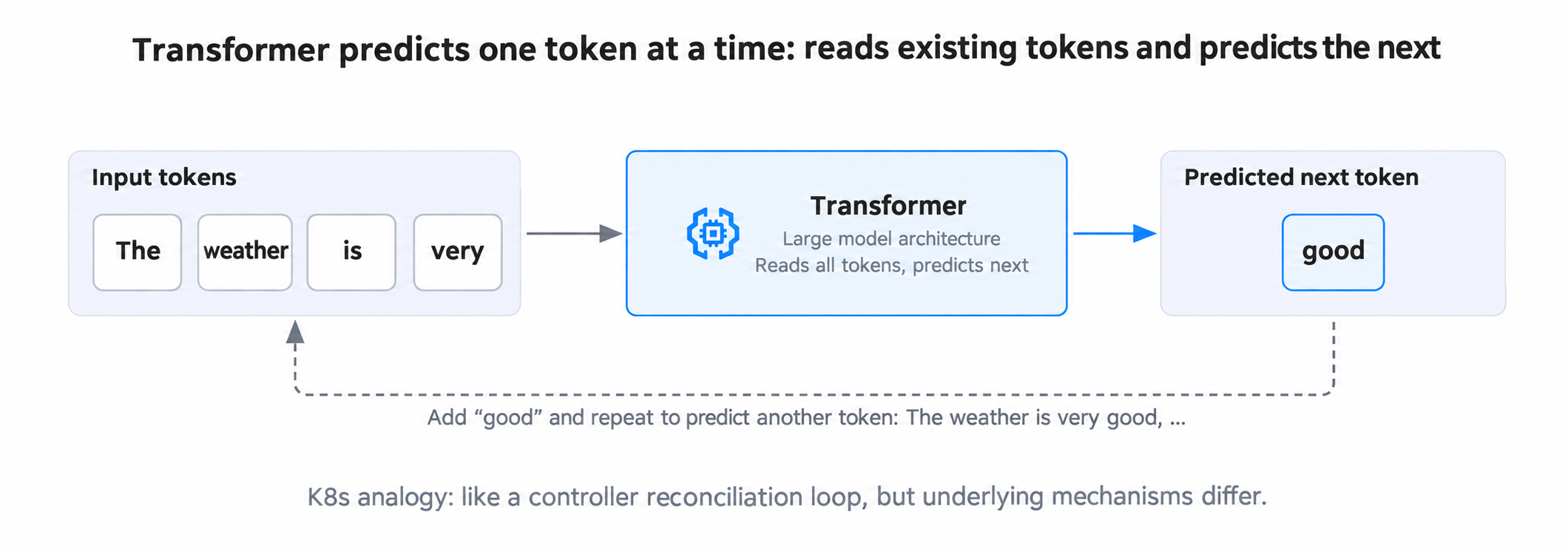
A K8s analogy is a controller's reconcile loop: read the current state (existing tokens), calculate the next output (one new token), update the sequence, and repeat.
That analogy only helps explain the iterative process. A Transformer's internal computation is different from a Kubernetes controller.
The way an AI assistant's answer appears progressively on screen is related to this autoregressive generation.
Training vs Inference
Training and inference are different stages in a model's lifecycle. Both use GPUs, but their workloads and resource needs differ.
- Training repeatedly computes over large datasets and adjusts parameters to learn patterns. Large training runs can take weeks or months and focus on aggregate throughput and training efficiency. In K8s terms, it resembles a long-running batch Job that produces model weights.
- Inference uses a trained model to process input and produce results. An online inference service must respond quickly while maintaining throughput under concurrent users. It resembles an online service deployed through a K8s Deployment.
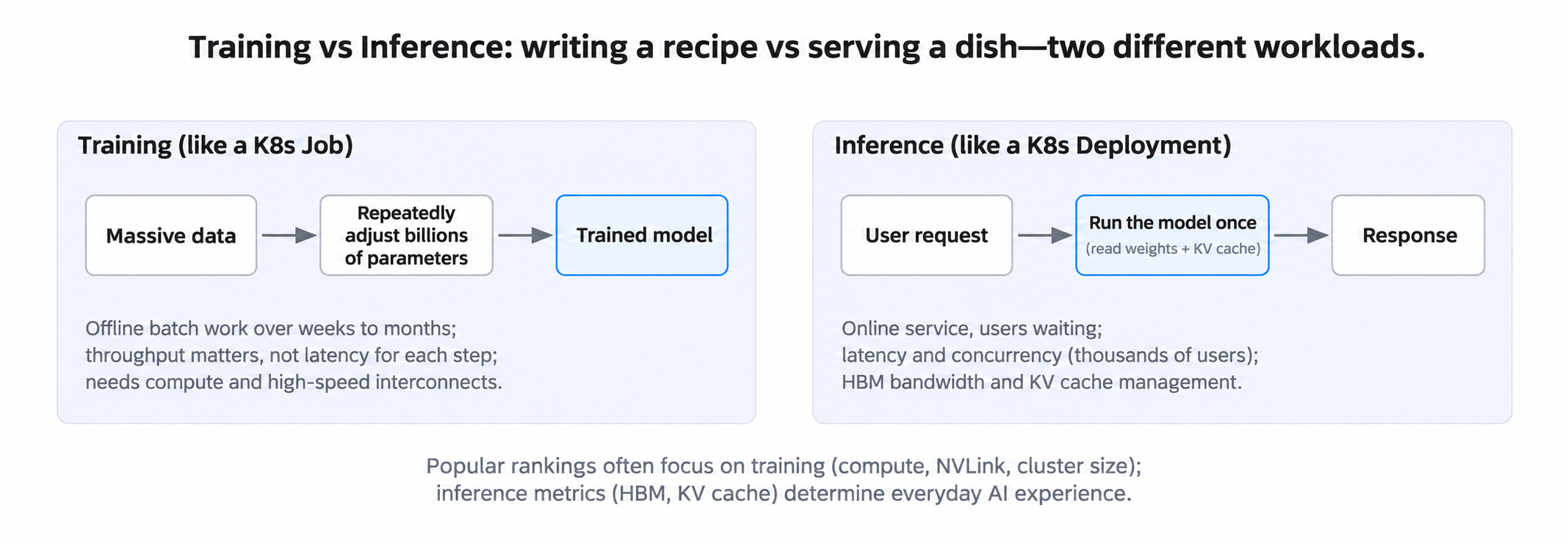
These differences affect GPU selection and performance evaluation.
For large-scale training, Tensor Core throughput, communication bandwidth between GPUs, and multi-card coordination matter. Computation and data exchange both affect total training time.
In LLM inference, HBM capacity and bandwidth and KV Cache management matter alongside compute capability. They affect context length, concurrent request count, and token generation speed.
GPU choices should therefore reflect the particular training or inference workload and its combined compute, memory, and communication needs.
Multi-GPU Cooperation: Distributed Computing in AI Clusters
A single GPU cannot meet every need. A large model may not fit in one card's memory, while large-scale training may need hundreds or thousands of GPUs.
Multiple GPUs must split tasks, exchange data, synchronize results, and coordinate execution across nodes. Cloud native engineers will recognize many of these distributed-systems problems.
Multi-GPU cooperation
With model parallelism, different parts of a model run on different GPUs. Each performs its assigned computation and exchanges intermediate results. This somewhat resembles splitting functions across services in a microservice architecture, but GPUs often require much tighter synchronization and are more sensitive to communication latency and bandwidth.
Communication between GPUs
Multi-GPU work exchanges data frequently, particularly in distributed training. GPUs in one node can use NVLink and other fast interconnects; cross-node communication commonly uses high-speed networks such as InfiniBand or RoCE.
Service-mesh engineers can think of east-west microservice traffic, although distributed AI computation typically has stricter bandwidth, latency, and topology requirements. NVIDIA is also integrating GPUs and high-speed networking at system level in designs such as Vera Rubin NVL72, which organizes multiple GPUs and interconnect components in a rack-scale system for parallel computing.
All-reduce
In data-parallel training, different GPUs process different subsets of training data and compute their own gradients. The system must aggregate those gradients so all participants use a consistent update. All-reduce is a common collective operation that reduces values across GPUs and distributes the result to each participant.
Experience with etcd or Raft can help explain the need to coordinate information among nodes, but they solve different problems. Raft addresses distributed consensus; All-reduce aggregates and distributes numerical data.
Continuous batching
In LLM inference, requests arrive at different times and generate different numbers of tokens. Static batching often waits for a batch to finish before starting another. Continuous batching adds new requests and removes completed ones during generation.
For an engineer familiar with event-driven systems, this resembles a system that keeps accepting and processing work. Here the scheduler manages not only requests but also GPU computation for each token-generation step. Dynamic batch membership can reduce GPU waiting and idle capacity and raise inference throughput.
Disaggregated inference
LLM inference generally has two main phases:
- Prefill processes input tokens and creates the corresponding KV Cache. It usually involves substantial parallel computation.
- Decode uses the existing KV Cache to generate output tokens step by step and is more sensitive to memory bandwidth and cache management.
Because the phases have different characteristics, some inference systems run them in separate GPU pools, with independent capacity and scaling. This is called disaggregated inference. KV Cache must move between Prefill and Decode; the transfer method depends on the hardware and inference-system design.
This resembles splitting and independently scaling microservices by function. The KV Cache is like session context passed between processing stages.
Multi-GPU computing involves new hardware and computation, yet task splitting, node communication, resource scheduling, and data management are familiar problems for cloud native engineers. Experience with Kubernetes, Istio, Envoy, and other distributed systems can help us understand AI clusters.
Scheduling GPU Clusters: Slurm and Kubernetes Together
After examining multi-GPU computation and communication, a K8s engineer may ask who schedules and manages the jobs. Slurm and Kubernetes are both common choices for GPU clusters, with different origins and strengths.
Slurm is widely used in high-performance computing (HPC). According to NVIDIA data cited in the source, roughly 65% of the global TOP500 supercomputers use Slurm. Many large AI training teams have established Slurm job scripts, fair-share policies, and accounting processes.
Large model training runs for long periods and has demanding requirements for GPU topology, cross-node communication, and aggregate throughput. Slurm's long history with batch jobs and large computing pools makes it a common choice.
Kubernetes is strong at containerized workloads and online services. Inference services need autoscaling, service discovery, traffic management, and observability—mature K8s capabilities. Kubernetes can also support model training through schedulers and ecosystem tools.
Organizations running both large training jobs and online inference may have to manage Slurm and Kubernetes environments together.
NVIDIA's open-source Slinky project offers one way to combine them: deploy and manage Slurm in a Kubernetes environment, using K8s for infrastructure management while retaining Slurm's HPC scheduling strengths.
Relevant components include:
- slurm-operator manages Slurm components such as slurmctld, slurmd, and slurmdbd with Kubernetes custom resources and workload objects. K8s configuration and lifecycle management simplify deployment and operations.
- GPU Operator + DCGM Exporter deploy and manage GPU drivers and related components and collect GPU metrics. Combined with Slurm job information, they can support job-level monitoring.
- ComputeDomains + DRA use Kubernetes Dynamic Resource Allocation and related mechanisms to manage GPU interconnect resources in systems such as GB200 NVL72, supporting distributed training.
According to NVIDIA production experience cited in the source, Slinky has managed more than 8,000 GPUs. In the cited NCCL all-reduce and all-gather tests, its communication performance was close to native Slurm. Under those test conditions, the Kubernetes management layer did not introduce obvious performance loss.
Slinky illustrates a cluster-management pattern: Kubernetes manages underlying infrastructure, while Slurm schedules the corresponding compute jobs in the same environment.
Training and inference still need different GPU resources. Whether using Slurm or Kubernetes, we must account for workload-specific allocation, topology awareness, elastic scheduling, and utilization. Beyond placing a task on a suitable GPU, improving resource efficiency is another infrastructure challenge.
KV Cache: The Memory Challenge in LLM Inference
KV Cache strongly affects device-memory use and inference performance. When a Transformer generates a new token, it needs attention information from previous tokens. Recomputing the Keys and Values for every earlier token each time would waste computation.
Inference systems therefore cache previously computed Keys and Values for later generation. This is the KV Cache (Key-Value Cache).
It avoids repeated computation but consumes memory that grows with the context. For example:
- A 10,000-token conversation needs corresponding Keys and Values stored for those tokens.
- Generating a new token usually reads historical KV Cache relevant to the current context.
- In the source's example of a 70B model with a 32K context, one request's KV Cache may reach 8–16 GB.
- Long contexts and many concurrent requests can put hundreds of gigabytes of KV Cache in memory at once.
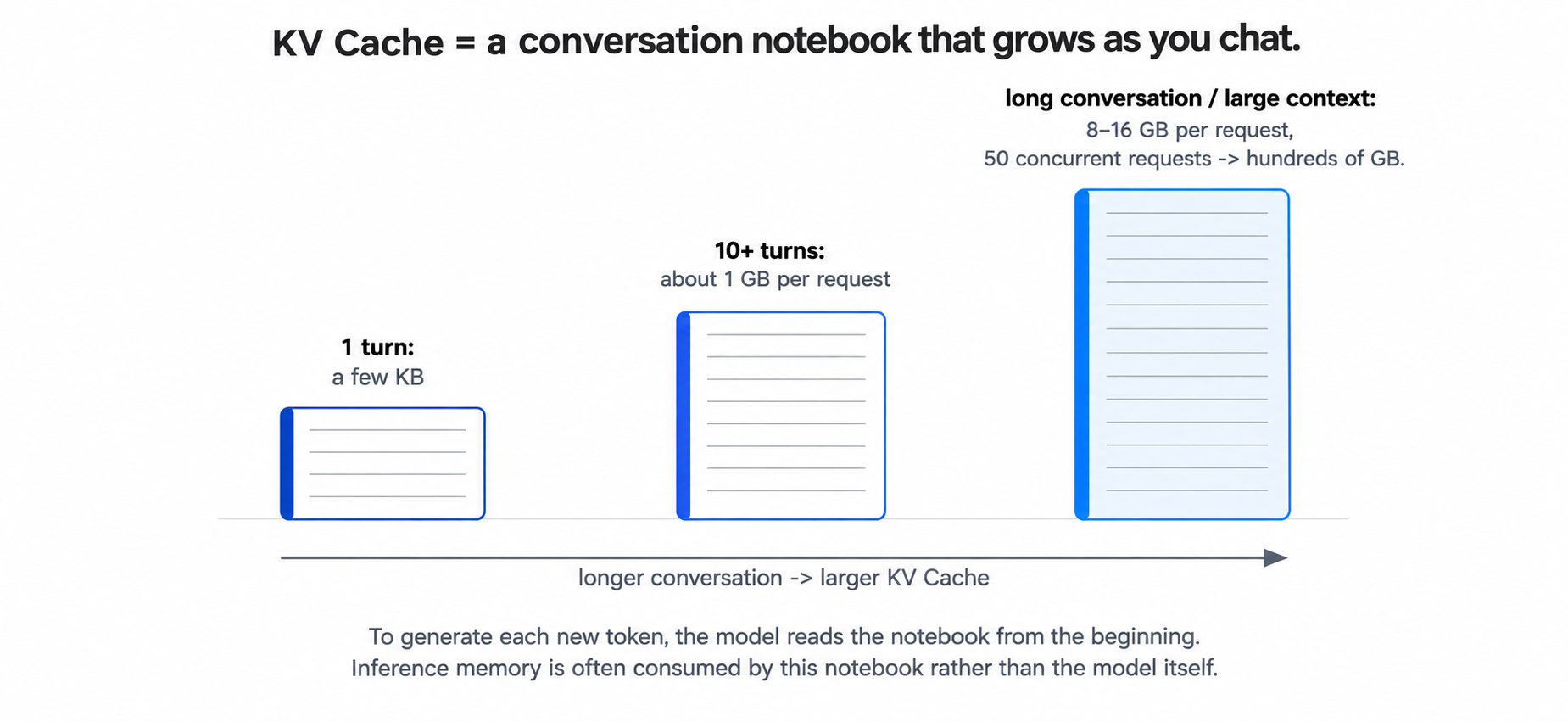
For a K8s analogy, KV Cache resembles locally stored session state: longer conversations retain more history, which must be accessed during later generation.
Inference memory must hold both model weights and KV Cache. Long contexts or high concurrency may consume so much cache space that the service can handle fewer simultaneous requests. Inference frameworks address this with different cache-management approaches.
vLLM's PagedAttention, for example, draws on virtual-memory paging to manage KV Cache in blocks, reducing fragmentation and improving memory use.
NVIDIA Dynamo and other inference systems provide hierarchical KV Cache management, moving data among storage levels such as GPU and CPU memory according to access needs.
How well an inference service allocates, reuses, and manages KV Cache directly affects memory efficiency, concurrency, and overall performance.
GPU Utilization Can Mislead
K8s operators know a Running Pod is not necessarily doing useful work. GPUs have a similar problem: high reported utilization does not guarantee efficient computation.
The GPU Utilization metric in nvidia-smi is the fraction of the sampling period during which at least one compute kernel executes. It shows how often the GPU is active, not whether all compute units are fully engaged.
A 90% utilization reading does not mean 90% of peak compute performance. Memory bandwidth, kernel launch overhead, and other limits can leave compute capacity underused.
Assess efficiency using SM (Streaming Multiprocessor) activity, compute throughput, Tensor Core activity, memory bandwidth, and other metrics together. Even when nvidia-smi reports almost 100% utilization, SM activity may be low. The actual bottleneck depends on the workload and finer-grained measurements.
For AI inference, service-level metrics matter too:
- Token throughput: output tokens per unit time, similar to throughput for an online service.
- TTFT (Time to First Token): time from request to the first output token, strongly influencing perceived responsiveness.
- TPOT (Time Per Output Token): average time per output token during generation. ITL (Inter-Token Latency) is the time between successive tokens. They are related, but reporting conventions can differ between frameworks.
- Device-memory use: distinguish weights, KV Cache, and temporary computation data to identify capacity or memory-access bottlenecks.
K8s engineers can relate these to QPS, request latency, and resource headroom. Evaluate both hardware activity and actual requests, token output, and response time.
Why NVIDIA Is Hard to Displace
NVIDIA's position in AI computing is difficult to discuss without its software ecosystem. Besides hardware performance, CUDA has been an important long-term advantage.
CUDA is more than a parallel-computing interface. It includes a programming model, compilers, a runtime, and accelerated libraries. Over years it has developed into a broad toolchain supported by frameworks such as PyTorch, TensorFlow, and JAX. Many training and inference systems are optimized specifically for CUDA.
Think of it as an ecosystem comparable to the Linux kernel, containerd, and associated cloud native tools together: many cooperating layers, not one component.
Moving an existing AI workload to another GPU platform therefore usually means more than replacing hardware. Organizations must revalidate kernels, accelerated libraries, frameworks, inference services, monitoring, and operations tools for compatibility and performance.
This software ecosystem across development, deployment, and operations—and the cost of adapting or migrating—underpins NVIDIA's competitive position.
The Future: AI Factories
NVIDIA increasingly uses “AI Factory” for data center infrastructure built for AI. The idea is that an AI data center must design computing, storage, networking, power, and cooling as a system, rather than focusing only on GPUs.
As GPU density and cluster sizes rise, operators must consider:
- Power: the source says one Vera Rubin rack draws more than 100 kW and a medium training cluster may need 10–50 MW. Capacity, stability, and redundancy need planning from the start.
- Cooling: dense GPU systems generate substantial heat. Air cooling may not suffice in some deployments, making liquid cooling important for high-density servers and racks.
- Network topology: distributed training exchanges data frequently. Bandwidth, latency, and GPU connectivity affect efficiency, so workloads should inform the network and node layout.
- Memory bandwidth: faster compute needs a corresponding data supply. Device-memory bandwidth remains a major factor in some AI workloads.
- Availability and operations: power redundancy, cooling failures, network reliability, and node recovery affect cluster stability.
Engineers experienced with large distributed systems will recognize these issues. High-density AI clusters impose stricter requirements for power, cooling, and interconnects and require closer coordination between hardware deployment and operations.
Don't Retire the CPU Yet
Although GPUs do the model computation, CPUs remain essential to AI infrastructure. Their role is becoming more varied as agentic AI applications grow.
In a conventional LLM inference service, CPUs handle request processing, preprocessing, and scheduling. Agents add orchestration, tool calls, collaboration between agents, state management, and result processing. Much of this requires CPU capacity.
Reinforcement learning and other tasks involving complex environments may also raise CPU load through environment execution, tool use, and evaluation.
Infrastructure planning therefore cannot focus only on GPU compute. Adequate CPU capacity and coordination between CPU and GPU can affect the whole system. K8s engineers should account for inference, orchestration, tools, and data processing when assigning CPU, GPU, memory, and network resources.
What This Means for K8s Veterans
After covering GPU architecture and computation, I return to my own work: GPU resource management.
GPUs are costly to buy and deploy. Allocating them does not mean they are fully used. Memory bandwidth, KV Cache management, batching, and other factors affect real efficiency.
Several questions remain:
- How can tenants share a GPU safely, much as K8s places multiple Pods on one node?
- Which allocation and sharing strategies fit different training and inference workloads?
- Which fine-grained metrics show whether GPU computing capability is actually being used?
GPU virtualization and sharing technologies must address these questions.
According to the ClearML AI infrastructure survey cited in the source, only about 7% of responding organizations achieved GPU utilization above 85% at peak times. More than half were in the 51%–70% range, and about 15% were below 50%.
These figures show that utilization remains a challenge for many organizations. Low utilization may result from workload characteristics, resource configuration, scheduling policy, and other causes; each case needs examination.
Based on my experience, I think of GPU resource management in three stages:
Allocation → Utilization → Efficiency
- Allocation asks who receives the resource. Kubernetes Device Plugin can discover and allocate GPUs; whole-card exclusivity and time-slicing are different resource-management approaches.
- Utilization asks how much of the allocated resource is actually used. Dynamic batching and elastic scaling can reduce idle capacity for different workloads.
- Efficiency asks how effectively computation uses the hardware. High utilization alone is insufficient. SM activity, Tensor Core use, memory bandwidth, and tokens per unit of energy give a fuller view.
GPU resource management can become more fine-grained. Future schedulers might use hardware runtime state and application metrics, rather than only checking whether a card has quota left. SM activity, device-memory use, and KV Cache occupancy could help decide whether to place another workload.
Cloud native engineers have already worked through similar problems in scheduling, multitenancy, and observability. That experience is a useful foundation for AI infrastructure.
Beyond NVIDIA
Most of this article has focused on NVIDIA. Its hardware and software are representative of today's AI computing, but other approaches exist. Cloud providers, traditional chipmakers, and Chinese hardware companies are developing their own products and software stacks.
- Cloud-designed accelerators: Google continues to develop TPUs; AWS advances Trainium and Inferentia; Meta, Microsoft, and others are building their own AI chips.
- Traditional chipmakers: AMD expands into AI with Instinct GPUs and ROCm; Intel develops Gaudi, oneAPI, and related products and tools.
- China's heterogeneous computing ecosystem: Huawei Ascend, Hygon DCU, Cambricon, Moore Threads, Enflame, Kunlunxin, MetaX, Biren, and others continue developing hardware and supporting software.
- Open software: UXL, Triton, and PyTorch support for different hardware backends are improving portability across accelerators.
Multiple accelerator types make infrastructure management more complex. A cluster may contain NVIDIA, AMD, and other GPUs, each with different device interfaces, drivers, runtimes, and software stacks. Discovery, allocation, scheduling, and monitoring must account for those differences.
Questions for later articles include:
- How can one cluster manage and observe multiple accelerator types with unified scheduling?
- How can Kubernetes Device Plugin and DRA (Dynamic Resource Allocation) support different accelerators?
- How might open software change CUDA's ecosystem advantage?
- What software and infrastructure improvements are needed to bring Chinese AI accelerators further into production?
This article started with GPU architecture, explained why it suits deep learning, and compared the hardware needs of training and inference. The next article will look beyond NVIDIA and examine how Kubernetes can manage and schedule heterogeneous accelerators.
References
- Ameen Alam, Why GPUs Became the Foundation of Modern AI (Part 1 of the series)
- Ameen Alam, The Hidden Technology Behind Modern AI GPUs (Part 2)
- Ameen Alam, Real AI Infrastructure and the Future of GPUs (Part 3)
- TrendForce, The Great Rebalance: How Agentic AI Is Reshaping the CPU/GPU Ratio (CPU:GPU ratio)
- Anton Polyakov (NVIDIA), Running Large-Scale GPU Workloads on Kubernetes with Slurm (Slinky/Slurm on K8s)
- Kawonise, Why NVIDIA GPU Architecture Is Perfect for AI: GPU Data Path for a Single Node (GPUDirect data path)
- Mirantis, GPU Infrastructure Automation and Strategy (GPU infrastructure automation and utilization)