

Two Axes, Four Patterns: Device-Aware GPU Binpack/Spread on K8s with HAMi
 Technical articles
Explore a practical 2×2 framework for GPU scheduling in Kubernetes: combining node and GPU-level binpack/spread strategies. Learn how HAMi enables device-aware scheduling beyond native K8s capabilities, with hands-on examples of four distinct patterns that balance cost efficiency, GPU availability, and performance for AI workloads.
On this page
Pods don’t just “land on nodes”—GPU pods also land on GPUs . Kubernetes today gives you solid node-level bin-packing/spreading (eg. MostAllocated, topology spread). But GPU-level bin-packing/spreading still requires a device-aware implementation . Kubernetes 1.34’s DRA makes device description and allocation first-class and even bridges back to extended resources for a smooth migration path—but generic device scoring (the bit that would enable built-in GPU bin-pack/spread) is still in flight.
Why “two axes”?
- Node axis:
- Binpack (eg.
MostAllocated,RequestedToCapacityRatio) helps consolidation and makes Cluster Autoscaler shrink easier → cost control. - Spread (Pod Topology Spread) improves availability and stabilizes tail-latency by avoiding single failure domains.
- Binpack (eg.
- GPU axis:
- Binpack on devices squeezes small workloads onto fewer physical GPUs , freeing whole GPUs for training or future bursts.
- Spread on devices reduces GPU-internal contention (HBM/SM/PCIe/NVLink) and smooths P99 for online inference.
The second axis (GPU) is where today’s “native” knobs are limited. Kubernetes node scoring doesn’t see which GPU a pod would use. DRA adds the structure for device allocation, but device/node scoring for DRA is a work-in-progress enhancement, and NodeResourcesFit scoring does not apply to extended resources backed by DRA (the migration bridge added in 1.34).
What DRA solves (and doesn’t)
- Solves: A standardized model to describe devices (
ResourceSlice), declare requests (ResourceClaim), and categorize types (DeviceClass). Kubernetes can allocate matching devices and place the pod on a node that can access them. In 1.34, KEP-5004 lets a DeviceClass map DRA-managed devices to an extended resource name so existing manifests can keep using the classicvendor.com/gpu: Nsyntax during migration. - Doesn’t (yet): A generic scheduler scorer for devices/nodes that would enable “built-in GPU bin-pack/spread.” The community opened issues to add a
dynamicresourcesscorer for correct bin-packing; until that lands, device-level strategies come from drivers or external/device-aware schedulers. Also: NodeResourcesFit scoring won’t work for extended resources backed by DRA .
The 2×2 you can actually feel: Node × GPU = four patterns
Below I use a minimal, reproducible setup to show all four patterns. The point isn’t to sell any particular stack—it’s to observe the trade-offs you’ll likely see in production.
One-click setup
All manifests and Terraform live here:
-
Repo:
https://github.com/dynamia-ai/hami-ecosystem-demo -
Demos:
demo/binpack-spread(four YAMLs = the four patterns). Each YAML is a minimalDeployment; only two knobs change:
Policies (two axes) via annotations:template: metadata: annotations: hami.io/node-scheduler-policy: "binpack" # or "spread" hami.io/gpu-scheduler-policy: "binpack" # or "spread"GPU quotas enforced by HAMi:
resources:
  limits:
    nvidia.com/gpu: 1
    nvidia.com/gpumem: "7500"  # ≈7.5GB cap so two pods can co-locate on one GPU
Everything else (image/args) is identical across the four files.
Bring up the EKS environment:
git clone <https://github.com/dynamia-ai/hami-ecosystem-demo>
cd hami-ecosystem-demo/infra/aws
terraform init
terraform apply -auto-approve
This creates two GPU nodes (one with 4×T4 , one with 4×A10G ). If you prefer a step-by-step walkthrough with notes, see “One-Click Setup” in:
Virtualizing Any GPU on AWS with HAMi: Free Memory Isolation — Also on: Reddit | Medium
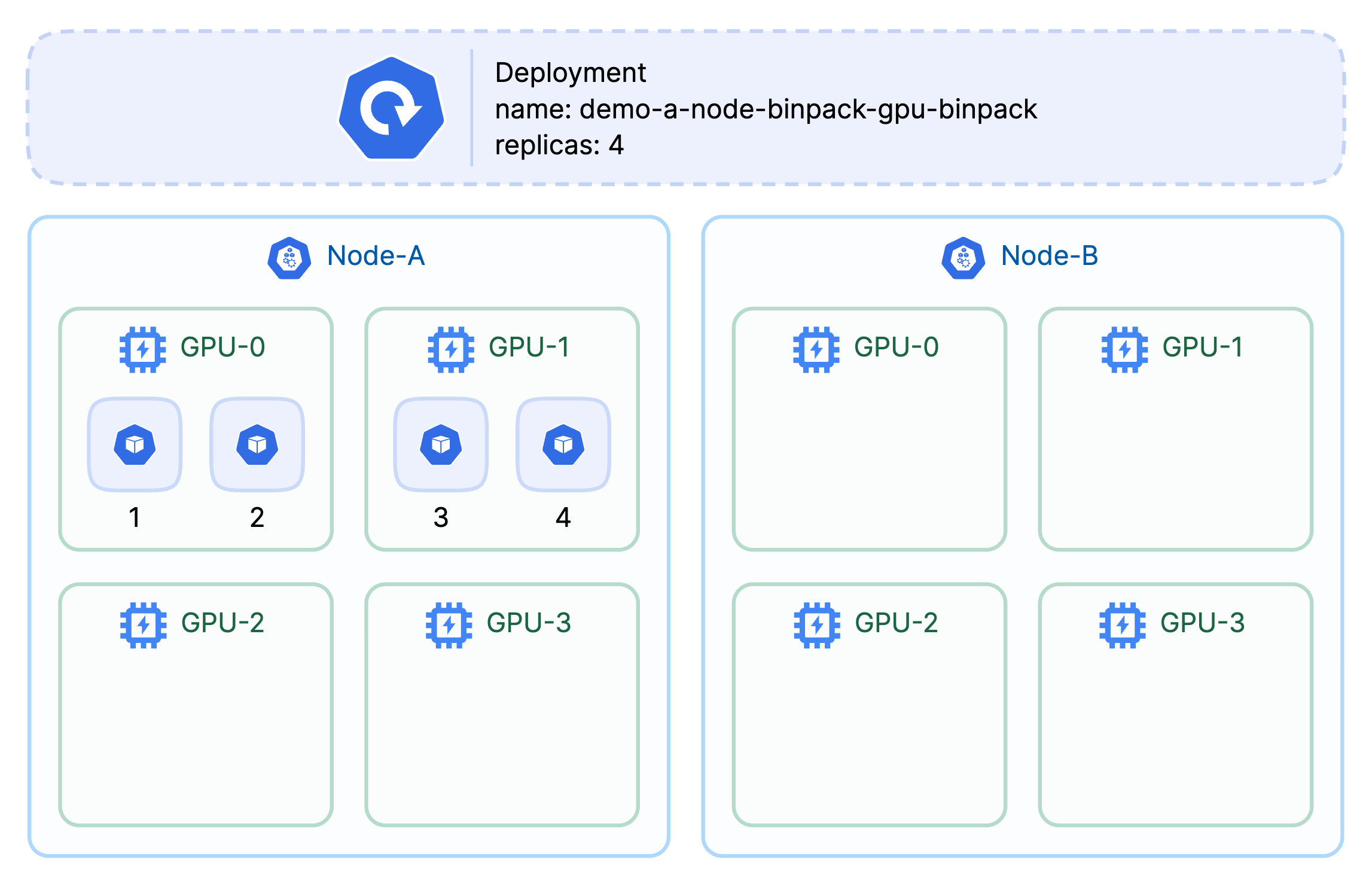
A) Node binpack × GPU binpack — “Cost-lean & keep whole GPUs free.”
- When: Many small inference or batch jobs; you want autoscaler headroom and intact GPUs for training later.
- Gains: Fewer active nodes; higher chance of whole-GPU availability .
- Costs: GPU-internal contention → P99 risk for latency-sensitive traffic.
Run:
kubectl apply -f demo/binpack-spread/a-node-binpack-gpu-binpack.yaml

{
  printf "POD\\tNODE\\tUUIDS\\n";
  kubectl get po -l app=demo-a -o json \\
  | jq -r '.items[] | select(.status.phase=="Running") | [.metadata.name,.spec.nodeName] | @tsv' \\
  | while IFS=$'\\t' read -r pod node; do
      uuids=$(kubectl exec "$pod" -c vllm -- nvidia-smi --query-gpu=uuid --format=csv,noheader | paste -sd, -);
      printf "%s\\t%s\\t%s\\n" "$pod" "$node" "$uuids";
    done;
} | column -t -s $'\\t'
Observed (example):
POD                                               NODE                                       UUIDS
demo-a-node-binpack-gpu-binpack-6899f6dfdd-8z8rx  ip-10-0-52-161.us-west-2.compute.internal  GPU-b0e94721-ad7c-6034-4fc8-9f0d1ac7d60d
demo-a-node-binpack-gpu-binpack-6899f6dfdd-nfbz4  ip-10-0-52-161.us-west-2.compute.internal  GPU-b0e94721-ad7c-6034-4fc8-9f0d1ac7d60d
demo-a-node-binpack-gpu-binpack-6899f6dfdd-dtx7b  ip-10-0-52-161.us-west-2.compute.internal  GPU-85caf98e-de2d-1350-ed83-807af940c199
demo-a-node-binpack-gpu-binpack-6899f6dfdd-wtd47  ip-10-0-52-161.us-west-2.compute.internal  GPU-85caf98e-de2d-1350-ed83-807af940c199
Single node , and the pods were packed onto the minimum number of GPUs that could satisfy their per-GPU limits (2 GPUs here).
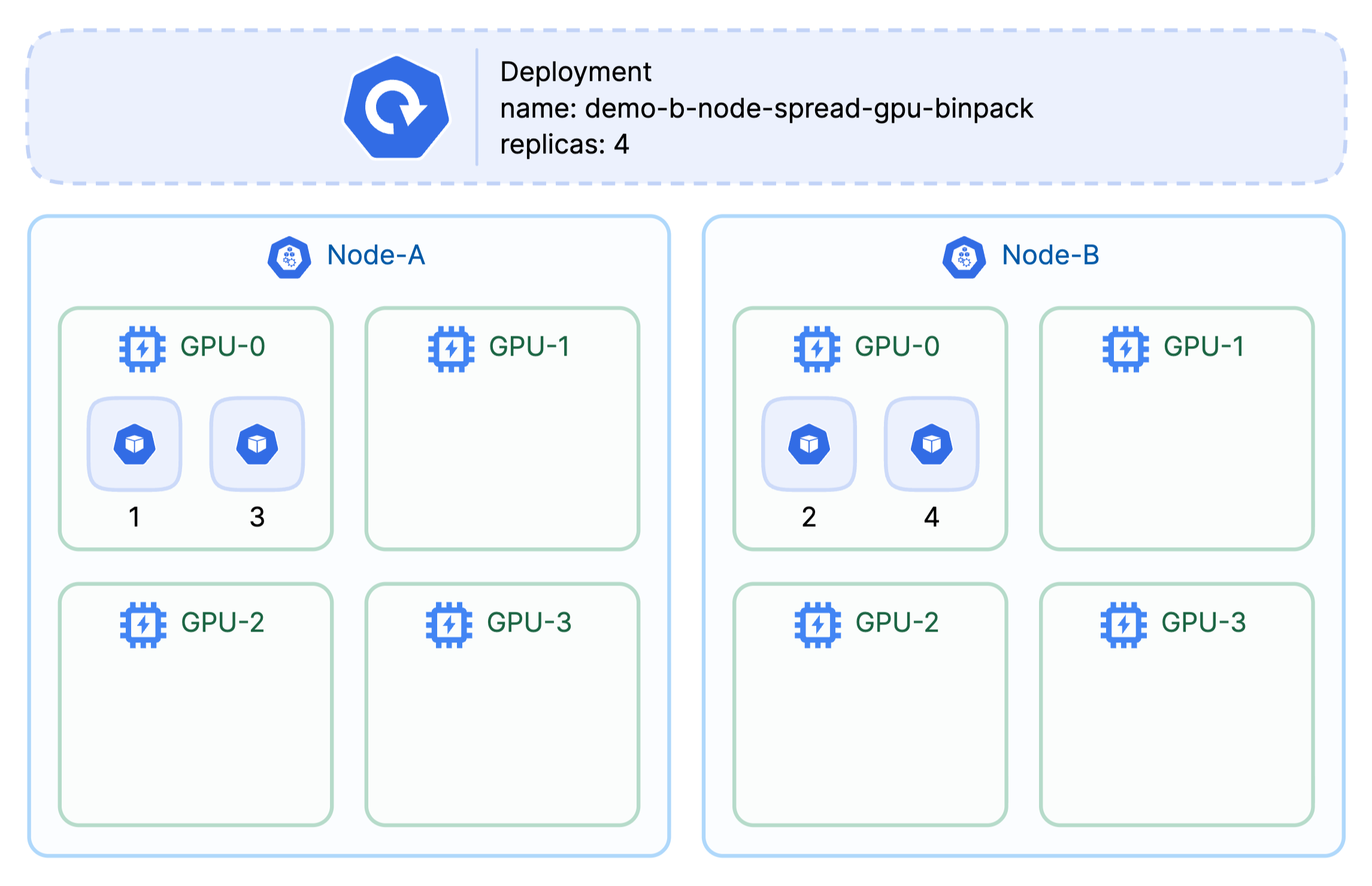
B) Node spread × GPU binpack — “HA across nodes, yet keep whole GPUs free.”
- When: Multi-replica services that need zone/node diversity but also want small jobs squeezed on GPUs.
- Gains: HA + whole-GPU availability .
- Costs: Harder to shrink the cluster.
Run:
kubectl delete -f demo/binpack-spread/a-node-binpack-gpu-binpack.yaml
kubectl apply -f demo/binpack-spread/b-node-spread-gpu-binpack.yaml
# ... same print script, label app=demo-b
Observed (example):
POD                                              NODE                                       UUIDS
demo-b-node-spread-gpu-binpack-548cb55c7d-8tg22  ip-10-0-52-161.us-west-2.compute.internal  GPU-dedbdfb2-408f-9ded-402f-e3dc22c08f66
demo-b-node-spread-gpu-binpack-548cb55c7d-h9ds6  ip-10-0-61-248.us-west-2.compute.internal  GPU-5f432a79-775e-db04-1e15-82307fdb5a1b
demo-b-node-spread-gpu-binpack-548cb55c7d-ncwdl  ip-10-0-61-248.us-west-2.compute.internal  GPU-5f432a79-775e-db04-1e15-82307fdb5a1b
demo-b-node-spread-gpu-binpack-548cb55c7d-stx67  ip-10-0-52-161.us-west-2.compute.internal  GPU-dedbdfb2-408f-9ded-402f-e3dc22c08f66
Across nodes , but packed to the same GPU per node .
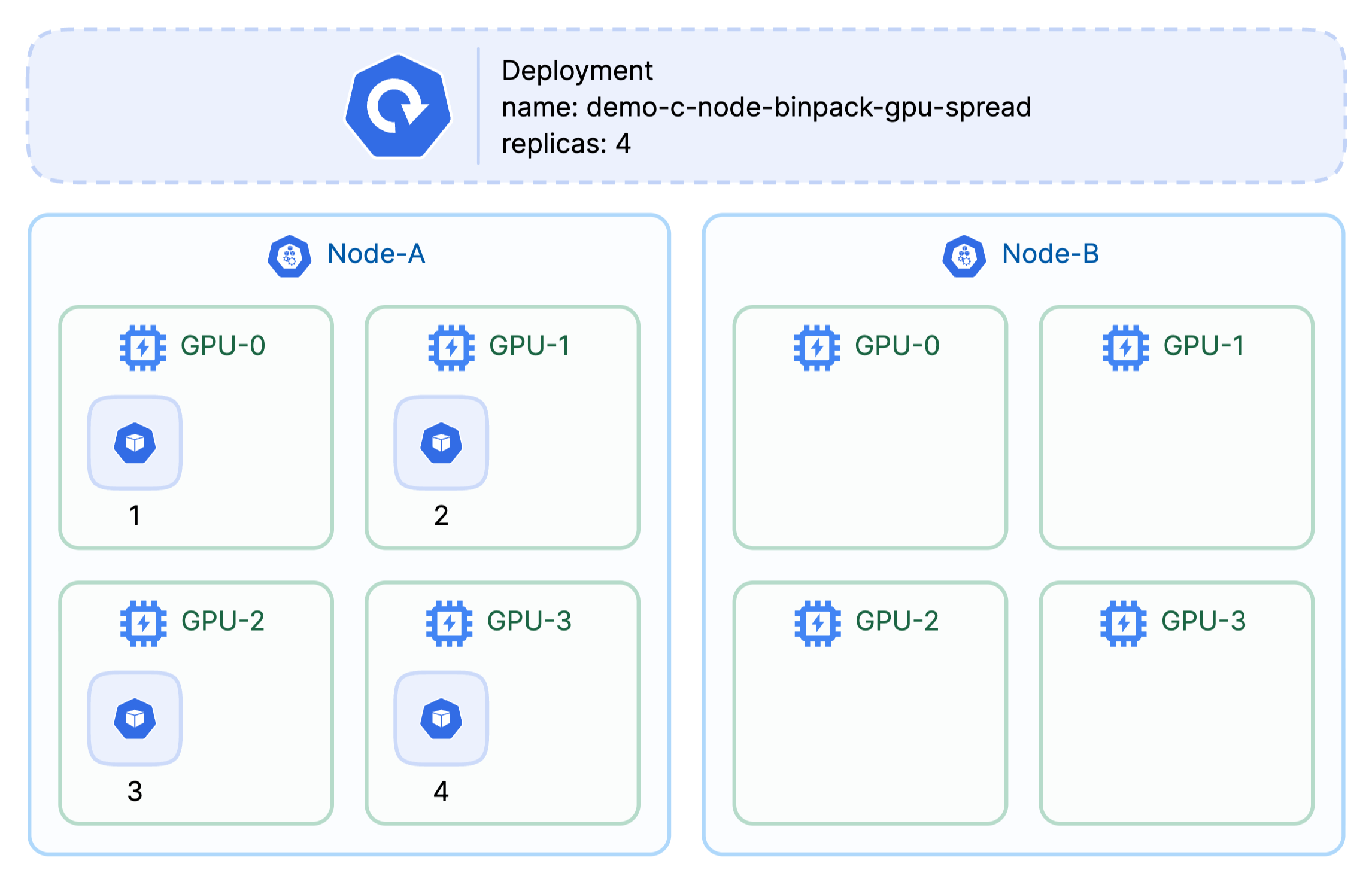
C) Node binpack × GPU spread — “Save some cost, protect tail-latency.”
- When: Online inference; want reasonably good consolidation without piling onto the same GPU.
- Gains: Still consolidation at node level; lower contention across GPUs.
- Costs: Not as cheap as (A).
Run:
kubectl delete -f demo/binpack-spread/b-node-spread-gpu-binpack.yaml
kubectl apply -f demo/binpack-spread/c-node-binpack-gpu-spread.yaml
# ... print script, label app=demo-c
Observed (example):
POD                                             NODE                                       UUIDS
demo-c-node-binpack-gpu-spread-d5f686b67-8zbz9  ip-10-0-61-248.us-west-2.compute.internal  GPU-041286d5-ed3d-4823-096e-a4c80fe17fb9
demo-c-node-binpack-gpu-spread-d5f686b67-hn2md  ip-10-0-61-248.us-west-2.compute.internal  GPU-b639414c-f867-90c3-dd3b-a2bd094a703e
demo-c-node-binpack-gpu-spread-d5f686b67-rrpzb  ip-10-0-61-248.us-west-2.compute.internal  GPU-4bfe5899-5368-2e73-de03-d34894b6d75c
demo-c-node-binpack-gpu-spread-d5f686b67-sv8fg  ip-10-0-61-248.us-west-2.compute.internal  GPU-5f432a79-775e-db04-1e15-82307fdb5a1b
One node , spread across multiple GPUs on that node.
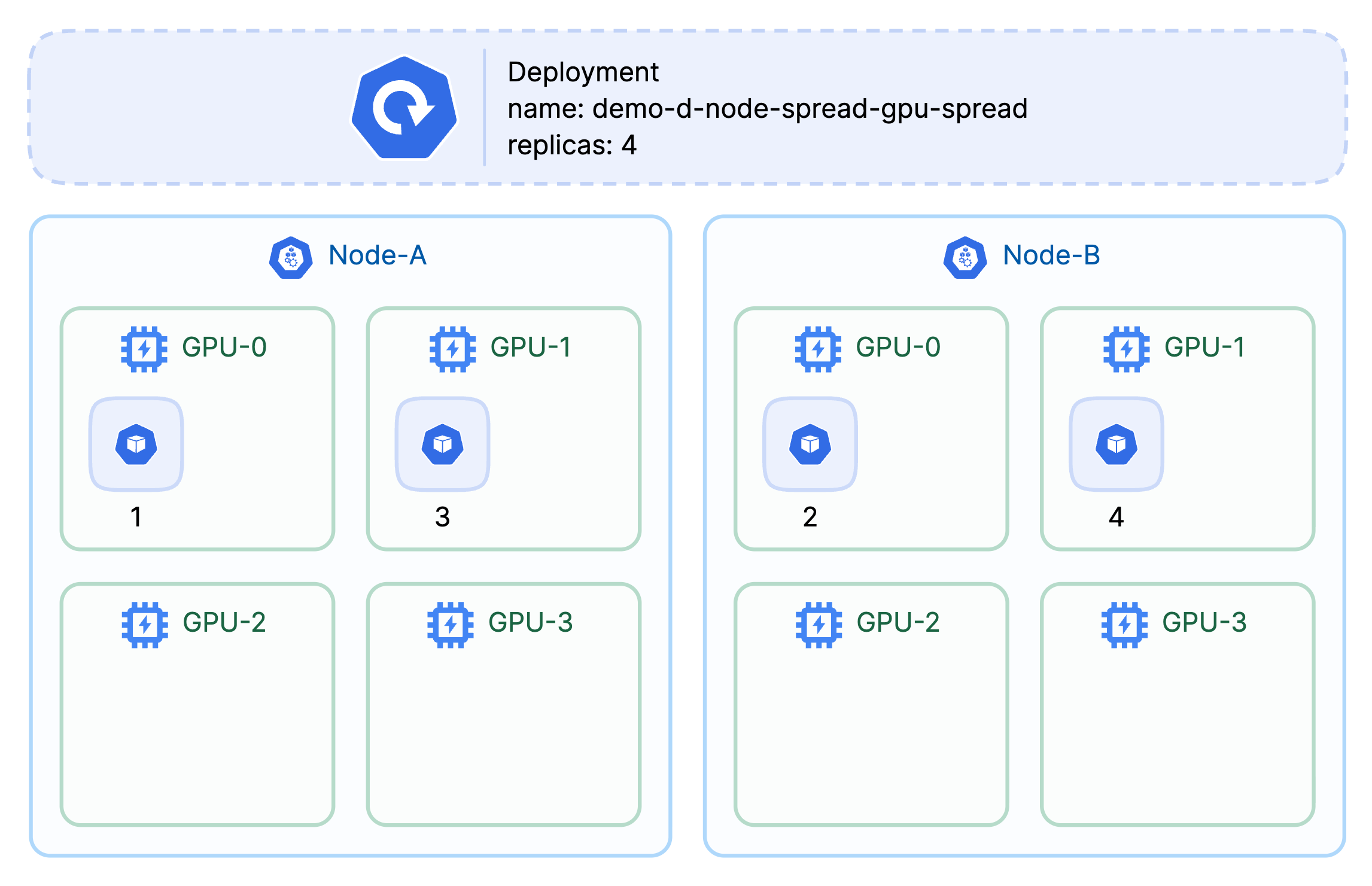
D) Node spread × GPU spread — “Tail-latency first.”
- When: Strict SLA (search, ads, chat) where P99 dominates.
- Gains: Low interference on both axes.
- Costs: Highest cost; most fragmentation.
Run:
kubectl delete -f demo/binpack-spread/c-node-binpack-gpu-spread.yaml
kubectl apply -f demo/binpack-spread/d-node-spread-gpu-spread.yaml
# ... print script, label app=demo-d
Observed (example):
POD                                            NODE                                      UUIDS
demo-d-node-spread-gpu-spread-c4555d97c-5gqkf  ip-10-0-52-161.us-west-2.compute.internal  GPU-b0e94721-ad7c-6034-4fc8-9f0d1ac7d60d
demo-d-node-spread-gpu-spread-c4555d97c-666dc  ip-10-0-61-248.us-west-2.compute.internal  GPU-5f432a79-775e-db04-1e15-82307fdb5a1b
demo-d-node-spread-gpu-spread-c4555d97c-8xjbh  ip-10-0-61-248.us-west-2.compute.internal  GPU-4bfe5899-5368-2e73-de03-d34894b6d75c
demo-d-node-spread-gpu-spread-c4555d97c-k727x  ip-10-0-52-161.us-west-2.compute.internal  GPU-dedbdfb2-408f-9ded-402f-e3dc22c08f66
Across GPUs and across nodes .
Where DRA fits today (and tomorrow)
- Today: DRA standardizes what to allocate and where it can run . If you also enable KEP-5004 , apps can keep requesting extended resources while the driver + slices do the real work underneath—useful for migrating off DevicePlugin. But : the native NodeResourcesFit scoring doesn’t apply to extended resources backed by DRA , and the
dynamicresourcesscorer is tracked to add proper bin-packing for dynamic resources. - Tomorrow: Once DRA’s device/node scoring lands, more of this can happen “in the core” (at least for generic cases). Device-aware implementations will still matter for card-internal topology (NUMA/NVLink) and policy nuance.
Repro & references
- Environment + four demos
https://github.com/dynamia-ai/hami-ecosystem-demo
https://github.com/dynamia-ai/hami-ecosystem-demo/tree/main/demo/binpack-spread - Background
Virtualizing Any GPU on AWS with HAMi: Free Memory Isolation (see One-Click Setup )
A Quick Take on K8s 1.34 GA DRA: 7 Questions You Probably Have - DRA context (v1.34)
Kubernetes PR #130653 (kubelet/scheduler support for extended resources backed by DRA ; note thatNodeResourcesFitscoring doesn’t apply to these)
KEP #5004 (DRA: handle extended resource requests via DRA driver)
Issue #133669 (adddynamicresourcesscorer ; correct bin-packing required for Beta)

Dynamia focuses on CNCF HAMi as the core foundation, providing flexible, reliable, on-demand, and elastic GPU virtualization and heterogeneous computing scheduling, and unified management global solutions. It can be deployed in a plug-in, lightweight, non-intrusive way in any public cloud, private cloud, or hybrid cloud environment, and supports heterogeneous chips such as NVIDIA, Ascend, Muxi, Cambricon, Hygon, Moore Threads, and Biren.
Website: https://dynamia.ai
Email: info@dynamia.ai