

HAMi GPU Descheduler: Defragmenting GPUs in Kubernetes Clusters
 Engineering
HAMi GPU Descheduler uses a HamiPodPlacement CRD and an admission webhook to evict, recreate and place GPU workloads, enabling teams to consolidate scattered vGPU resources according to declarative plans.
On this page
GPUs are among the more expensive resources in a Kubernetes cluster, and using them precisely is increasingly important. In production, many teams share GPUs to improve overall resource utilization.
As a cluster runs over time, however, a new question emerges: why can a new Pod still not be scheduled when plenty of GPU capacity remains free?
One common cause is GPU fragmentation. As Pods are created, deleted, scaled and rebuilt, GPU resources that were once concentrated become scattered. A cluster may have substantial free capacity overall, yet no single GPU can provide the contiguous resources a Pod requires.
To address this practical problem, the HAMi community and engineers at Yixin Group jointly designed and implemented HAMi GPU Descheduler, bringing GPU defragmentation to Kubernetes so scattered GPU workloads can be consolidated as intended.
The problem: capacity without a place to run
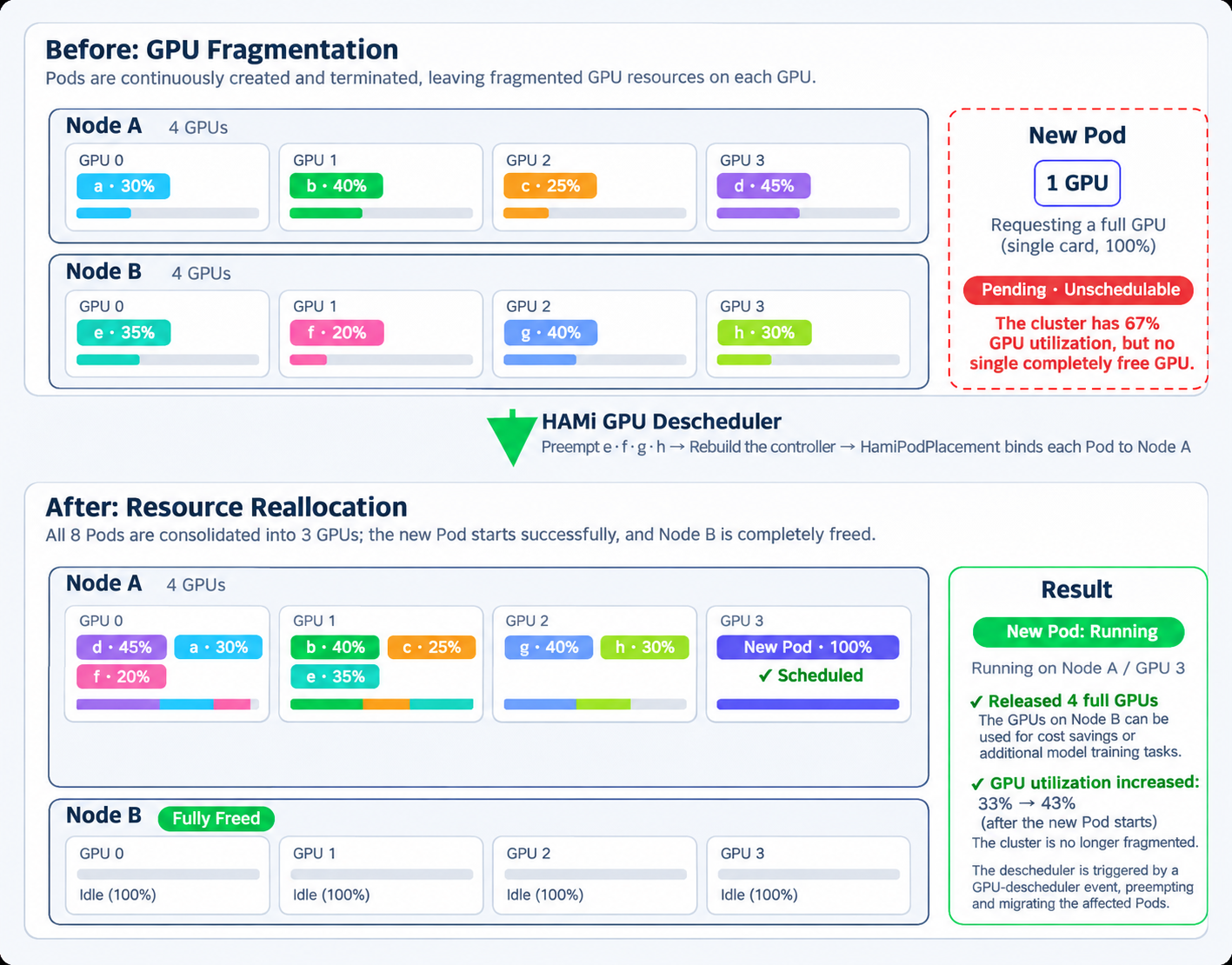
Consider a Kubernetes cluster with two nodes, each sharing four GPUs through HAMi.
Over time, eight Pods occupy resources on different GPUs:
- Node A:
a30%,b40%,c25%,d45% - Node B:
e35%,f20%,g40%,h30%
Across the cluster, only 33% of GPU memory is used, leaving substantial capacity free.
Yet a new Pod requesting an entire GPU may still be unschedulable.
That is because the free resources are not concentrated on one completely idle GPU. The scheduler cannot place the Pod, which remains Pending, while much of the GPU capacity sits idle.
This resembles memory fragmentation: total capacity is not the same as currently available contiguous capacity.
The difference is that an allocator can coalesce memory fragments, but cannot do so for GPUs. A Pod that needs an entire card, such as an inference service without model parallelism, must run on a completely idle device. Fragments spread across different GPUs cannot be combined into one whole card.
Fragmentation also affects more than whole-GPU requests. Any vGPU request exceeding the largest free block on every device has nowhere to go.
For example, a Pod requiring 70% of one GPU may remain Pending if the largest contiguous share available on any GPU is only 40%, even when the cluster has plenty of free resources overall.
High GPU utilization therefore does not necessarily mean GPU resources are readily usable.
Why GPU fragmentation gets worse
GPU fragmentation is not a bug. It is a common consequence of running a dynamic, shared-GPU cluster over time.
- Autoscaling: scale-down removes Pods scattered across nodes, leaving many partially occupied GPUs.
- Rolling updates: new Pods land on nodes with spare capacity, and departing old Pods leave gaps.
- Failure retries: a training job may land on a different node each time it restarts.
- Mixed workloads: inference Pods requesting 20% to 40% of GPU memory are interleaved with whole-GPU jobs.
Running requests of different sizes together over time further increases fragmentation. A cluster can reach a familiar state: overall utilization looks healthy, while contiguous resources available to large jobs keep shrinking.
Worse, fragmentation often affects the most important jobs. Small Pods keep fitting into gaps, while jobs needing larger GPU allocations become increasingly difficult to schedule.
The difficulties of manual GPU defragmentation
The most direct response is manual: identify fragments, run kubectl delete pod on workloads that can move, wait for their controllers to recreate them, and hope they land in the right place, using node selectors if necessary. Repeat until one card has enough free capacity for the waiting Pod.
That may be acceptable occasionally, but the drawbacks are clear for a long-running production cluster:
- High operational effort: every eviction is a manual decision. You need to know whether a workload tolerates interruption and where to place it next.
- Unstable results: a deleted Pod re-enters Kubernetes scheduling. Without explicit placement constraints, it may land elsewhere, quickly undoing the consolidation.
- No declarative placement intent: without a recorded intent, the layout soon deteriorates again and the same work repeats.
What teams really need is a declarative, one-time instruction: consolidate these workloads onto the GPUs of that node. This is the problem HAMi GPU Descheduler addresses.
HAMi GPU Descheduler
HAMi GPU Descheduler is a GPU defragmentation tool for HAMi-virtualized Kubernetes clusters.
It consolidates vGPU workloads scattered across nodes through two mechanisms:
- Mutating Admission Webhook
HamiPodPlacementCRD
Its role resembles a disk defragmenter in an operating system: bring scattered workloads together to restore contiguous free capacity on each device.
It complements HAMi Scheduler. The scheduler handles GPU virtualization, scheduling and isolation; the descheduler consolidates workloads that are already running to create a more compact resource layout.
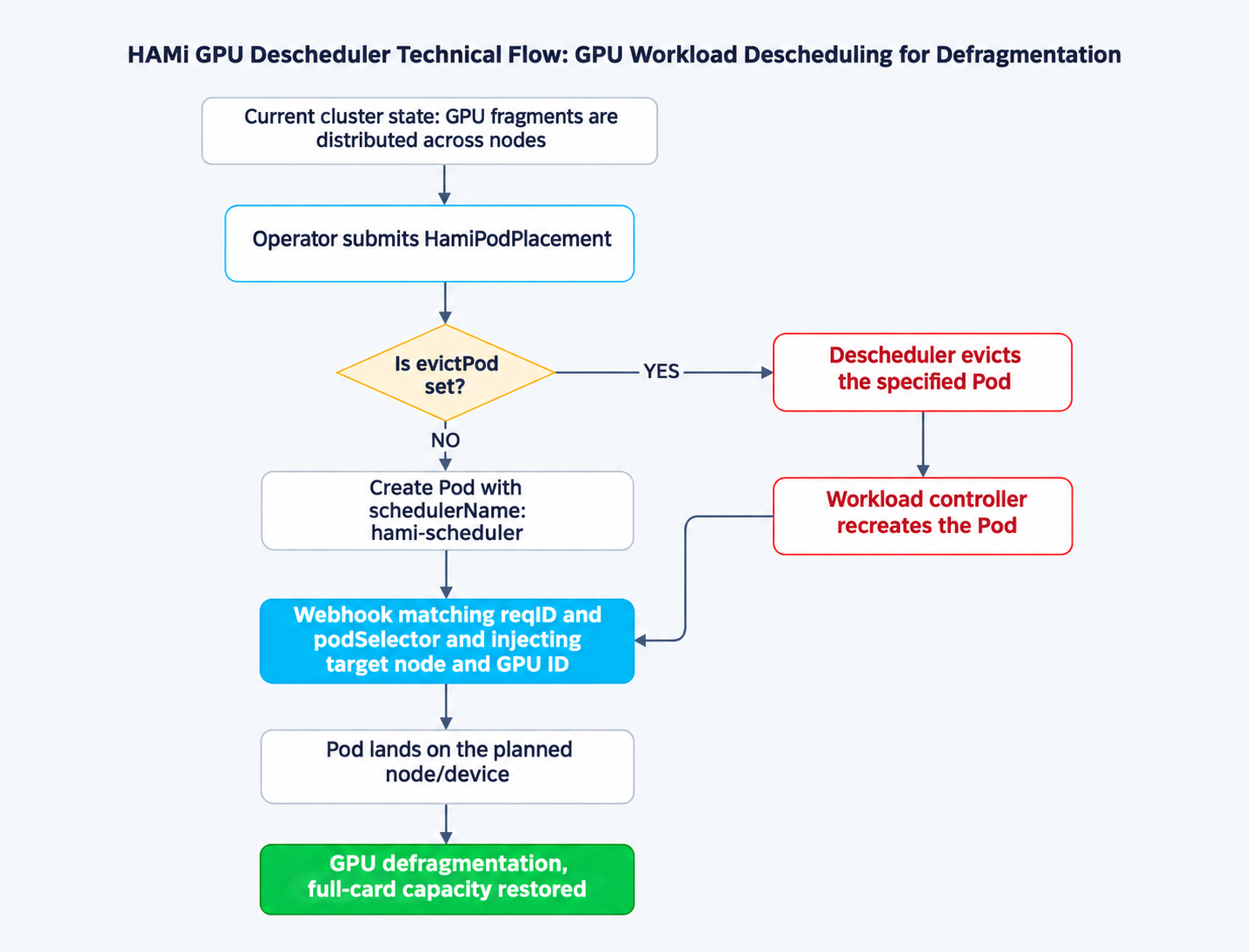
The process works as follows:
- Create a
HamiPodPlacementdescribing the desired target node, GPU devices and matching Pods, optionally specifying a Pod to evict to make room. - If
evictPodis set, the descheduler evicts that Pod and waits. Its workload controller, such as a Deployment or StatefulSet, recreates it. - When the new or recreated Pod reaches admission, the webhook matches it to a
HamiPodPlacementusingreqIDandpodSelector, then injects the planned placement. - The Pod is scheduled onto the specified node and GPU devices. Each
HamiPodPlacementis consumed by exactly one Pod, making the operation idempotent and auditable.
Expressing placement as a CRD turns defragmentation into another ordinary Kubernetes operation: declarative, reviewable in Git and automatable.
Consolidating this cluster
Return to the two-node cluster from the beginning.
Six one-time HamiPodPlacement operations suffice to empty node B and create contiguous capacity on node A. Pods e, f, g and h move from B to A, while c and d are pinned again within A, bringing all eight Pods onto GPUs 0 through 2.
For Pod e, for example:
apiVersion: scheduling.hami.placement.com/v1
kind: HamiPodPlacement
metadata:
  name: consolidate-e
  namespace: default
spec:
  reqID: "defrag-e-0001" # 最短 5 个字符,仅消费一次
  podSelector:
    matchLabels:
      app: inference
  nodeName: gpu-node-a
  gpuDevices:
    - gpu-1 # 或 gpu-1/70 表示 GPU 1 的 70%
  evictPod: inference-e-6cd5964877-zdb5z # 需要驱逐并重新放置的 Pod
One point about podSelector matters: it determines which Pod consumes this placement, and the first matching Pod admitted will consume it.
If every Pod in the namespace has the label app: inference, a sibling of e may consume the placement instead.
Labels such as a ReplicaSet's pod-template-hash do not solve this: all replicas in one ReplicaSet share the value, so a sibling admitted first may still consume the placement. Use a label unique to the workload being moved so the selector excludes other Pods. For workloads with multiple replicas, move only one replica at a time and avoid migration while sibling Pods are being created.
What evictPod does and how to use it
evictPod is the key field that turns placement into migration. It names a running Pod in the same namespace and tells the descheduler which Pod must first release its GPU resources for this placement.
The descheduler first evicts the specified Pod and waits for its Deployment, StatefulSet or other controller to recreate it. At admission, the webhook uses reqID and podSelector to match the new Pod to the corresponding HamiPodPlacement, then pins it to the planned nodeName and gpuDevices.
Without this field, placement affects only Pods created later and serves as a planning tool. With it, you can actively move running workloads, which is what defragmentation requires.
There are practical reasons why this field is optional.
Eviction happens before destination validation. Before adding the field, verify that nodeName and gpuDevices identify a valid destination with enough capacity; otherwise the evicted Pod may have nowhere to run.
The descheduler also only waits for replacement Pods; it never creates them itself. Evicted workloads must therefore be managed by a controller. Use evictPod deliberately and move one Pod at a time.
As each Pod is evicted, recreated and pinned to a particular GPU on node A, the layout converges to the diagram's consolidated state: eight Pods occupy three GPUs, the new Pod uses the fourth, and node B is completely empty. Four whole GPUs are recovered without adding capacity. Cluster GPU memory utilization rises from 33% to 43%, entirely due to the new Pod that previously could not start.
The empty node can be scaled down to reduce costs or used for large-model training jobs requiring whole GPUs.
Before eviction
Active eviction terminates running Pods and may briefly reduce availability. Workloads must be managed by a controller, such as a Deployment or StatefulSet, to ensure Pods are recreated. Before consolidation, check workload readiness and disruption protection.
Quick start
Deploy with Helm. HAMi Scheduler v2.10.0+ and Kubernetes v1.24+ are required; Kubernetes v1.28+ is recommended.
git clone https://github.com/Project-HAMi/gpu-descheduler.git
cd gpu-descheduler
helm install gpu-descheduler ./chart --namespace kube-system --create-namespace
Check that the webhook is running:
kubectl get pods -n kube-system -l app=gpu-descheduler-webhook -w
The webhook also provides a REST API on port 8083 to inspect cluster GPU status and placement records, helping you decide what to consolidate. This port is not exposed through a Service. Forward it to your local machine first. The command keeps running, so use a separate terminal:
kubectl port-forward -n kube-system deploy/gpu-descheduler-webhook 8083:8083
Then query the API:
# 查看节点、GPU 设备与健康状态
curl -s http://localhost:8083/api/v1/cluster-info

# 查看当前 Placement CRD 缓存与分配记录
curl -s http://localhost:8083/api/v1/placements
Target Pods must use schedulerName: hami-scheduler, and their labels must match the podSelector in HamiPodPlacement. See the user guide for the complete workflow.
Conclusion
GPU fragmentation is an availability and cost problem that grows with cluster dynamism. Capacity exists but cannot be used, while manual consolidation is fragile and leaves little traceable intent.
HAMi GPU Descheduler offers another approach. A HamiPodPlacement CRD declares the placement plan, while an admission webhook enables eviction, recreation and targeted placement of Pods. GPU defragmentation becomes a more flexible, controllable Kubernetes resource operation.
HAMi Issue #2072 raised the need for GPU defragmentation within a node.
The Yixin training and inference platform team then designed and primarily implemented the Webhook + CRD solution, contributing the code as open source to the HAMi community.
After the repository became public, community maintainers and users continued reviewing and improving it.
Thank you to everyone who contributed ideas, code and feedback.
GPU defragmentation plans are still defined by people: which Pods to consolidate and how to select target nodes and GPUs still require human judgment. The descheduler executes those plans precisely. Workloads can already be moved across nodes.
The community is exploring further automation: detecting GPU fragments automatically, generating multiple candidate plans for users to select and execute, and expanding the scope of consolidation from individual nodes to the whole cluster.
If you share GPUs with HAMi in a dynamic cluster, watch for Pods that remain Pending because of fragmented GPU resources. The problem is especially visible when a Pod requests an entire GPU.
Try HAMi GPU Descheduler:
- Code and releases: github.com/Project-HAMi/gpu-descheduler
- User guide: Consolidating GPU resource fragments with HAMi GPU Descheduler