HAMI vGPU Principle Analysis Part 4: Spread & Binpack Advanced Scheduling Strategy Implementation
In the last article, we analyzed the hami-scheduler workflow and understood how hami-webhook and hami-scheduler work together.
HAMI vGPU Principle Analysis Part 3: hami-scheduler Workflow Analysis
This is the fourth article in the HAMI principle analysis series, analyzing how hami-scheduler selects nodes during scheduling, i.e., how advanced scheduling strategies like Spread and Binpack are implemented.
In this article, we will address the final question: How are advanced scheduling strategies like Spread and Binpack implemented?
The following analysis is based on HAMI v2.4.0.
Here again is the HAMI Webhook & Scheduler workflow summarized in the previous article:
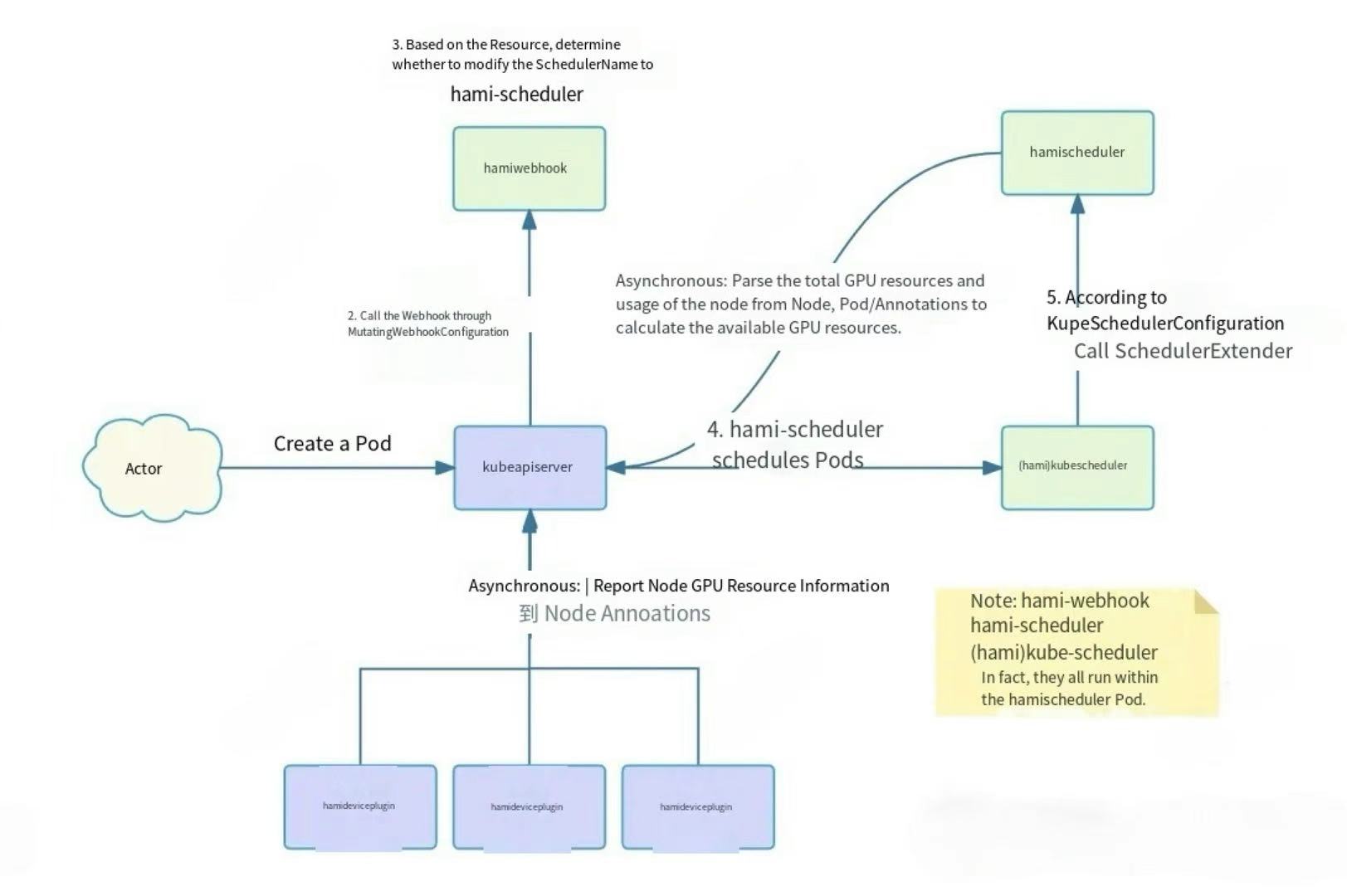
- A user creates a Pod and requests vGPU resources in it.
- The kube-apiserver, based on the
MutatingWebhookConfiguration, sends a request to the HAMI-Webhook. - The HAMI-Webhook inspects the Pod's
Resourcefield. If it requests a vGPU resource managed by HAMI, it changes the Pod'sSchedulerNametohami-scheduler, directing the Pod to be scheduled byhami-scheduler.- For privileged Pods, the Webhook skips processing.
- For Pods using vGPU resources but with a specified
nodeName, the Webhook rejects them.
- The
hami-schedulerthen schedules the Pod. However, it uses the defaultkube-schedulerimage from Kubernetes, so its basic scheduling logic is the same as thedefault-scheduler. Thekube-scheduleris configured viaKubeSchedulerConfigurationto call an Extender Scheduler plugin.- This Extender Scheduler is another container within the
hami-schedulerPod, which provides both the Webhook and Scheduler APIs. - When a Pod requests vGPU resources, the
kube-schedulercalls the Extender Scheduler plugin via HTTP as configured, thus implementing custom scheduling logic.
- This Extender Scheduler is another container within the
- The Extender Scheduler plugin contains the actual HAMI scheduling logic. It scores nodes based on their remaining resources to select a node.
- Asynchronous tasks, including GPU perception logic:
- A background Goroutine in the devicePlugin periodically reports GPU resources on the Node and writes them to the Node's Annotations.
- The Extender Scheduler plugin parses the total GPU resources from Node annotations and the used GPU resources from the annotations of running Pods on the Node. It then calculates the remaining available resources for each Node and stores them in memory for scheduling.
1. Configuring Scheduling Policies
hami-scheduler provides two different levels of scheduling policies:
- Node Scheduling Policy: Affects how a node is selected for a Pod during the scheduling process.
- GPU Scheduling Policy: Affects how a GPU is selected for a Pod after a node with multiple GPUs has been chosen.
According to the deployment documentation, we can specify the scheduling policies during deployment:
scheduler.defaultSchedulerPolicy.nodeSchedulerPolicy: String type, with a preset value of "binpack", representing the GPU node scheduling policy. ("binpack" means to try to assign tasks to the same GPU node as much as possible; "spread" means to try to assign tasks to different GPU nodes.)scheduler.defaultSchedulerPolicy.gpuSchedulerPolicy: String type, with a preset value of "spread", representing the GPU scheduling policy. ("binpack" means to try to assign tasks to the same GPU as much as possible; "spread" means to try to assign tasks to different GPUs.)
Like this:
helm install vgpu vgpu-charts/vgpu \
  --set scheduler.defaultSchedulerPolicy.nodeSchedulerPolicy=binpack \
  --set scheduler.defaultSchedulerPolicy.gpuSchedulerPolicy=spread
After deployment, these two configurations apply to the hami-scheduler as follows:
apiVersion: apps/v1
kind: Deployment
metadata:
  name: vgpu-hami-scheduler
  namespace: kube-system
spec:
  template:
    spec:
      containers:
      - command:
        - scheduler
        # ... other args
        - --node-scheduler-policy=binpack
        - --gpu-scheduler-policy=spread
It's these two parameters:
- --node-scheduler-policy=binpack
- --gpu-scheduler-policy=spread
2. Node Scheduling Strategy Principle
This part is relatively simple. The logic for selecting a node is within the Filter interface.
// pkg/scheduler/scheduler.go#L444
func (s *Scheduler) Filter(args extenderv1.ExtenderArgs) (*extenderv1.ExtenderFilterResult, error) {
    klog.InfoS("begin schedule filter", "pod", args.Pod.Name, "uuid", args.Pod.UID, "namespaces", args.Pod.Namespace)

    // ... logic to check if pod requests resources ...

    nodeUsage, failedNodes, err := s.getNodesUsage(args.NodeNames, args.Pod)
    // ... handle errors ...

    nodeScores, err := s.calcScore(nodeUsage, nums, annos, args.Pod)
    // ... handle errors ...

    if len((*nodeScores).NodeList) == 0 {
        // ... handle no suitable nodes ...
    }

    sort.Sort(nodeScores)
    m := (*nodeScores).NodeList[len((*nodeScores).NodeList)-1]
    klog.Infof("schedule %v/%v to %v %v", args.Pod.Namespace, args.Pod.Name, m.NodeID, m.Devices)

    // ... patch pod annotations ...

    res := extenderv1.ExtenderFilterResult{NodeNames: &[]string{m.NodeID}}
    return &res, nil
}
The main part is these few lines:
// Calculate scores and get all suitable nodes
nodeScores, err := s.calcScore(nodeUsage, nums, annos, args.Pod)

// Sort
sort.Sort(nodeScores)
// Directly select the last node
m := (*nodeScores).NodeList[len((*nodeScores).NodeList)-1]

// Return the result
res := extenderv1.ExtenderFilterResult{NodeNames: &[]string{m.NodeID}}
return &res, nil```

This can be divided into two parts:
-   Calculate scores for all nodes.
-   Select the most suitable node based on the scheduling policy.

### Calculating Scores

The score calculation logic is in the `calcScore` method:

```go
// pkg/scheduler/score.go#L185
func (s *Scheduler) calcScore(nodes *map[string]*NodeUsage, nums util.PodDeviceRequests, annos map[string]string, task *corev1.Pod) (*policy.NodeScoreList, error) {
    // ... get policy from config or pod annotations ...

    for nodeID, node := range *nodes {
        score := policy.NodeScore{NodeID: nodeID, Devices: make(util.PodDevices), Score: 0}
        score.ComputeScore(node.Devices)

        // ... filter logic (fitInDevices) ...

        if ctrfit {
            res.NodeList = append(res.NodeList, &score)
        }
    }
    return &res, nil
}
The specific algorithm is in ComputeScore:
// pkg/scheduler/policy/node_policy.go#L53
func (ns *NodeScore) ComputeScore(devices DeviceUsageList) {
    // current user having request resource
    used, usedCore, usedMem := int32(0), int32(0), int32(0)
    for _, device := range devices.DeviceLists {
        used += device.Device.Used
        usedCore += device.Device.Usedcores
        usedMem += device.Device.Usedmem
    }
    klog.V(2).Infof("node %s used %d, usedCore %d, usedMem %d,", ns.NodeID, used, usedCore, usedMem)

    total, totalCore, totalMem := int32(0), int32(0), int32(0)
    for _, deviceLists := range devices.DeviceLists {
        total += deviceLists.Device.Count
        totalCore += deviceLists.Device.Totalcore
        totalMem += deviceLists.Device.Totalmem
    }
    useScore := float32(used) / float32(total)
    coreScore := float32(usedCore) / float32(totalCore)
    memScore := float32(usedMem) / float32(totalMem)
    ns.Score = float32(Weight) * (useScore + coreScore + memScore)
    klog.V(2).Infof("node %s computer score is %f", ns.NodeID, ns.Score)
}
The scoring logic is based on the ratio of used GPU Core and GPU Memory to the total GPU Core and GPU Memory on each node, normalized by weights to get a final score.
In general: the less remaining GPU Core and GPU Memory on a node, the higher its score.
At first glance, this logic seems a bit counter-intuitive. Shouldn't more resources result in a higher score?
No problem, it will become clear after we look at the "Selecting a Node based on Policy" section.
Filtering Nodes
After scoring, nodes that do not meet the conditions need to be filtered out based on the Pod's requested GPU information.
For example: if a Pod requests 2 vGPUs and a Node has only one card, it's definitely not feasible.
Parsing Pod's Requested GPU Information
First, the requested GPU information is parsed from the Pod info:
// pkg/scheduler/scheduler.go#L444
func (s *Scheduler) Filter(args extenderv1.ExtenderArgs) (*extenderv1.ExtenderFilterResult, error) {
    nums := k8sutil.Resourcereqs(args.Pod)
}
The Resourcereqs content is as follows, which is relatively straightforward: it parses the requested gpu, gpucore, gpumem, etc., from the container's Resources based on the name.
Filtering Logic
The filtering logic is also in the calcScore method:
ctrfit := false
for ctrid, n := range nums {
    // ...
    klog.V(5).InfoS("fitInDevices", "pod", klog.KObj(task), "node", nodeID)
    fit, _ := fitInDevices(node, n, annos, task, &score.Devices)
    ctrfit = fit
    if !fit {
        klog.InfoS("calcScore:node not fit pod", "pod", klog.KObj(task), "node", nodeID)
        break
    }
}

if ctrfit {
    res.NodeList = append(res.NodeList, &score)
}
The specific filtering rule is here: fitInDevices. If all conditions are met, it returns true; otherwise, it returns false, indicating the node is not schedulable.
This way, we have filtered out the unsuitable nodes. The remaining nodes can all schedule the Pod, but which one is chosen depends on the configured scheduling policy.
Selecting a Node based on Policy
After calculating the score for each node, a selection can be made based on the policy.
// Calculate scores and get all suitable nodes
nodeScores, err := s.calcScore(nodeUsage, nums, annos, args.Pod)

// Sort
sort.Sort(nodeScores)
// Directly select the last node
m := (*nodeScores).NodeList[len((*nodeScores).NodeList)-1]

// Return the result
res := extenderv1.ExtenderFilterResult{NodeNames: &[]string{m.NodeID}}
return &res, nil
The specific selection logic is here:
// Sort
sort.Sort(nodeScores)
// Directly select the last node
m := (*nodeScores).NodeList[len((*nodeScores).NodeList)-1]
After sorting the score data, it directly selects the last node.
I was a bit confused when I first saw this, not understanding how it was related to the scheduling policy.
The actual logic is in the sort here. NodeScoreList must implement the sort interface to be sorted, so let's see how it's implemented:
// pkg/scheduler/policy/node_policy.go#L32
type NodeScoreList struct {
    NodeList []*NodeScore
    Policy   string
}

// ... Len() and Swap() methods ...

func (l NodeScoreList) Less(i, j int) bool {
    if l.Policy == NodeSchedulerPolicySpread.String() {
        return l.NodeList[i].Score > l.NodeList[j].Score
    }
    // default policy is Binpack
    return l.NodeList[i].Score < l.NodeList[j].Score
}
The core part:
func (l NodeScoreList) Less(i, j int) bool {
    if l.Policy == NodeSchedulerPolicySpread.String() {
        return l.NodeList[i].Score > l.NodeList[j].Score
    }
    // default policy is Binpack
    return l.NodeList[i].Score < l.NodeList[j].Score
}
Depending on our Policy, there are two sorting methods, and they are exactly opposite.
This involves the implementation of sort.Sort(). Simply put:
- If the
Less()method uses a greater than (>) comparison, the final sorting result will be in descending order. - If the
Less()method uses a less than (<) comparison, the final sorting result will be in ascending order.
Corresponding to the scheduling policies:
- Binpack policy uses a less than (
<) comparison, resulting in an ascending sort. - Spread policy uses a greater than (
>) comparison, resulting in a descending sort.
And since the scoring rule was: the fewer remaining resources, the higher the score, and we select the last node after sorting.
At this point, the logic is clear.
- The Binpack policy selects the last node. Because of the ascending sort, the last Node has the highest score, meaning it has the least free resources.
- The Spread policy selects the last node. Because of the descending sort, the last Node has the lowest score, meaning it has the most free resources.
This perfectly matches the original meaning of the policies:
- Binpack tries to schedule all Pods to the same node, filling up one node's resources before using others.
- Spread is the opposite, trying to distribute Pods across all nodes.
Where does the scheduling policy come from?
This logic is actually in the calScore method, which first uses a default policy (overridden by command-line flags) and then checks the Pod's annotations for hami.io/node-scheduler-policy to override it.
With this, the Node scheduling policy analysis is complete.
3. GPU Scheduling Strategy Principle
Once a Node is selected, if it has multiple GPUs, which one should the Pod be allocated to? This is where the GPU scheduling policy comes into effect.
The logic for selecting a GPU is also implicitly in the Filter method, specifically within fitInDevices.
Filtering GPUs
The logic here is hidden quite deeply, in the fitInDevices method.
// pkg/scheduler/score.go#L144
func fitInDevices(node *NodeUsage, requests util.ContainerDeviceRequests, annos map[string]string, pod *corev1.Pod, devinput *util.PodDevices) (bool, float32) {
    // ...
    for _, k := range requests {
        sort.Sort(node.Devices)
        fit, tmpDevs := fitInCertainDevice(node, k, annos, pod)
        // ...
    }
    // ...
}
The core part:
for _, k := range requests {
    sort.Sort(node.Devices)
    fit, tmpDevs := fitInCertainDevice(node, k, annos, pod)
    if fit {
        devs = append(devs, tmpDevs[k.Type]...)
    } else {
        return false, 0
    }
    (*devinput)[k.Type] = append((*devinput)[k.Type], devs)
}
The sort.Sort appears again. Does this look familiar? Let's check the Sort interface implementation for GPUs:
// ... Len() and Swap() methods ...

func (l DeviceUsageList) Less(i, j int) bool {
    if l.Policy == GPUSchedulerPolicyBinpack.String() {
        if l.DeviceLists[i].Device.Numa == l.DeviceLists[j].Device.Numa {
            return l.DeviceLists[i].Score < l.DeviceLists[j].Score
        }
        return l.DeviceLists[i].Device.Numa > l.DeviceLists[j].Device.Numa
    }
    // default policy is spread
    if l.DeviceLists[i].Device.Numa == l.DeviceLists[j].Device.Numa {
        return l.DeviceLists[i].Score > l.DeviceLists[j].Score
    }
    return l.DeviceLists[i].Device.Numa < l.DeviceLists[j].Device.Numa
}
As expected, it's the same pattern. The Less method returns different results based on the GPU scheduling policy to control whether the sort is ascending or descending.
Selecting a GPU
Then the subsequent code for selecting a GPU is as follows, in fitInCertainDevice:
func fitInCertainDevice(...) (bool, map[string]util.ContainerDevices) {
    // ...
    for i := len(node.Devices.DeviceLists) - 1; i >= 0; i-- {
        // ... filtering conditions ...

        if k.Nums > 0 {
            k.Nums--
            tmpDevs[k.Type] = append(tmpDevs[k.Type], util.ContainerDevice{
                // ... populate device info ...
            })
        }
        if k.Nums == 0 {
            return true, tmpDevs
        }
    }
    return false, tmpDevs
}
The core is this for loop:
for i := len(node.Devices.DeviceLists) - 1; i >= 0; i-- {
}
It also starts from the last GPU. This means if a GPU at the end of the list meets the conditions, it will be selected directly, and it won't check the ones before it.
- Binpack policy: The result is in ascending order, so the GPUs further back have fewer free resources.
- Spread policy: The result is in descending order, so the GPUs further back have more free resources.
This also aligns with the meaning of the respective policies.
With this, the GPU scheduling policy analysis is complete.
How the DevicePlugin Parses GPU Info
During scheduling, we recorded the chosen GPU in the Pod's Annotations. The DevicePlugin doesn't need to select a GPU; it can just parse it from the Annotations.
The logic in GetNextDeviceRequest and DecodePodDevices handles reading the hami.io/vgpu-devices-to-allocate annotation and parsing the comma- and colon-separated string to get the device details.
At this point, the analysis of HAMI's Node and GPU level Spread and Binpack advanced scheduling strategies is complete.
4. Summary
Scheduling Policy Configuration
hami-scheduler provides two different levels of scheduling policies:
- Node Scheduling Policy: Affects how a node is selected for a Pod.
- GPU Scheduling Policy: Affects how a GPU is selected for a Pod on a multi-GPU node.
Both support Spread and Binpack configurations:
Spreadtries to distribute tasks across different Nodes or GPUs to keep the load level similar across the cluster's Nodes or GPUs.Binpacktries to assign tasks to the same Node or GPU, filling one up before using another.
Specific Node and GPU Scheduling Strategy Implementation
The implementation for both can be broken down into these steps:
- Scoring Nodes/GPUs: Score is calculated based on resource utilization.
- Filtering: Unsuitable Nodes/GPUs are filtered out.
- Selecting: The best Node/GPU is selected based on the scheduling policy.
- The core logic is implemented in the
Lessmethod of thesort.Sortinterface. - For the
Spreadpolicy, it selects the Node/GPU with more remaining resources. For theBinpackpolicy, it selects the one with fewer remaining resources.
- The core logic is implemented in the
- Recording the Result:
- For a Node, the result is finalized by binding the Pod to it.
- For a GPU, the choice is recorded in the Pod's Annotations for the DevicePlugin to use.
To learn more about the HAMI project, please visit the GitHub repository or join our Slack community.