Open-source Synergy, Koordinator v1.6 Released: Teaming Up with the HAMi Community to Redefine AI/ML Heterogeneous Resource Scheduling
Original Authors: Wang Jianyu, Zeng Fansong, Song Tao, Han Rougang
Foreword
Latest Progress in Community Collaboration
Against the backdrop of rapid development in AI/ML and large model scenarios, open-source community collaboration is becoming a core force driving technological innovation. The Koordinator community and the CNCF Sandbox project HAMi have engaged in deep collaboration in version v1.6, jointly launching GPU sharing with strong isolation capabilities. This provides a more efficient resource scheduling and isolation solution for AI training and inference scenarios. This collaboration combines Koordinator's expertise in scheduling with HAMi's technological advantages in device management middleware, offering innovative support for AI scenarios through the following core capabilities:
- GPU Sharing with Strong Isolation: Based on HAMi-Core's CUDA-Runtime interception capability, it supports multiple containers securely sharing the same GPU card. This allows users to allocate GPU computing power and memory ratios on demand, significantly improving the deployment density for small models or lightweight inference tasks and avoiding resource waste from exclusive card occupation.
This is the first joint feature release by the Koordinator and HAMi communities and a milestone in their joint exploration of heterogeneous resource scheduling standardization. In the future, both parties will continue to deepen their cooperation, promote the implementation of more end-to-end solutions, foster technological integration within the community ecosystem, and help enterprises reduce costs and increase efficiency.
The following is the complete introduction to the v1.6 release from the official Koordinator announcement, republished from the Alibaba Cloud Infrastructure official article:
Background
With the popularity of large models like DeepSeek, the demand for heterogeneous device resource scheduling in the AI and high-performance computing fields has grown rapidly, whether for GPUs, NPUs, or RDMA devices. How to efficiently manage and schedule these resources has become a core issue in the industry. In this context, Koordinator has actively responded to community demands, continuously delving into heterogeneous device scheduling capabilities, and has launched a series of innovative features in the latest v1.6 version to help customers solve heterogeneous resource scheduling challenges.
In version v1.6, we have improved the device topology scheduling capability, supporting the perception of GPU topology structures for more machine models, which significantly accelerates GPU interconnection performance within AI applications. In collaboration with the open-source project HAMi, we have introduced end-to-end GPU & RDMA joint allocation capabilities and strong GPU isolation capabilities, effectively improving the cross-machine interconnection efficiency of typical AI training tasks and the deployment density of inference tasks, thereby better guaranteeing application performance and increasing cluster resource utilization. At the same time, we have enhanced the resource plugin of the Kubernetes community, allowing it to configure different node scoring strategies for different resources. This feature can effectively reduce the GPU fragmentation rate when GPU tasks and CPU tasks are co-located in the same cluster.
Since its official open-sourcing in April 2022, Koordinator has released 14 major versions, attracting contributions from outstanding engineers from numerous companies such as Alibaba, Ant Group, Intel, Xiaohongshu, Xiaomi, iQIYI, 360, and Youzan. They have brought a wealth of ideas, code, and practical application scenarios, greatly promoting the project's development. It is particularly worth mentioning that in version v1.6.0, a total of 10 new developers actively participated in the construction of the Koordinator community. They are @LY-today, @AdrianMachao, @TaoYang526, @dongjiang1989, @chengjoey, @JBinin, @clay-wangzhi, @ferris-cx, @nce3xin, and @lijunxin559. We thank them for their contributions and thank all community members for their continued dedication and support!
Core Highlight Features
1. GPU Topology-Aware Scheduling: Accelerating GPU Interconnect within AI Applications
With the rapid development of fields like deep learning and high-performance computing (HPC), GPUs have become a core resource for many compute-intensive workloads. In Kubernetes clusters, the efficient utilization of GPU resources is crucial for improving application performance. However, the performance of GPU resources is not uniform and is affected by hardware topology and resource configuration. For example:
- In systems with multiple NUMA nodes, the physical connections between GPUs, CPUs, and memory can affect data transfer speed and computational efficiency.
- For NVIDIA card models like the L20 and L40S, the communication efficiency between GPUs depends on whether they belong to the same PCIe or the same NUMA node.
- For Huawei's Ascend NPUs and NVIDIA H-series machines using the SharedNVSwitch mode in virtualized environments, GPU allocation must adhere to certain predefined Partition rules.
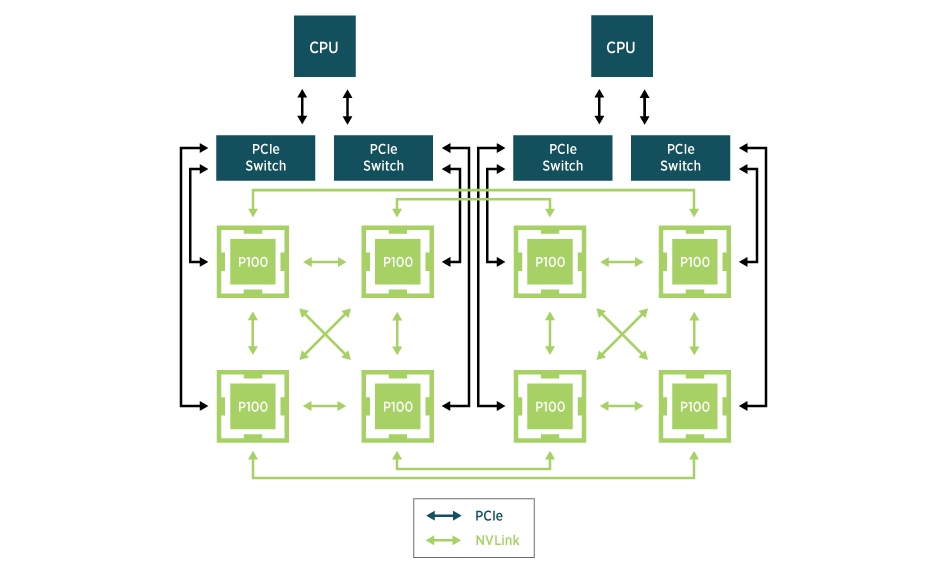
Koordinator addresses these device scenarios by providing rich device topology scheduling APIs to meet Pods' demands for GPU topology. Here are some examples of how to use these APIs:
- Allocate GPU, CPU, and memory on the same NUMA Node
apiVersion: v1
kind: Pod
metadata:
  annotations:
    scheduling.koordinator.sh/numa-topology-spec: '{"numaTopologyPolicy":"Restricted","singleNUMANodeExclusive":"Preferred"}'
spec:
  containers:
  - resources:
      limits:
        koordinator.sh/gpu: 200
        cpu: 64
        memory: 500Gi
      requests:
        koordinator.sh/gpu: 200
        cpu: 64
        memory: 500Gi
- Allocate GPUs on the same PCIe
apiVersion: v1
kind: Pod
metadata:
  annotations:
    scheduling.koordinator.sh/device-allocate-hint: |-
      {
        "gpu": {
          "requiredTopologyScope": "PCIe"
        }
      }
spec:
  containers:
    - resources:
        limits:
          koordinator.sh/gpu: 200
- Allocate GPUs on the same NUMA Node
apiVersion: v1
kind: Pod
metadata:
  annotations:
    scheduling.koordinator.sh/device-allocate-hint: |-
      {
        "gpu": {
          "requiredTopologyScope": "NUMANode"
        }
      }
spec:
  containers:
    - resources:
        limits:
          koordinator.sh/gpu: 400
- Allocate GPUs according to a predefined Partition
Typically, predefined GPU Partition rules are determined by the specific GPU model or system configuration, and may also be influenced by the GPU configuration on a particular node. The scheduler cannot know the specific details of the hardware model or GPU type; instead, it relies on node-level components to report these predefined rules to a custom device resource (CR) to become aware of them, as shown below:
apiVersion: scheduling.koordinator.sh/v1alpha1
kind: Device
metadata:
  annotations:
    scheduling.koordinator.sh/gpu-partitions: |
      {
        "1": [
          {
            "NVLINK": {
              "minors": [0],
              "gpuLinkType": "NVLink",
              "ringBusBandwidth": "400Gi",
              "allocationScore": "1"
            }
          }
        ],
        "2": [],
        "4": [],
        "8": []
      }
  labels:
    node.koordinator.sh/gpu-partition-policy: "Honor"
  name: node-1
When multiple optional Partition schemes are available, Koordinator allows users to decide whether to allocate according to the optimal Partition:
apiVersion: v1
kind: Pod
metadata:
  name: hello-gpu
  annotations:
    scheduling.koordinator.sh/gpu-partition-spec: |
      {
        "allocatePolicy": "Restricted"
      }
spec:
  containers:
    - name: main
      resources:
        limits:
          koordinator.sh/gpu: 100
When the user does not need to allocate according to the optimal Partition, the scheduler will allocate in a way that is as "binpacked" as possible.
To learn more details about GPU topology-aware scheduling, please refer to the following design documents:
We sincerely thank community developer @eahydra for their contributions to this feature!
2. End-to-End GDR Support: Improving Interconnection Performance for Cross-Machine Tasks
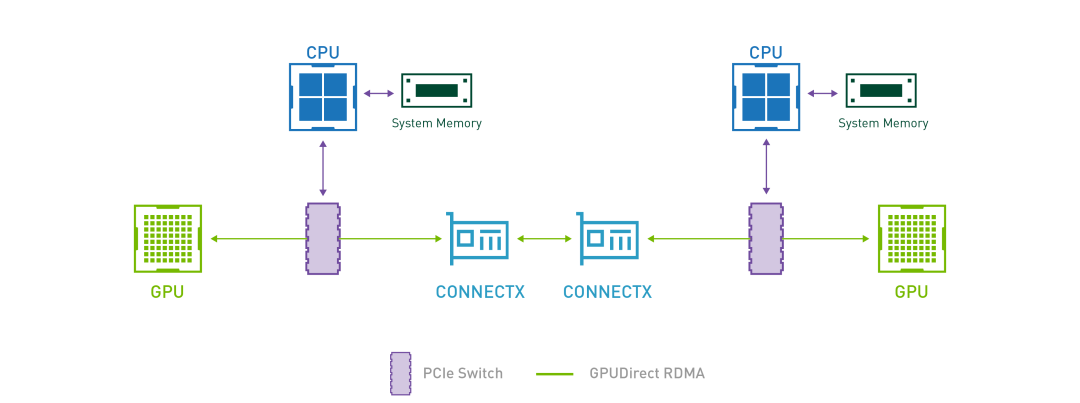
In AI model training scenarios, GPUs need to perform frequent collective communications to synchronize the weights updated during each training iteration. GDR, which stands for GPUDirect RDMA, aims to solve the efficiency problem of data exchange between GPUs on multiple machines. With GDR technology, GPUs on different machines can exchange data without going through the CPU and memory, which significantly saves CPU/Memory overhead and reduces latency. To achieve this goal, Koordinator v1.6.0 has designed and implemented a GPU/RDMA device joint scheduling feature. The overall architecture is as follows:
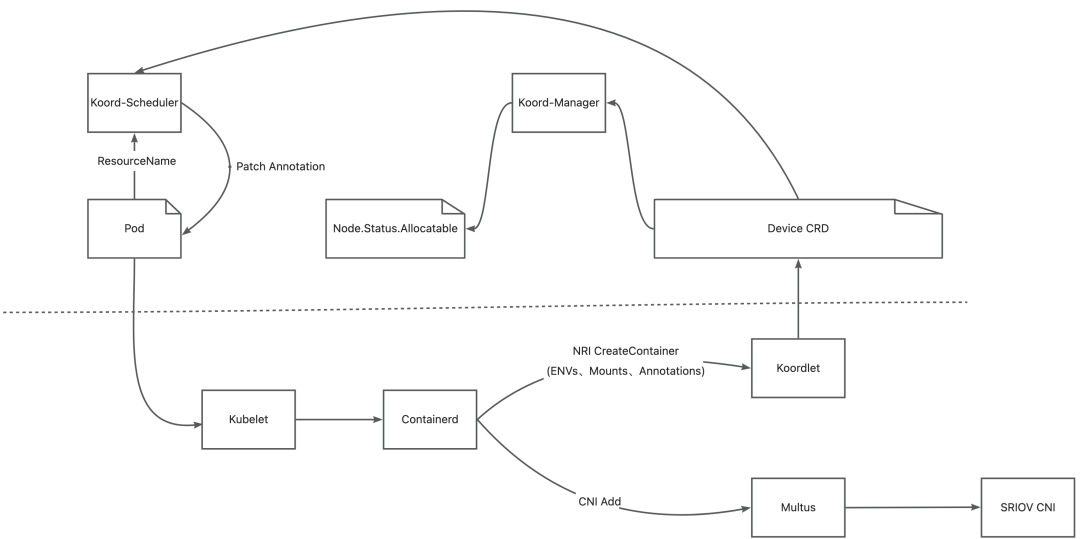
- Koordlet detects the GPU and RDMA devices on the node and reports the relevant information to the Device CR.
- Koord-Manager synchronizes the resources from the Device CR to
node.status.allocatable. - Koord-Scheduler allocates GPUs and RDMA for the Pod based on the device topology and annotates the allocation result on the Pods.
- Multus-CNI accesses the Koordlet PodResources Proxy to get the RDMA devices allocated to the Pods and attaches the corresponding NICs to the Pods' network namespaces.
- Koordlet provides an NRI plugin to mount the devices into the containers.
Due to the involvement of numerous components and a complex environment, Koordinator v1.6.0 provides Best Practices to show how to deploy Koordinator, Multus-CNI, and SRIOV-CNI step-by-step. After deploying the relevant components, users can simply use the following Pod specification to request the scheduler to perform joint allocation for the GPU and RDMA it has requested:
apiVersion: v1
kind: Pod
metadata:
  name: pod-vf01
  namespace: kubeflow
  annotations:
    scheduling.koordinator.sh/device-joint-allocate: |-
      {
        "deviceTypes": ["gpu","rdma"]
      }
    scheduling.koordinator.sh/device-allocate-hint: |-
      {
        "rdma": {
          "vfSelector": {}
        }
      }
spec:
  schedulerName: koord-scheduler
  containers:
  - name: container-vf
    resources:
      requests:
        koordinator.sh/gpu: 100
        koordinator.sh/rdma: 100
      limits:
        koordinator.sh/gpu: 100
        koordinator.sh/rdma: 100
To further test GDR tasks end-to-end with Koordinator, you can refer to the examples in the Best Practices for a step-by-step guide. We would also like to sincerely thank community developer @ferris-cx for their contributions to this feature!
3. GPU Sharing with Strong Isolation: Increasing Resource Utilization for AI Inference Tasks
In AI applications, GPUs are indispensable core devices for large model training and inference, providing powerful computing support for compute-intensive tasks. However, this powerful computing capability often comes with a high cost. In actual production environments, we often encounter situations where some small models or lightweight inference tasks only need to occupy a small portion of a GPU's resources (e.g., 20% of the computing power or GPU memory), but to run these tasks, we have to exclusively occupy a high-performance GPU card. This method of resource usage not only wastes valuable GPU computing power but also significantly increases enterprise costs.
This situation is particularly common in the following scenarios:
- Online Inference Services: Many online inference tasks have low computational requirements but high latency requirements, and they usually need to be deployed on high-performance GPUs to meet real-time needs.
- Development and Testing Environments: When developers are debugging models, they often only need to use a small amount of GPU resources, but traditional scheduling methods lead to low resource utilization.
- Multi-tenant Shared Clusters: In GPU clusters shared by multiple users or teams, having each task exclusively occupy a GPU leads to uneven resource allocation, making it difficult to fully utilize the hardware capabilities.
To solve this problem, Koordinator, in collaboration with HAMi, provides users with the ability to share and isolate GPUs, allowing multiple Pods to share the same GPU card. This approach not only significantly improves GPU resource utilization but also reduces enterprise costs while meeting the flexible resource needs of different tasks. For example, in Koordinator's GPU sharing mode, users can precisely allocate the number of GPU cores or the percentage of GPU memory, ensuring that each task gets the resources it needs without interfering with others.
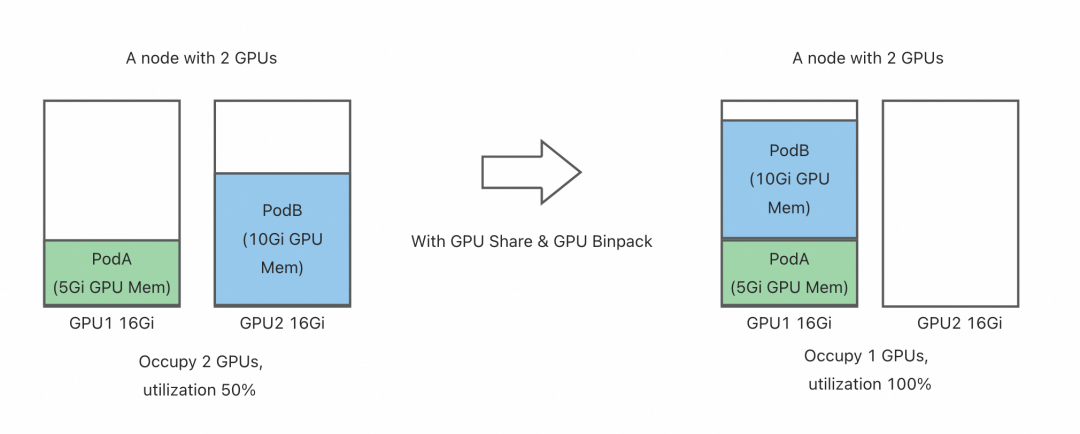
HAMi is a CNCF Sandbox project aimed at providing a device management middleware for Kubernetes. HAMi-Core is its core module, which provides GPU sharing and isolation capabilities by intercepting API calls between the CUDA-Runtime (libcudart.so) and the CUDA-Driver (libcuda.so). In version v1.6.0, Koordinator utilizes the GPU isolation function of HAMi-Core to provide an end-to-end GPU sharing solution.
You can deploy a DaemonSet directly on the corresponding nodes to install HAMi-core using the following YAML file.
apiVersion: apps/v1
kind: DaemonSet
metadata:
  name: hami-core-distribute
  namespace: default
spec:
  selector:
    matchLabels:
      koord-app: hami-core-distribute
  template:
    metadata:
      labels:
        koord-app: hami-core-distribute
    spec:
      affinity:
        nodeAffinity:
          requiredDuringSchedulingIgnoredDuringExecution:
            nodeSelectorTerms:
            - matchExpressions:
              - key: node-type
                operator: In
                values:
                - "gpu"
      containers:
      - command:
        - /bin/sh
        - -c
        - |
          cp -f /k8s-vgpu/lib/nvidia/libvgpu.so /usl/local/vgpu && sleep 3600000
        image: docker.m.daocloud.io/projecthami/hami:v2.4.0
        imagePullPolicy: Always
        name: name
        resources:
          limits:
            cpu: 200m
            memory: 256Mi
          requests:
            cpu: "0"
            memory: "0"
        volumeMounts:
        - mountPath: /usl/local/vgpu
          name: vgpu-hook
        - mountPath: /tmp/vgpulock
          name: vgpu-lock
      tolerations:
      - operator: Exists
      volumes:
      - hostPath:
          path: /usl/local/vgpu
          type: DirectoryOrCreate
        name: vgpu-hook
      - hostPath:
          path: /tmp/vgpulock
          type: DirectoryOrCreate
        name: vgpu-lock
The GPU Binpack capability of the Koordinator scheduler is enabled by default. After installing Koordinator and HAMi-Core, users can request a shared GPU card and enable HAMi-Core isolation in the following way.
apiVersion: v1
kind: Pod
metadata:
  name: pod-example
  namespace: default
  labels:
    # Specify hami-core as the GPU isolation provider
    koordinator.sh/gpu-isolation-provider: hami-core
spec:
  schedulerName: koord-scheduler
  containers:
  - command:
    - sleep
    - 365d
    image: busybox
    imagePullPolicy: IfNotPresent
    name: curlimage
    resources:
      limits:
        cpu: 40m
        memory: 40Mi
        koordinator.sh/gpu-shared: 1      # Request 1 shared GPU
        koordinator.sh/gpu-core: 50       # Request 50% of GPU cores
        koordinator.sh/gpu-memory-ratio: 50 # Request 50% of GPU memory
      requests:
        cpu: 40m
        memory: 40Mi
        koordinator.sh/gpu-shared: 1
        koordinator.sh/gpu-core: 50
        koordinator.sh/gpu-memory-ratio: 50
    terminationMessagePath: /dev/termination-log
    terminationMessagePolicy: File
  restartPolicy: Always
For guidance on how to enable HAMi's GPU sharing and isolation capabilities in Koordinator, please refer to:
We sincerely thank the HAMi community member @wawa0210 for their support on this feature!
4. Differentiated GPU Scheduling Strategy: Effectively Reducing GPU Fragmentation
In modern Kubernetes clusters, various types of resources (such as CPU, memory, GPU, etc.) are usually managed on a unified platform. However, the usage patterns and requirements of different types of resources often differ significantly, which leads to different needs for resource packing and spreading strategies.
For example:
- GPU Resources: In AI model training or inference tasks, to maximize GPU utilization and reduce fragmentation, users usually want to prioritize scheduling GPU tasks to nodes that already have GPUs allocated (i.e., a "packing" strategy). This strategy can avoid resource waste caused by overly dispersed GPU distribution.
- CPU and Memory Resources: In contrast, the demand for CPU and memory resources is more diverse. For some online services or batch processing tasks, users prefer to spread the tasks across multiple nodes (i.e., a "spreading" strategy) to avoid resource hotspots on a single node, thereby improving the overall stability and performance of the cluster.
In addition, in mixed-workload scenarios, the resource demands of different tasks will also affect each other. For example:
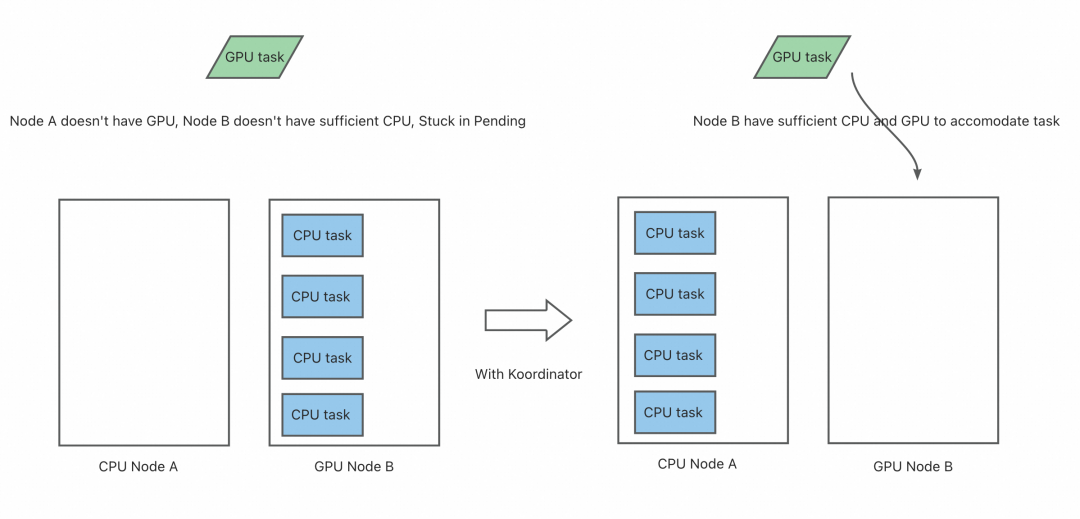
- In a cluster that runs both GPU training tasks and regular CPU-intensive tasks, if a CPU-intensive task is scheduled to a GPU node and consumes a large amount of CPU and memory resources, it may cause subsequent GPU tasks to fail to start due to insufficient non-CPU resources, eventually leaving them in a Pending state.
- In a multi-tenant environment, some users may only request CPU and memory resources, while others need GPU resources. If the scheduler cannot distinguish between these demands, it may lead to resource contention and unfair resource allocation.
The native NodeResourcesFit plugin in Kubernetes currently only supports configuring the same scoring strategy for different resources, as shown below:
apiVersion: kubescheduler.config.k8s.io/v1
kind: KubeSchedulerConfiguration
profiles:
  - pluginConfig:
      - name: NodeResourcesFit
        args:
          apiVersion: kubescheduler.config.k8s.io/v1
          kind: NodeResourcesFitArgs
          scoringStrategy:
            type: LeastAllocated
            resources:
              - name: cpu
                weight: 1
              - name: memory
                weight: 1
              - name: nvidia.com/gpu
                weight: 1
However, in practice, some scenarios are not suitable for this design. For example, in AI scenarios, services requesting GPUs want to prioritize occupying the entire GPU machine to prevent GPU fragmentation, while services requesting CPU & MEM want to prioritize spreading to reduce CPU hotspots. Koordinator introduced the NodeResourceFitPlus plugin in v1.6.0 to support configuring differentiated scoring strategies for different resources. Users can configure the Koordinator scheduler as follows when installing it:
apiVersion: kubescheduler.config.k8s.io/v1
kind: KubeSchedulerConfiguration
profiles:
- pluginConfig:
  - args:
      apiVersion: kubescheduler.config.k8s.io/v1
      kind: NodeResourcesFitPlusArgs
      resources:
        nvidia.com/gpu:
          type: MostAllocated
          weight: 2
        cpu:
          type: LeastAllocated
          weight: 1
        memory:
          type: LeastAllocated
          weight: 1
    name: NodeResourcesFitPlus
  plugins:
    score:
      enabled:
      - name: NodeResourcesFitPlus
        weight: 2
  schedulerName: koord-scheduler
In addition, services requesting CPU & MEM would prefer to be spread out to non-GPU machines to prevent excessive consumption of CPU & MEM on GPU machines, which could cause genuine GPU-requesting tasks to be stuck in a Pending state due to insufficient non-GPU resources. Koordinator introduced the ScarceResourceAvoidance plugin in v1.6.0 to support this requirement. Users can configure the scheduler as follows, indicating that nvidia.com/gpu is a scarce resource, and when a Pod does not request this scarce resource, it should try to avoid being scheduled on it.
apiVersion: kubescheduler.config.k8s.io/v1
kind: KubeSchedulerConfiguration
profiles:
- pluginConfig:
  - args:
      apiVersion: kubescheduler.config.k8s.io/v1
      kind: ScarceResourceAvoidanceArgs
      resources:
      - nvidia.com/gpu
    name: ScarceResourceAvoidance
  plugins:
    score:
      enabled:
      - name: NodeResourcesFitPlus
        weight: 2
      - name: ScarceResourceAvoidance
        weight: 2
      disabled:
      - name: "*"
  schedulerName: koord-scheduler
For detailed design and usage guidance on the differentiated GPU resource scheduling strategy, please refer to:
We sincerely thank community developer @LY-today for their contribution to this feature.
5. Fine-grained Resource Reservation: Meeting the Efficient Operation Needs of AI Tasks
The efficient utilization of heterogeneous resources often depends on the precise alignment of closely coupled CPU and NUMA resources. For example:
- GPU-accelerated tasks: In servers with multiple NUMA nodes, if the physical connection between a GPU and CPU or memory crosses a NUMA boundary, it can lead to increased data transfer latency, thereby significantly reducing task performance. Therefore, such tasks usually require the GPU, CPU, and memory to be allocated on the same NUMA node.
- AI inference services: Online inference tasks are very sensitive to latency and require that the resource allocation for GPUs and CPUs be as close as possible to reduce communication overhead across NUMA nodes.
- Scientific computing tasks: Some high-performance computing tasks (such as molecular dynamics simulations or weather forecasting) require high-bandwidth, low-latency memory access, and therefore must strictly align CPU cores with local memory.
These requirements not only apply to task scheduling but also extend to resource reservation scenarios. In a production environment, resource reservation is an important mechanism for locking in resources for critical tasks in advance, ensuring that they can run smoothly at some future point in time. However, in heterogeneous resource scenarios, simple resource reservation mechanisms often fail to meet the needs of fine-grained resource orchestration. For example:
- Some tasks may need to reserve CPU and GPU resources on a specific NUMA node to ensure optimal performance after the task starts.
- In multi-tenant clusters, different users may need to reserve different combinations of resources (such as GPU+CPU+memory) and want these resources to be strictly aligned.
- When reserved resources are not fully utilized, how to flexibly allocate the remaining resources to other tasks without affecting the resource guarantees of the reserved tasks is also an important challenge.
To address these complex scenarios, Koordinator has comprehensively enhanced its resource reservation function in version v1.6, providing more fine-grained and flexible resource orchestration capabilities. The specific improvements include:
- Support for fine-grained reservation and preemption of CPU and GPU resources.
- Support for Pods to precisely match the amount of reserved resources.
- Resource reservation affinity now supports specifying reservation names and taint toleration attributes.
- Resource reservation now supports a limit on the number of Pods.
- Support for resource reservation to preempt low-priority Pods.
Plugin extension interface changes:
- The reservation resource validation interface
ReservationFilterPluginhas been moved from the PreScore stage to the Filter stage to ensure more accurate filtering results.
The following are examples of how to use the new features:
- Exact-Match Reservation
Specify that a Pod must exactly match the amount of reserved resources. This can be used to narrow down the matching relationship between a group of Pods and a group of resource reservations, making the allocation of reserved resources more controllable.
apiVersion: v1
kind: Pod
metadata:
  annotations:
    # Specifies that the Pod must exactly match the reserved resources for the given resource types. The Pod can only match Reservation objects where the reserved resource amounts for these types are exactly equal to the Pod's specifications. For example, specify "cpu", "memory", "nvidia.com/gpu".
    scheduling.koordinator.sh/exact-match-reservation: '{"resourceNames":["cpu","memory","nvidia.com/gpu"]}'
spec:
  # Other PodSpec content as needed
  containers:
  - name: app
    resources:
      requests:
        cpu: "4"
        memory: "8Gi"
        nvidia.com/gpu: "1"
      limits:
        cpu: "4"
        memory: "8Gi"
        nvidia.com/gpu: "1"
- Ignore Reservation (
reservation-ignored)
Specify that a Pod can ignore resource reservations. This allows the Pod to fill the idle resources on a node that are reserved but not yet allocated. When used with preemption, it can further reduce resource fragmentation.
apiVersion: v1
kind: Pod
metadata:
  labels:
    # Specifies that the Pod's scheduling can ignore resource reservations.
    scheduling.koordinator.sh/reservation-ignored: "true"
spec:
  containers:
  - name: app
    image: busybox
    command: ["sleep", "3600"]
- Reservation Affinity (by name)
apiVersion: v1
kind: Pod
metadata:
  annotations:
    # Specifies the name of the resource reservation for the Pod to match.
    scheduling.koordinator.sh/reservation-affinity: '{"name":"test-reservation"}'
spec:
  containers:
  - name: app
    image: busybox
    command: ["sleep", "3600"]
- Specify Reservation Taints and Tolerations
---
apiVersion: scheduling.koordinator.sh/v1alpha1
kind: Reservation
metadata:
  name: test-reservation
spec:
  # Specify the Taints of the Reservation. Its reserved resources can only be allocated to Pods that tolerate these taints.
  taints:
  - effect: NoSchedule
    key: test-taint-key
    value: test-taint-value
  # Other Reservation spec fields as needed

---
apiVersion: v1
kind: Pod
metadata:
  annotations:
    # Specify the Pod's tolerations for reservation taints.
    scheduling.koordinator.sh/reservation-affinity: |
      {
        "tolerations":[
          {
            "key":"test-taint-key",
            "operator":"Equal",
            "value":"test-taint-value",
            "effect":"NoSchedule"
          }
        ]
      }
spec:
  containers:
  - name: app
    image: busybox
    command: ["sleep", "3600"]
- Enable Reservation Preemption
Note: The use case of a high-priority Pod preempting a low-priority Reservation is not currently supported.
apiVersion: kubescheduler.config.k8s.io/v1beta3
kind: KubeSchedulerConfiguration
profiles:
- pluginConfigs:
  - name: Reservation
    args:
      apiVersion: kubescheduler.config.k8s.io/v1beta3
      kind: ReservationArgs
      enablePreemption: true
  plugins:
    postFilter:
      # Disable DefaultPreemption and enable preemption for the Reservation plugin
      disabled:
      - name: DefaultPreemption
      enabled:
      - name: Reservation
We sincerely thank community developer @saintube for their contribution to this feature!
6. Co-location: Mid-tier support for idle resource reallocation, enhanced Pod-level QoS configuration
In modern data centers, co-location technology has become an important means of improving resource utilization. By deploying latency-sensitive tasks (such as online services) and resource-intensive tasks (such as offline batch processing) in the same cluster, enterprises can significantly reduce hardware costs and improve resource efficiency. However, as the resource utilization level of co-located clusters continues to rise, ensuring resource isolation between different types of tasks has become a key challenge.
In co-location scenarios, the core objectives of resource isolation capabilities are:
- Guaranteeing the performance of high-priority tasks: For example, online services require stable CPU, memory, and I/O resources to meet low-latency requirements.
- Fully utilizing idle resources: Offline tasks should use the resources not used by high-priority tasks as much as possible, but without interfering with the high-priority tasks.
- Dynamically adjusting resource allocation: Adjust resource allocation strategies in real-time based on changes in node load to avoid resource contention or waste.
To achieve these goals, Koordinator continues to build and improve its resource isolation capabilities. In version v1.6, we have focused on a series of feature optimizations and bug fixes around resource over-commitment and co-location QoS, including the following:
- Mid-tier resource over-commitment and node profiling features have optimized their calculation logic to support over-committing unallocated node resources, avoiding secondary over-commitment of node resources.
- The metric degradation logic for load-aware scheduling has been optimized.
- CPU QoS and Resctrl QoS now support pod-level configuration.
- Out-of-band load management has been supplemented with Prometheus metrics to enhance observability.
- Bug fixes for features like Blkio QoS and resource amplification.
Mid-tier resource over-commitment was introduced in Koordinator v1.3, providing dynamic resource over-commitment based on node profiling. However, to ensure the stability of over-committed resources, Mid-tier resources were entirely derived from the allocated Prod pods on the node. This meant that an empty node initially had no Mid-tier resources, which caused many inconveniences for workloads using Mid-tier resources. The Koordinator community has received feedback and contributions from some enterprise users on this issue.
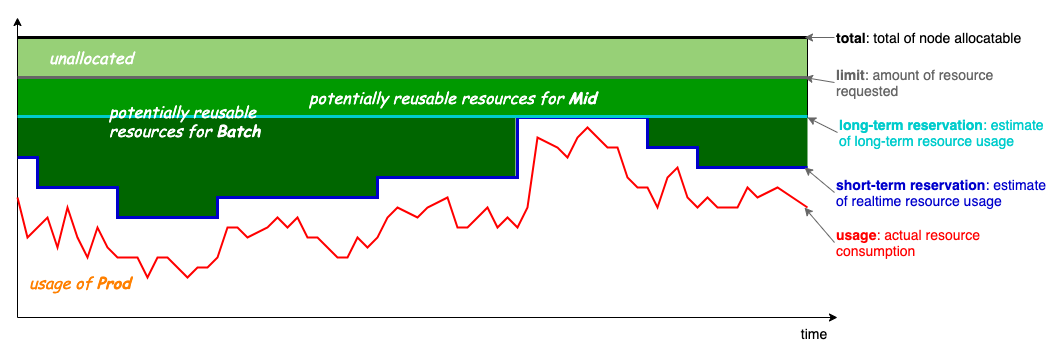
In version v1.6, Koordinator has updated the over-commitment calculation formula as follows:
NodeAllocatable * thresholdRatio) + ProdUnallocated * unallocatedRatio
ProdReclaimable := min(max(0, ProdAllocated - ProdPeak * (1 + safeMargin)), NodeUnused)
There are two changes to the calculation logic:
- It supports over-committing unallocated resources based on a static ratio to improve the cold start problem.
- It does not allow over-committing of actually used node resources, avoiding situations where the estimated value is too large due to secondary over-commitment. For example, some users used Koordinator's node resource amplification capability to schedule more Prod pods, causing
ProdAllocated > NodeAllocatableon the node, which led to the estimated value ofMidAllocatabledeviating from the actual node load.
In addition, in terms of co-location QoS, Koordinator v1.6 has enhanced the Pod-level QoS policy configuration capability, which is suitable for use cases such as blacklisting interfering Pods on co-located nodes and canary releasing co-location QoS configurations:
- The Resctrl feature now supports Pod-level LLC and memory bandwidth isolation capabilities.
- The CPU QoS feature now supports Pod-level CPU QoS configuration.
The Resctrl feature can be enabled at the Pod level in the following way:
- Enable the Resctrl feature in the Koordlet's feature-gate.
- Configure LLC and memory bandwidth (MB) limiting policies through the Pod annotation
node.koordinator.sh/resctrl. For example:
apiVersion: v1
kind: Pod
metadata:
  annotations:
    node.koordinator.sh/resctrl: |
      {
        "llc": {"schemata": {"range": [0, 30]}},
        "mb":  {"schemata": {"percent": 20}}
      }
spec:
  containers:
  - name: app
    image: busybox
    command: ["sleep", "infinity"]
Pod-level CPU QoS configuration can be enabled as follows:
- Enable CPU QoS. Please refer to: https://koordinator.sh/docs/user-manuals/cpu-qos/
- Configure the Pod's CPU QoS policy through the Pod annotation
koordinator.sh/cpuQOS. For example:
apiVersion: v1
kind: Pod
metadata:
  annotations:
    koordinator.sh/cpuQOS: '{"groupIdentity": 1}'
spec:
  containers:
  - name: app
    image: busybox
    command: ["sleep", "3600"]
We sincerely thank community developers @kangclzjc, @j4ckstraw, @lijunxin559, @tan90github, and @yangfeiyu20102011 for their contributions to the co-location related features!
7. Scheduling, Descheduling: Continuously Improving Operational Efficiency
As cloud-native technology continues to evolve, more and more enterprises are migrating their core business to the Kubernetes platform, leading to an explosive growth in cluster size and the number of tasks. This trend has brought significant technical challenges, especially in terms of scheduling performance and descheduling strategies:
- Scheduling Performance Requirements: As cluster sizes expand, the number of tasks that the scheduler needs to handle increases dramatically, placing higher demands on the scheduler's performance and scalability. For example, in large-scale clusters, how to quickly make Pod scheduling decisions and reduce scheduling latency has become a key issue.
- Descheduling Strategy Requirements: In multi-tenant environments, resource competition intensifies, and frequent descheduling can cause workloads to be repeatedly migrated between different nodes, which in turn increases the system load and affects cluster stability. In addition, how to reasonably allocate resources to avoid hotspots while ensuring the stable operation of production tasks has also become an important consideration in descheduling strategy design.
To address these challenges, Koordinator has comprehensively optimized the scheduler and descheduler in version v1.6.0, aiming to improve scheduling performance and enhance the stability and reasonableness of descheduling strategies. The following are the optimizations we have made to the scheduler's performance in the current version:
- Moved the
MinMembercheck for PodGroups toPreEnqueueto reduce unnecessary scheduling cycles. - Delayed the resource return for Reservations to the
AfterPreFilterstage, only returning resources on nodes allowed by thePreFilterResult, which reduces algorithmic complexity. - Optimized the
CycleStatedistribution for plugins likeNodeNUMAResource,DeviceShare, andReservationto reduce memory overhead. - Added latency metrics for the additional extension points in Koordinator, such as
BeforePreFilterandAfterPreFilter.
As cluster sizes continue to grow, the stability and reasonableness of the descheduling process have become a core focus. Frequent evictions can lead to workloads being repeatedly migrated between nodes, increasing system load and causing stability risks. To this end, we have made several optimizations to the descheduler in version v1.6.0:
1. LowNodeLoad Plugin Optimization
a. The LowNodeLoad plugin now supports configuring ProdHighThresholds and ProdLowThresholds, which, combined with Koordinator's priority, allows for differentiated management of workload resource utilization. This can reduce hotspot issues caused by production applications, thereby achieving more fine-grained load balancing.
b. Optimized the sorting logic for Pods to be evicted. By using a segmented function scoring algorithm, it selects the most suitable Pod for eviction, ensuring reasonable resource allocation and avoiding stability issues caused by evicting the Pod with the highest resource utilization.
c. Optimized the pre-eviction check logic for Pods. Before evicting a Pod, LowNodeLoad now checks one by one whether the target node will become a new hotspot node due to the descheduling. This optimization effectively prevents repeated descheduling.
2. MigrationController Enhancement
a. The MigrationController has an ObjectLimiter capability to control the eviction frequency of a workload within a certain period. It now supports configuring namespace-level eviction rate limiting for more fine-grained control over evictions within a namespace. The ObjectLimiter has also been moved from the Arbitrator to inside the MigrationController to fix a potential rate-limiting failure issue in concurrent scenarios.
b. A new EvictAllBarePods configuration item has been added, allowing users to enable the eviction of Pods without an OwnerRef, thereby increasing the flexibility of descheduling.
c. A new MaxMigratingGlobally configuration item has been added. The MigrationController can now independently control the maximum number of Pod evictions, reducing stability risks.
d. Optimized the calculation logic of the GetMaxUnavailable method. When the calculated maximum number of unavailable replicas for a workload is rounded down to 0, it is now defaulted to 1, preventing the user's control over the number of unavailable replicas from losing its expected accuracy and consistency.
3. A new global descheduling configuration parameter, MaxNoOfPodsToEvictTotal, has been added to ensure a global maximum number of Pod evictions for the descheduler, reducing the burden on the cluster and improving stability
We sincerely thank community developers @AdrianMachao, @songtao98, @LY-today, @zwForrest, @JBinin, @googs1025, and @bogo-y for their contributions to the scheduling and descheduling optimizations!
Future Plans
The Koordinator community will continue to focus on strengthening GPU resource management and scheduling functions, providing a descheduling plugin to further address the GPU fragmentation problem caused by imbalanced resource allocation. We plan to introduce more new features and functionalities in the next version to support more complex workload scenarios. At the same time, in terms of resource reservation and co-location, we will further optimize to support more fine-grained scenarios.
The proposals currently being planned by the community are as follows:
- Fine-grained device scheduling support for Ascend NPU
- Provide a descheduling plugin to solve the resource imbalance problem
- Reservation support for binding to already allocated Pods
The key usage problems to be addressed are as follows:
Long-term planned proposals are as follows:
We encourage users to provide feedback on their experience and welcome more developers to participate in the Koordinator project to jointly promote its development!
HAMi, short for Heterogeneous AI Computing Virtualization Middleware, is a "one-stop" architecture designed to manage heterogeneous AI computing devices in a k8s cluster. It provides the ability to share heterogeneous AI devices and offers resource isolation between tasks. HAMi is dedicated to improving the utilization of heterogeneous computing devices in k8s clusters and providing a unified reuse interface for different types of heterogeneous devices. HAMi is currently a CNCF Sandbox project and has been included in the CNCF's CNAI technology landscape.
Community Website: https://project-hami.io
GitHub: https://github.com/Project-HAMi