HAMi Integrates with Kubernetes DRA: A Practical Guide to the Next-Generation GPU Resource Model
Original author: 意琦行
Republished from: HAMi 正式接入 Kubernetes DRA:下一代 GPU 资源模型实践指南
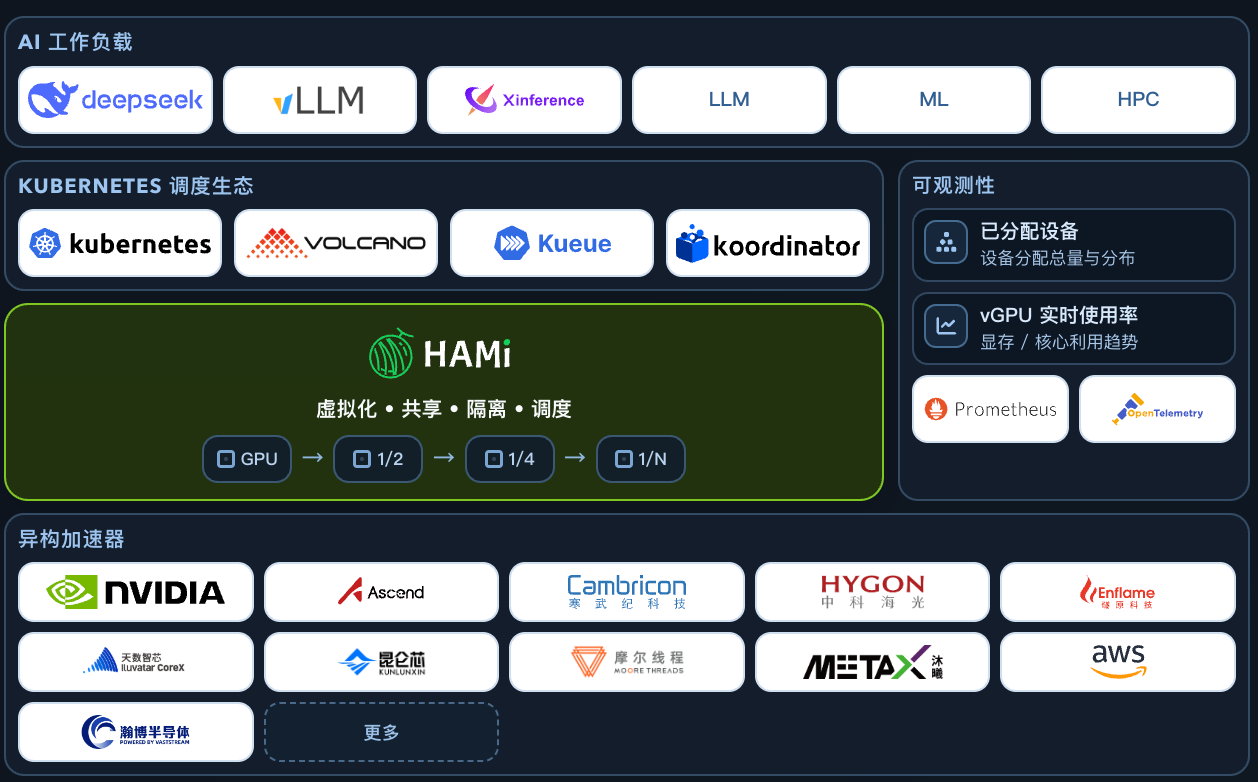
HAMi is one of the most active open-source vGPU solutions for Kubernetes. It can partition a physical GPU into multiple virtual GPUs by memory and compute, allowing different Pods to share the same device.
This article focuses on deploying and using HAMi in DRA mode. After installing the HAMi DRA driver, we submit Pods in both native DRA mode and DevicePlugin-compatible mode, then verify that GPU partitioning works as expected.
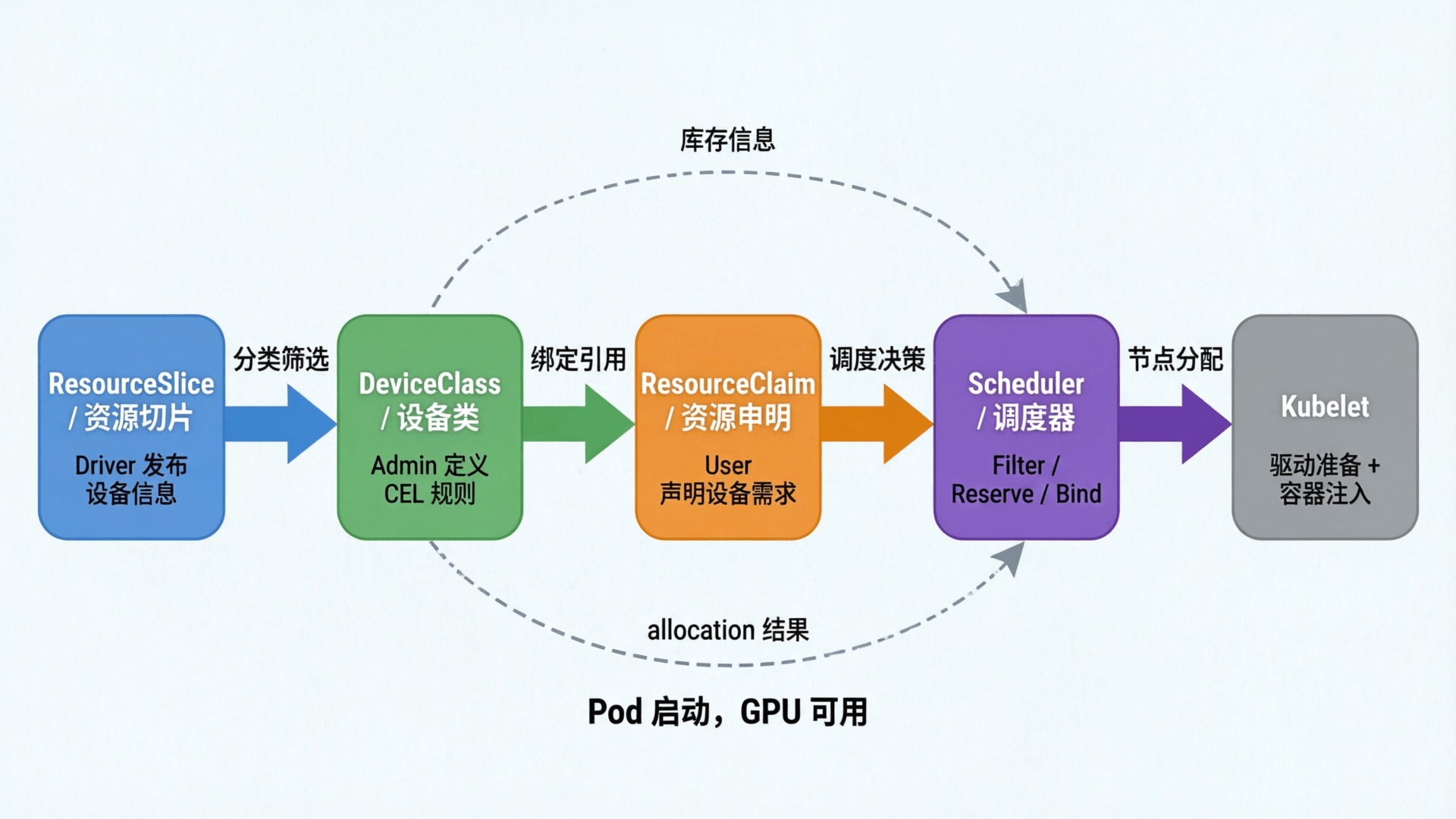
Kubernetes 1.34 officially promoted DRA, or Dynamic Resource Allocation, to GA. DRA's key improvement is that the scheduler participates in resource allocation, matching device attributes during Pod scheduling and avoiding the DevicePlugin problem where a Pod may only discover insufficient resources after landing on a node.
Recent HAMi versions have officially integrated with DRA. Users can either use native DRA mode or migrate smoothly through DevicePlugin-compatible mode.
What Is HAMi
HAMi, a heterogeneous AI computing virtualization middleware, is an open-source platform for managing heterogeneous AI accelerators in Kubernetes clusters. Formerly known as k8s-vGPU-scheduler, HAMi enables device sharing across containers and workloads.
HAMi is a CNCF Sandbox project and is listed in both the CNCF Landscape and the CNAI Landscape.
Core Features
Device sharing
- Multi-device support: compatible with heterogeneous AI accelerators such as GPUs and NPUs.
- Shared access: multiple containers can share devices concurrently to improve resource utilization.
Memory management
- Hard limits: strict memory limits are enforced inside containers to prevent resource conflicts.
- Dynamic allocation: device memory is allocated on demand based on workload requirements.
- Flexible units: memory can be specified in MB or as a percentage of total device memory.
Device specification
- Type selection: users can request specific heterogeneous accelerator types.
- UUID targeting: users can target specific devices by UUID.
Ease of use
- Transparent to workloads: no code changes are required inside containers.
- Simple deployment: HAMi can be installed and removed through Helm with straightforward configuration.
Open governance
- Community-driven: jointly initiated by organizations from internet, finance, manufacturing, cloud services, and other sectors.
- Neutral development: governed by CNCF as an open-source project.
Installing HAMi
Prerequisites:
- Kubernetes 1.34 or later, with the DRAConsumableCapacity Feature Gate enabled.
- DRAConsumableCapacity is not enabled by default in Kubernetes 1.34 and 1.35, so it must be configured manually.
- The container runtime must enable CDI.
- NVIDIA GPU driver 440 or later.
The first requirement is especially important: DRAConsumableCapacity is enabled by default only from Kubernetes 1.36 onward. For 1.34 and 1.35, it must be enabled manually.
Installing GPU Operator
When installing GPU Operator, disable DevicePlugin:
helm repo add nvidia https://helm.ngc.nvidia.com/nvidia && helm repo update

helm upgrade --install --wait gpu-operator \
     -n gpu-operator --create-namespace \
     nvidia/gpu-operator \
     --version=v26.3.1 \
     --set driver.enabled=true \
     --set devicePlugin.enabled=false
--set devicePlugin.enabled=false: disables DevicePlugin to avoid conflicts with the DRA driver installed later.
Installing Cert-manager
The HAMi DRA webhook requires TLS certificates, so install cert-manager first for automatic certificate issuance.
helm repo add cert-manager https://charts.jetstack.io
helm repo update

helm install cert-manager cert-manager/cert-manager \
  -n cert-manager --create-namespace \
  --set crds.enabled=true
Installing HAMi with Helm
Label the node with gpu=on. Nodes without this label will not be managed by HAMi.
#kubectl label nodes {nodeid} gpu=on

kubectl label nodes ecs-a10-sh gpu=on
Add the HAMi chart repository:
helm repo add hami-charts https://project-hami.github.io/HAMi/
Install HAMi:
# The key setting is --set dra.enabled=true, which enables DRA mode.
helm -n hami-system install hami hami-charts/hami --set dra.enabled=true --create-namespace
Note: DRA mode is incompatible with the traditional mode. Do not enable both at the same time.
If the GPU driver is preinstalled on the host instead of being installed by GPU Operator, specify this additional option:
--set hami-dra.drivers.nvidia.containerDriver=false
Verification
Under normal circumstances, the following Pods should start in the hami-system namespace:
root@ECS-A10-SH:/data/nfs/shared-skills-cicd# k -n hami-system get po
NAME                                     READY   STATUS    RESTARTS   AGE
hami-dra-driver-kubelet-plugin-hflbh     1/1     Running   0          2m49s
hami-hami-dra-monitor-7b484d5f95-rlkcg   1/1     Running   0          22m
hami-hami-dra-webhook-64bfdc6b86-d4nlr   1/1     Running   0          22m
Usage
Viewing ResourceSlice
Check whether the DRA driver has published a ResourceSlice:
root@ECS-A10-SH:/data/nfs/shared-skills-cicd# kubectl get resourceslice
NAME                                             NODE         DRIVER                          POOL         AGE
ecs-a10-sh-hami-core-gpu.project-hami.io-hnn6d   ecs-a10-sh   hami-core-gpu.project-hami.io   ecs-a10-sh   119s
The details are as follows:
root@ECS-A10-SH:/data/nfs/shared-skills-cicd# kubectl get resourceslice ecs-a10-sh-hami-core-gpu.project-hami.io-hnn6d -oyaml
apiVersion: resource.k8s.io/v1
kind: ResourceSlice
metadata:
  creationTimestamp: "2026-05-13T09:28:56Z"
  generateName: ecs-a10-sh-hami-core-gpu.project-hami.io-
  generation: 1
  name: ecs-a10-sh-hami-core-gpu.project-hami.io-hnn6d
  ownerReferences:
  - apiVersion: v1
    controller: true
    kind: Node
    name: ecs-a10-sh
    uid: 76c7db94-fe0b-44ea-9b07-8bdb6132888b
  resourceVersion: "61417761"
  uid: 46d46b45-108e-45e3-98f2-000a091571d3
spec:
  devices:
  - attributes:
      architecture:
        string: Ampere
      brand:
        string: Nvidia
      cudaComputeCapability:
        version: 8.6.0
      cudaDriverVersion:
        version: 12.4.0
      driverVersion:
        version: 550.144.3
      minor:
        int: 0
      pcieBusID:
        string: 0000:65:01.0
      productName:
        string: NVIDIA A10
      resource.kubernetes.io/pcieRoot:
        string: pci0000:64
      type:
        string: hami-gpu
      uuid:
        string: GPU-f1c7d08c-ae21-13e7-0de0-9eb14ff71eaf
    capacity:
      cores:
        value: "100"
      memory:
        value: 23028Mi
    name: hami-gpu-0
  driver: hami-core-gpu.project-hami.io
  nodeName: ecs-a10-sh
  pool:
    generation: 1
    name: ecs-a10-sh
    resourceSliceCount: 1
The ResourceSlice records information such as GPU architecture, model, and memory.
Submitting a Workload: Native DRA Mode
The native DRA flow creates a ResourceClaim first, then creates a Pod that uses the ResourceClaim.
Submit the Workload
The complete YAML for the ResourceClaim and corresponding Pod is shown below:
# Native DRA mode: manually create a ResourceClaim.
# Request 10 GiB memory and 50 cores on an A10 GPU.

apiVersion: resource.k8s.io/v1
kind: ResourceClaim
metadata:
  name: gpu-half-claim
spec:
  devices:
    requests:
    - name: gpu
      exactly:
        deviceClassName: hami-core-gpu.project-hami.io
        allocationMode: ExactCount
        count: 1
        capacity:
          requests:
            cores: 50
            memory: "10Gi"
---
apiVersion: v1
kind: Pod
metadata:
  name: gpu-test-dra-native
spec:
  containers:
  - name: cuda
    image: 172.31.0.2:5000/nvidia/cuda:13.0.1-base-ubi9
    command: ["sleep", "3600"]
    resources:
      claims:
      - name: gpu
  resourceClaims:
  - name: gpu
    resourceClaimName: gpu-half-claim
  restartPolicy: Never
Check Scheduling
The ResourceClaim shows the resource allocation:
root@ECS-A10-SH:~/lixd/deploy/gpu/hami/examples# k get po
NAME                  READY   STATUS    RESTARTS   AGE
gpu-test-dra-native   1/1     Running   0          88s
root@ECS-A10-SH:~/lixd/deploy/gpu/hami/examples# k get resourceclaim
NAME             STATE                AGE
gpu-half-claim   allocated,reserved   21s
root@ECS-A10-SH:~/lixd/deploy/gpu/hami/examples# k get resourceclaim gpu-half-claim -oyaml
apiVersion: resource.k8s.io/v1
kind: ResourceClaim
metadata:
  name: gpu-half-claim
  namespace: default
spec:
  devices:
    requests:
    - exactly:
        allocationMode: ExactCount
        capacity:
          requests:
            cores: "50"
            memory: 10Gi
        count: 1
        deviceClassName: hami-core-gpu.project-hami.io
      name: gpu
status:
  allocation:
    devices:
      results:
      - consumedCapacity:
          cores: "50"
          memory: 10Gi
        device: hami-gpu-0
        driver: hami-core-gpu.project-hami.io
        pool: ecs-a10-sh
        request: gpu
        shareID: 6108e68f-a7ec-4a30-9782-634885c0c728
    nodeSelector:
      nodeSelectorTerms:
      - matchFields:
        - key: metadata.name
          operator: In
          values:
          - ecs-a10-sh
  reservedFor:
  - name: gpu-test-dra-native
    resource: pods
    uid: d99dc6df-092c-4f3a-ac55-cfb88c017af7
Result
Running nvidia-smi inside the Pod shows that the visible memory is the requested 10 GiB, confirming that HAMi is effective.
[HAMI-core Msg(51:140707774973760:libvgpu.c:870)]: Initializing.....
Wed May 13 10:58:20 2026
+-----------------------------------------------------------------------------------------+
| NVIDIA-SMI 550.144.03             Driver Version: 550.144.03     CUDA Version: 13.0     |
|-----------------------------------------+------------------------+----------------------+
| GPU  Name                 Persistence-M | Bus-Id          Disp.A | Volatile Uncorr. ECC |
| Fan  Temp   Perf          Pwr:Usage/Cap |           Memory-Usage | GPU-Util  Compute M. |
|                                         |                        |               MIG M. |
|=========================================+========================+======================|
|   0  NVIDIA A10                     On  |   00000000:65:01.0 Off |                    0 |
|  0%   32C    P8             22W /  150W |       0MiB /  10240MiB |      0%      Default |
|                                         |                        |                  N/A |
+-----------------------------------------+------------------------+----------------------+

+-----------------------------------------------------------------------------------------+
| Processes:                                                                              |
|  GPU   GI   CI        PID   Type   Process name                              GPU Memory |
|        ID   ID                                                               Usage      |
|=========================================================================================|
|  No running processes found                                                             |
+-----------------------------------------------------------------------------------------+
[HAMI-core Msg(51:140707774973760:multiprocess_memory_limit.c:703)]: Cleanup on exit for PID 51
[HAMI-core Msg(51:140707774973760:multiprocess_memory_limit.c:739)]: Exit cleanup complete for PID 51
Submitting a Workload: DevicePlugin-Compatible Mode
Native DRA mode requires manually creating a ResourceClaim, which is not friendly enough for existing workloads.
To make migration easier, HAMi provides a compatibility mode: users still request resources as they would with DevicePlugin, while the HAMi DRA webhook automatically intercepts and converts the request into a ResourceClaim. After the scheduler allocates the device, the claim is mounted into the Pod.
Submit the Workload
As with DevicePlugin, request resources normally under resources:
# Compatibility mode: request GPUs in the traditional way.
# The HAMi webhook automatically converts the request into a ResourceClaim.
# Request 1 GPU, 10 GiB memory, and 50% compute.

apiVersion: v1
kind: Pod
metadata:
  name: gpu-test-compatible
spec:
  containers:
  - name: cuda
    image: 172.31.0.2:5000/nvidia/cuda:13.0.1-base-ubi9
    command: ["sleep", "3600"]
    resources:
      limits:
        nvidia.com/gpu: 1
        nvidia.com/gpumem: 10240
        nvidia.com/gpucores: 50
  restartPolicy: Never
Check Scheduling
HAMi automatically generates a ResourceClaim based on nvidia.com/gpumem and nvidia.com/gpucores, then binds it to the Pod.
The corresponding ResourceClaim is shown below:
root@ECS-A10-SH:~/lixd/deploy/gpu/hami/examples# k get resourceclaim
NAME                               STATE                AGE
default-gpu-test-compatible-cuda   allocated,reserved   2m47s
root@ECS-A10-SH:~/lixd/deploy/gpu/hami/examples# k get resourceclaim default-gpu-test-compatible-cuda -oyaml
apiVersion: resource.k8s.io/v1
kind: ResourceClaim
metadata:
  creationTimestamp: "2026-05-13T11:14:06Z"
  finalizers:
  - resource.kubernetes.io/delete-protection
  name: default-gpu-test-compatible-cuda
  namespace: default
  resourceVersion: "61451167"
  uid: 8212ef37-f71c-45ca-ac4a-f94ead923eef
spec:
  devices:
    requests:
    - exactly:
        allocationMode: ExactCount
        capacity:
          requests:
            cores: "50"
            memory: "10737418240"
        count: 1
        deviceClassName: hami-core-gpu.project-hami.io
        selectors:
        - cel:
            expression: device.attributes["hami-core-gpu.project-hami.io"].type ==
              "hami-gpu"
      name: gpu
status:
  allocation:
    devices:
      results:
      - consumedCapacity:
          cores: "50"
          memory: 10Gi
        device: hami-gpu-0
        driver: hami-core-gpu.project-hami.io
        pool: ecs-a10-sh
        request: gpu
        shareID: a8dba99f-7841-41ad-9f07-5ec39ddee543
    nodeSelector:
      nodeSelectorTerms:
      - matchFields:
        - key: metadata.name
          operator: In
          values:
          - ecs-a10-sh
  reservedFor:
  - name: gpu-test-compatible
    resource: pods
    uid: 173a6d7f-665b-4b2d-961c-f550d70f7484
The key configuration:
spec:
  devices:
    requests:
    - exactly:
        allocationMode: ExactCount
        capacity:
          requests:
            cores: "50"
            memory: "10737418240"
        count: 1
Compare that with the original Pod resource request:
resources:
  limits:
    nvidia.com/gpu: 1
    nvidia.com/gpumem: 10240
    nvidia.com/gpucores: 50
Webhook conversion mapping:
| Original resource request | ResourceClaim field |
|---|---|
nvidia.com/gpu: 1 | requests.count: 1 |
nvidia.com/gpumem: 10240 | requests.capacity.memory |
nvidia.com/gpucores: 50 | requests.capacity.cores |
Result
The visible memory is also 10240 MiB, confirming that HAMi works in compatibility mode as well.
root@ECS-A10-SH:~/lixd/deploy/gpu/hami/examples# k exec -it gpu-test-compatible -- nvidia-smi
[HAMI-core Msg(57:139707024262976:libvgpu.c:870)]: Initializing.....
Wed May 13 11:21:39 2026
+-----------------------------------------------------------------------------------------+
| NVIDIA-SMI 550.144.03             Driver Version: 550.144.03     CUDA Version: 13.0     |
|-----------------------------------------+------------------------+----------------------+
| GPU  Name                 Persistence-M | Bus-Id          Disp.A | Volatile Uncorr. ECC |
| Fan  Temp   Perf          Pwr:Usage/Cap |           Memory-Usage | GPU-Util  Compute M. |
|                                         |                        |               MIG M. |
|=========================================+========================+======================|
|   0  NVIDIA A10                     On  |   00000000:65:01.0 Off |                    0 |
|  0%   32C    P8             22W /  150W |       0MiB /  10240MiB |      0%      Default |
|                                         |                        |                  N/A |
+-----------------------------------------+------------------------+----------------------+

+-----------------------------------------------------------------------------------------+
| Processes:                                                                              |
|  GPU   GI   CI        PID   Type   Process name                              GPU Memory |
|        ID   ID                                                               Usage      |
|=========================================================================================|
|  No running processes found                                                             |
+-----------------------------------------------------------------------------------------+
[HAMI-core Msg(57:139707024262976:multiprocess_memory_limit.c:703)]: Cleanup on exit for PID 57
[HAMI-core Msg(57:139707024262976:multiprocess_memory_limit.c:739)]: Exit cleanup complete for PID 57
Summary
This article walked through a complete HAMi DRA-mode workflow from installation to verification:
- Deploy HAMi DRA: disable DevicePlugin, install HAMi through Helm, and enable
dra.enabled=true. - Native DRA mode: manually create a ResourceClaim to declare GPU memory and compute, then reference it from a Pod through
resourceClaim. - DevicePlugin-compatible mode: keep using traditional resource requests such as
nvidia.com/gpu; the HAMi DRA webhook automatically converts them into ResourceClaims, allowing existing workloads to migrate without changes.
The core difference between the two modes is how the ResourceClaim is created: native mode manages it manually, while compatibility mode generates it automatically. The underlying scheduling and partitioning logic is the same.