HAMi Quick-Start: 9 Key Questions Every New User Must Know
Preface
🚀 Say goodbye to GPU-resource headaches—HAMi puts you in control of heterogeneous clusters.
Are you facing any of these challenges?
- Low GPU utilization: Expensive GPUs are often idle, making ROI hard to achieve.
- Heterogeneous-device chaos: NVIDIA, Ascend, and other accelerators in the same cluster are tricky to manage.
- Resource black box: You can’t see real-time allocation and usage, so optimization feels impossible.
HAMi is purpose-built to solve these pain points. It specializes in GPU sharing & isolation, natively supports heterogeneous devices including NVIDIA and Ascend, and pairs with the HAM-WebUI visual console to boost utilization, simplify operations, and make resource usage transparent.
To help you grasp HAMi’s core value and day-to-day usage, we created this article—“9 Key Questions Every New User Must Know.” Let’s clear common hurdles and tackle heterogeneous AI compute like pros.
Q1: Which hardware partners does HAMi support?
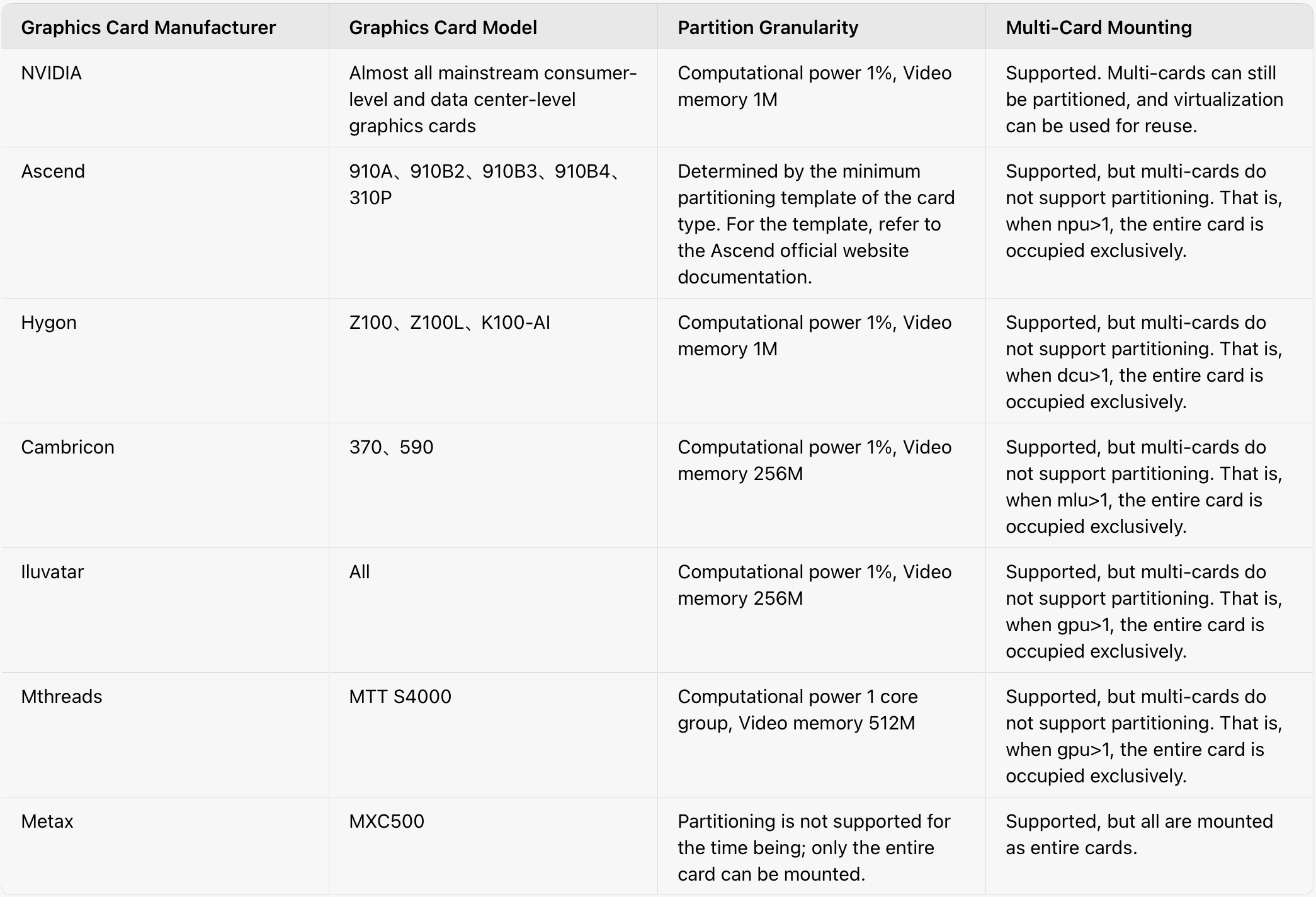
Q2: What is a vGPU? Why can’t I “multi-open” on one card even though I see 10 vGPUs?
In short:
- A vGPU is not a virtual graphics card; it is a virtual view of the physical card.
- Setting
deviceSplitCount: 10means one physical GPU can be seen & shared by at most 10 tasks, not that one task can request multiple vGPUs on the same card.
Detailed explanation:
- All vGPUs share the same underlying physical resources; they are logical views, not independent partitions.
- When you request
nvidia.com/gpu: 2, the scheduler interprets this as “give me two physical GPUs,” not two vGPUs on the same card. - The allocation model is designed for multi-task sharing of one card, not single-task replication of views.
- Inside the container, the GPU UUID matches the physical node, confirming that vGPUs are logical over-commitment views.
Bottom line: vGPU over-commitment boosts overall utilization by letting more tasks share one card, rather than increasing an individual task’s resources.
Q3: Which open-source schedulers can HAMi integrate with?
Currently supported:
- Volcano – Use the
volcano-vgpu-device-pluginmaintained by the HAMi project to enable GPU-aware batch scheduling.
Currently NOT supported:
- KubeVirt & Kata Containers – Both rely on virtualization (PCI passthrough or Virtio) for isolation. HAMi’s device plugin requires direct device mounting into containers, making architectural integration non-trivial. For performance and complexity reasons, we focus on bare-metal / container runtimes for now.
Q4: Does HAMi support multi-node, multi-GPU distributed training? Cross-node & cross-GPU?
Absolutely.
- Multi-node, multi-GPU: K8s schedules multiple Pods across nodes. Each Pod uses its local GPUs, while distributed frameworks (PyTorch, TensorFlow, Horovod, etc.) handle cross-node & cross-GPU coordination.
- Cross-node: Pods on different nodes communicate via high-performance networks (NCCL, RDMA) to exchange gradients and parameters.
- Cross-GPU: A single Pod can request multiple GPUs on the same node for intra-node parallelism.
Not supported:
- Single Pod spanning multiple nodes – K8s design forbids this; HAMi does not implement remote GPU invocation. Use the multi-Pod distributed pattern instead.
Q5: Can GPU resources be changed on the fly? Does HAMi support dynamic adjustment?
Not yet. True dynamic adjustment is unsupported.
Rationale:
- Container-level limitation: GPU resources are static at Pod creation.
- K8s design: Declarative, predictable resource management is a core principle.
- DRA misconception: DRA (Dynamic Resource Allocation) helps K8s understand complex device parameters—it does not enable live resource resizing.
Future outlook:
- If “runtime limits on compute & memory” become a strong demand, HAMi may explore program-level throttling.
- Native dynamic GPU resizing remains a long-term community goal.
Q6: Why are there so many device plugins? Some from vendors, some from HAMi?
Why some domestic vendors ship without a separate runtime:
- All-in-one approach: Cambricon, Hygon, Enflame, etc., embed device discovery & mounting inside their device plugin, eliminating the need for an extra runtime component.
- NVIDIA & Ascend prefer separation: Device plugin handles resource reporting; runtime (NVIDIA Container Runtime or Ascend Docker Runtime) handles environment setup, mount points, and advanced features—cleaner modularity.
Why HAMi sometimes re-implements device plugins:
- Official plugins lack metadata needed for advanced features (NUMA awareness, compute/memory caps, over-commit).
- Simpler scheduler integration: Custom plugins expose richer, purpose-built APIs.
Examples:
- Ascend: Each card type required its own plugin; HAMi abstracts card-type templates into one plugin.
- NVIDIA: Limited resource info; HAMi re-implements to expose compute, memory, and topology data.
Q7: vGPU split count not working? Compute/memory limits ignored? How to debug?
- Split count ignored – Check for conflicting NVIDIA official device plugin or incorrect
devicePlugin.deviceSplitCount. - Compute not limited – Add
GPU_CORE_UTILIZATION_POLICY=force; otherwise a single container on the card runs unrestricted. - Memory not limited – Privileged mode or
NVIDIA_VISIBLE_DEVICES=allinside the container overrides limits. - Recommendation: Audit plugin conflicts, verify environment variables.
⚠️ Compute-limit note: A 50 % limit means long-term average usage will be ~50 %; instantaneous spikes above that are possible.
Q8: Why does nvidia-smi inside a GPU Pod show no processes?
PID namespace isolation hides host PIDs. To see GPU processes, set hostPID=true (security trade-off—use with caution).
Q9: What’s on HAMi’s roadmap? Next-gen feature preview
HAMi is continuously evolving. Key directions:
Core technology
- Full DRA migration – Develop HAMi DRA driver; migrate GPU virtualization & scheduling logic to K8s-native DRA framework.
WebUI overhaul
- i18n & dark mode
- Better abstraction for Ascend and other accelerators, lowering onboarding cost.
- Richer metrics with iframe embedding support.
Feature extensions (subject to release planning):
- Granular scheduling knobs: node/ GPU compact vs. spread, node over-commit ratio, device-mode filters (hami-core, MIG, MPS).
- VM monitoring & governance – Track VMs as external nodes via special labels.
- Multi-cluster unified dashboard – Cross-cluster resource overview.
- YAML wizard – WebUI form to generate annotated K8s manifests in one click.
To learn more about the HAMi project, please visit our GitHub repository or join our Slack community.