【Run:ai KAI-Scheduler Deep Dive】Supplement: Demystifying How the Reservation Pod Discovers GPU Allocation Details
Yesterday, our article, [Nvidia's Open-Sourced KAI-Scheduler vs. HAMi: An Analysis of Technical Paths to GPU Sharing and a Look at Future Synergy](https://dynamia.ai/en/blog/KAI-Scheduler vs HAMi: Technical Paths to GPU Sharing and Synergy Outlook), took a deep dive into how KAI-Scheduler achieves fractional GPU sharing. We're very grateful for all the attention and lively discussion it generated! In particular, a reader pointed out a key technical detail that needed further clarification. Today, we're going to dedicate this post to analyzing that very issue.
Reader Feedback and Technical Clarification
A reader mentioned in the comments:
"The article missed a key technical point. The GPU card allocation is handled by the device plugin, so when the reservation pod is successfully scheduled, it doesn't yet know which card it has been assigned to, making it impossible to update the GpuSharingNodeInfo."
This question hits the nail on the head! However, first, we need to be more precise about who is responsible for GPU resource allocation:
In fact, after a scheduling decision is made, the allocation of GPU device resources involves the collaboration of three key components:
-
Device Discovery and Resource Reporting (NVIDIA Device Plugin): The NVIDIA Device Plugin is responsible for discovering available physical GPUs on a node and registering these devices with the kubelet (e.g., as
nvidia.com/gpu) via the Kubernetes Device Plugin API. It also continuously reports the health status of the devices and, when the kubelet requests a resource allocation, returns the necessary mount information and environment variables for the container to run. -
Resource Allocation Decision and Device Selection (kubelet): After a Pod is scheduled to a node, the kubelet is responsible for deciding which specific GPU device to use. Based on the list of devices and their health status reported by the Device Plugin, it selects the required number of GPUs from the unallocated devices and calls the Device Plugin's
Allocate()interface, passing in the IDs of the selected devices. This process happens before the Pod starts and is the decision point for the actual resource allocation. -
Device Mounting and Runtime Configuration (NVIDIA Container Runtime): When the container starts, the NVIDIA Container Runtime (as an extension of containerd or Docker), based on the environment variables (like
NVIDIA_VISIBLE_DEVICES) and mount information passed in by the kubelet, mounts the corresponding physical GPU device nodes and driver libraries into the container, ensuring that the application inside the container can access the GPU correctly.
This separation of responsibilities is also crucial to the core problem we are addressing in this article: After KAI-Scheduler creates a Reservation Pod, how does it know precisely which physical GPU device that Pod has been assigned?
Without this critical information, KAI-Scheduler cannot accurately update its internally maintained GpuSharingNodeInfo (the internal ledger we mentioned yesterday), and thus cannot track how much of which physical GPU's resources have been consumed.
So, how does KAI-Scheduler bridge this "last mile" information gap? In this supplementary article, we'll unveil the process.
Recap: The Reservation Pod Mechanism
KAI-Scheduler's core innovation is the introduction of the Reservation Pod mechanism to solve the problem that native Kubernetes does not support fractional GPU sharing:
- When a user Pod requests 0.5 of a GPU, KAI-Scheduler creates a Reservation Pod.
- This Pod requests a whole GPU resource from Kubernetes.
- Kubernetes allocates a complete physical GPU to this Pod.
- KAI-Scheduler internally manages this "reserved" GPU, allowing multiple user Pods to share the same physical GPU.
The Complete Pod Scheduling and GPU Allocation Flow
To understand the entire process more clearly, let's break down the complete flow from the time a user submits a Pod to when it ultimately obtains GPU resources:
1. User Pod Scheduling Decision
- Scheduling decision made by KAI-Scheduler:
- KAI-Scheduler receives the user Pod request.
- It uses its internal scheduling policies (including various plugins like
gpuspreadorgpupack) to evaluate which node is suitable for running the Pod. - It calculates which node the Pod should run on and which GPU (an existing or new GPU group) should be used.
- Node and GPU selection process:
// pkg/scheduler/gpu_sharing/gpuSharing.go
func AllocateFractionalGPUTaskToNode(
    ssn  *framework.Session,
    stmt *framework.Statement,
    pod  *pod_info.PodInfo,
    node *node_info.NodeInfo,
    isPipelineOnly bool,
) bool {
    // Get the list of suitable GPUs on this node
    fittingGPUs := ssn.FittingGPUs(node, pod)

    // Select the most suitable GPU based on the policy
    gpuForSharing := getNodePreferableGpuForSharing(fittingGPUs, node, pod, isPipelineOnly)
    if gpuForSharing == nil {
        return false
    }

    // Assign the selected GPU group to the Pod
    pod.GPUGroups = gpuForSharing.Groups

    // Subsequent allocation logic...
    return true
}
2. Reservation Pod Creation and Scheduling
Once KAI-Scheduler has determined the node and GPU selection, it enters the binding phase:
- Create Reservation Pod:
- If a new GPU needs to be used, KAI-Scheduler creates a Reservation Pod via the
ReserveGpuDevicefunction. - This Pod is configured with a
NodeName, explicitly specifying which node it should run on. - The Reservation Pod requests a full GPU resource.
- If a new GPU needs to be used, KAI-Scheduler creates a Reservation Pod via the
// pkg/binder/binding/resourcereservation/resource_reservation.go

// createGPUReservationPod creates a GPU resource reservation Pod on a specified node
func (rsc *service) createGPUReservationPod(ctx context.Context, nodeName, gpuGroup string) (*v1.Pod, error) {
    podName := fmt.Sprintf("%s-%s-%s",
        gpuReservationPodPrefix,
        nodeName,
        rand.String(reservationPodRandomCharacters),
    )

    resources := v1.ResourceRequirements{
        Limits: v1.ResourceList{
            constants.GpuResource: *resource.NewQuantity(numberOfGPUsToReserve, resource.DecimalSI),
        },
    }

    return rsc.createResourceReservationPod(nodeName, gpuGroup, podName, gpuReservationPodPrefix, resources)
}

// createResourceReservationPod creates a generic resource reservation Pod (pinned to a node, bypassing the scheduler)
func (rsc *service) createResourceReservationPod(
    nodeName, gpuGroup, podName, appName string,
    resources v1.ResourceRequirements,
) (*v1.Pod, error) {
    podSpec := &v1.Pod{
        ObjectMeta: metav1.ObjectMeta{
            Name:      podName,
            Namespace: namespace,
            Labels: map[string]string{
                constants.AppLabelName:               appLabelValue,
                constants.GPUGroup:                   gpuGroup,
                runaiResourceReservationAppLabelName: appName,
            },
        },
        Spec: v1.PodSpec{
            NodeName: nodeName, // Explicitly specifies the node, bypassing the scheduler
            Containers: []v1.Container{
                {
                    Name:      resourceReservation,
                    Image:     rsc.reservationPodImage, // Lightweight image
                    Resources: resources,
                },
            },
        },
    }
    return podSpec, rsc.kubeClient.Create(context.Background(), podSpec)
}
- Bypassing the Scheduler by Directly Specifying the Node:
- The Reservation Pod has the
NodeNamefield set at creation time. - This means the Pod does not go through any scheduler's scheduling process (including the default scheduler).
- It is directly assigned to the specified node, and the kubelet on that node is responsible for starting the Pod.
- The Reservation Pod has the
- Waiting for GPU Allocation:
- After creating the Reservation Pod, KAI-Scheduler blocks and waits for the Pod to obtain the actual GPU device UUID.
- During this waiting period, the Pod is assigned a physical GPU device by the NVIDIA Container Runtime.
The Information Acquisition Challenge
In the process described above, there is a key information gap: when the Reservation Pod is successfully scheduled, KAI-Scheduler does not immediately know which specific physical GPU device on the node it has been assigned to.
Without this information, KAI-Scheduler cannot accurately update its internal GpuSharingNodeInfo (which records the allocated resources for each physical GPU).
Here is the GpuSharingNodeInfo structure from KAI-Scheduler's internals, showing the information it needs to record:
// pkg/scheduler/api/node_info/gpu_sharing_node_info.go

// GpuSharingNodeInfo tracks the real-time status of GPU sharing usage on a node
type GpuSharingNodeInfo struct {
    // Shared GPUs that are being released (key = GPU ID)
    ReleasingSharedGPUs map[string]bool

    // Memory that has been actually used (in bytes)
    UsedSharedGPUsMemory map[string]int64

    // Memory that is in the process of being released (in bytes)
    ReleasingSharedGPUsMemory map[string]int64

    // Memory that has been allocated to Pods but may not have been actually occupied yet (in bytes)
    AllocatedSharedGPUsMemory map[string]int64
}
I. The Ingenious Solution: Self-Discovery Probe + Watch Mechanism
KAI-Scheduler cleverly solves this problem with the following design:
1. Device Information Reporting Container
The Reservation Pod container runs a small application (cmd/resourcereservation) that can read the GPU device information mounted for the Pod by the NVIDIA Container Runtime.
Here is the key code showing how this device information reporting container gets the GPU device UUID:
// pkg/resourcereservation/discovery/discovery.go
package discovery

import (
 "context"
 "fmt"
 "os"
 "path/filepath"
 "strings"
)

const gpusDir = "/proc/driver/nvidia/gpus/"

// GetGPUDevice returns the corresponding GPU UUID on the node where the specified Pod is located.
func GetGPUDevice(ctx context.Context, podName string, namespace string) (string, error) {
 // Read the GPU directory
 deviceSubDirs, err := os.ReadDir(gpusDir)
 if err != nil {
  return "", err
 }

 // Iterate through each GPU subdirectory
 for _, subDir := range deviceSubDirs {
  infoFilePath := filepath.Join(gpusDir, subDir.Name(), "information")
  data, err := os.ReadFile(infoFilePath)
  if err != nil {
   continue
  }

  content := string(data)
  lines := strings.Split(content, "\n")
  for _, line := range lines {
   if strings.Contains(line, "GPU UUID") {
    words := strings.Fields(line)
    return words[len(words)-1], nil // The last field is the GPU UUID
   }
  }
 }

 return "", fmt.Errorf("failed to find GPU UUID")
}
2. Information Feedback
The device information reporting container writes the obtained GPU device UUID into the Reservation Pod's Annotations.
// cmd/resourcereservation/app/app.go

func Run(ctx context.Context) error {
    // ... (omitting preceding logic)

    // Get the namespace and name of the current Pod
    namespace, name, err := poddetails.CurrentPodDetails()
    if err != nil {
        return err
    }

    // Initialize the Pod annotation patcher
    patch := patcher.NewPodPatcher(kubeClient, namespace, name)

    // If not yet patched
    if !patched {
        var gpuDevice string
        gpuDevice, err = discovery.GetGPUDevice(ctx, namespace, name)
        if err != nil {
            return err
        }

        logger.Info("Found GPU device", "deviceId", gpuDevice)

        // Write the discovered GPU UUID to the Pod's annotations
        err = patch.PatchDeviceInfo(ctx, gpuDevice)
        if err != nil {
            return err
        }

        logger.Info("Pod was updated with GPU device UUID")
    }

    // ... (omitting subsequent logic)
    return nil
}
It is worth noting that although the relevant variable names and annotation names contain the word "index," they actually store the full GPU UUID:
// pkg/resourcereservation/patcher/pod_patcher.go

const (
    reservedGpuIndexAnnotation = "run.ai/reserve_for_gpu_index"
)

// PatchDeviceInfo writes the discovered GPU UUID to the current Pod's annotations.
func (pp *PodPatcher) PatchDeviceInfo(ctx context.Context, uuid string) error {
    // Get the full information of the current Pod (error handling omitted)
    pod, err := pp.kubeClient.CoreV1().Pods(pp.namespace).Get(ctx, pp.podName, metav1.GetOptions{})
    if err != nil {
        return err
    }

    // Initialize the annotations map (if nil)
    if pod.Annotations == nil {
        pod.Annotations = make(map[string]string)
    }

    // Write the GPU device UUID
    pod.Annotations[reservedGpuIndexAnnotation] = uuid

    // Update the Pod
    _, err = pp.kubeClient.CoreV1().Pods(pp.namespace).Update(ctx, pod, metav1.UpdateOptions{})
    return err
}
3. Watch Mechanism
KAI-Scheduler monitors changes to the Reservation Pod via the Kubernetes Watch API. As soon as it detects the annotation with the GPU device UUID, it retrieves this information and updates its internal state.
// pkg/binder/binding/resourcereservation/resource_reservation.go

// waitForGPUReservationPodAllocation listens to the GPU reservation Pod until the GPU UUID is written to its annotations.
func (rsc *service) waitForGPUReservationPodAllocation(
    ctx context.Context,
    nodeName,
    gpuReservationPodName string,
) string {
    // Construct the List-Watch object
    watcher, err := rsc.kubeClient.Watch(
        ctx,
        &v1.PodList{},
        client.InNamespace(namespace),
        client.MatchingFields{"metadata.name": gpuReservationPodName},
    )
    if err != nil {
        // Error handling (omitted)
        return unknownGpuIndicator
    }
    defer watcher.Stop()

    timeout := time.After(rsc.allocationTimeout)

    for {
        select {
        case <-timeout:
            // Timeout handling: return the unknown GPU indicator
            return unknownGpuIndicator

        case event := <-watcher.ResultChan():
            pod := event.Object.(*v1.Pod)
            if pod.Annotations[gpuIndexAnnotationName] != "" {
                // Successfully retrieved the GPU UUID
                return pod.Annotations[gpuIndexAnnotationName]
            }
        }
    }
}
4. User Pod Binding
After obtaining the GPU UUID, KAI-Scheduler will:
- Update internal state: Record the GPU's usage.
- Bind the user Pod: Associate the user Pod with the Reservation Pod so they share the same GPU.
- Set environment variables: Ensure the user Pod can access the correct GPU device.
// pkg/binder/binding/binder.go

func (b *Binder) Bind(
    ctx context.Context,
    pod *v1.Pod,
    node *v1.Node,
    bindRequest *v1alpha2.BindRequest,
) error {
    // 1. Differentiate whether it is a GPU sharing scenario
    var reservedGPUIds []string
    var err error
    if common.IsSharedGPUAllocation(bindRequest) {
        // 1.1 Lock the GPU in advance through the ResourceReservation mechanism
        reservedGPUIds, err = b.reserveGPUs(ctx, pod, bindRequest)
        if err != nil {
            return fmt.Errorf("failed to reserve GPUs: %w", err)
        }
    }

    // 2. Construct a standard Kubernetes Binding object
    binding := &v1.Binding{
        ObjectMeta: metav1.ObjectMeta{
            Namespace: pod.Namespace,
            Name:      pod.Name,
            UID:       pod.UID,
        },
        Target: v1.ObjectReference{
            Kind: "Node",
            Name: node.Name,
        },
    }

    // 3. Call the API Server to complete the binding
    if err := b.kubeClient.CoreV1().Pods(pod.Namespace).Bind(ctx, binding, metav1.CreateOptions{}); err != nil {
        return fmt.Errorf("failed to bind pod %s/%s to node %s: %w", pod.Namespace, pod.Name, node.Name, err)
    }

    // 4. Optionally, write the reserved GPU UUID back to the Pod's annotations or perform other post-processing
    if len(reservedGPUIds) > 0 {
        // ... (omitted)
    }

    return nil
}
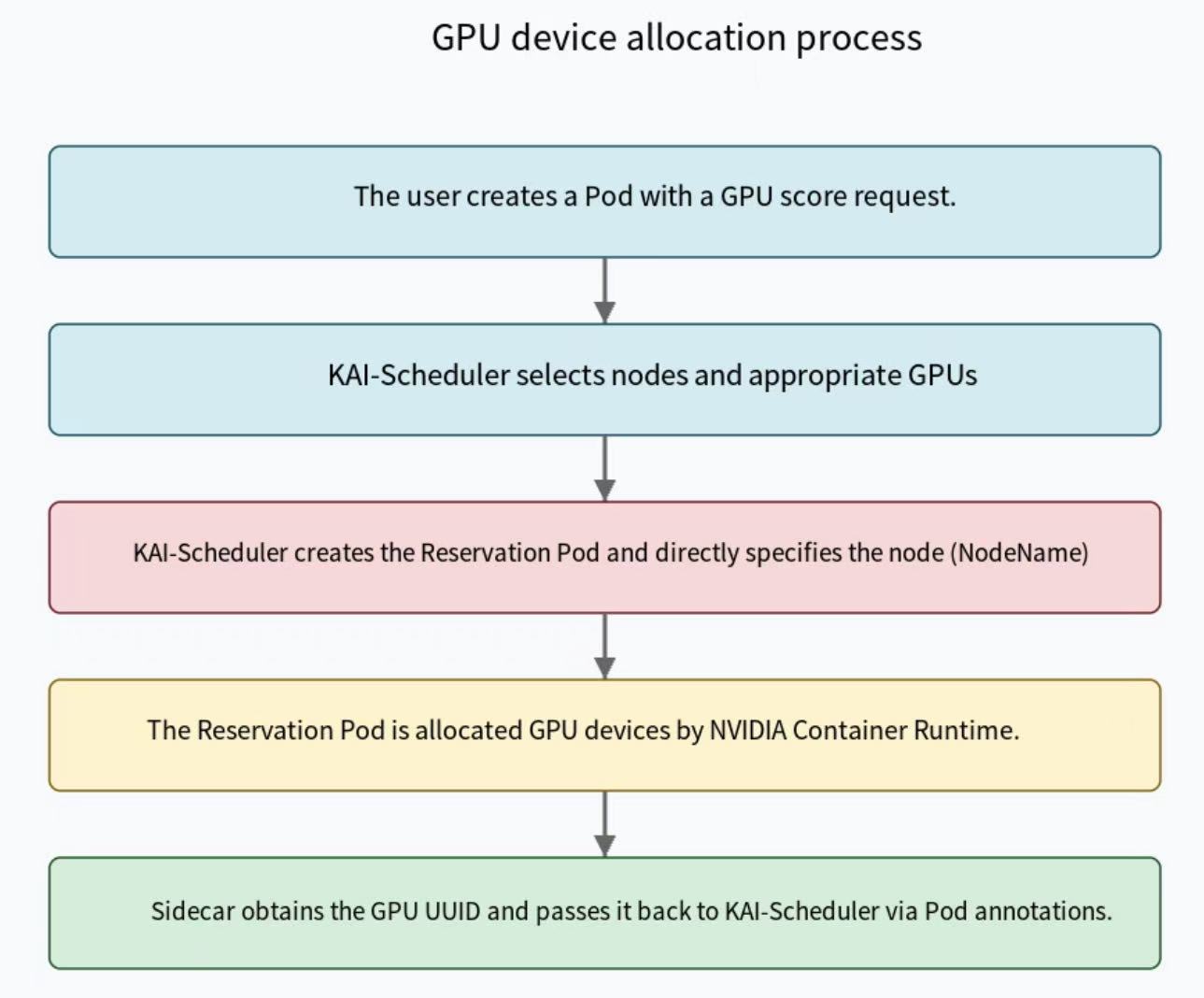
II. The Complete Information Flow: From Scheduling to Device Identification
-
KAI-Scheduler selects a suitable node and GPU for the user Pod.
When a user requests a fractional GPU, KAI-Scheduler makes a scheduling decision and selects a suitable node to run the Pod. -
KAI-Scheduler creates a Reservation Pod and specifies the node.
KAI-Scheduler creates a Reservation Pod that requests an entire GPU resource and directly specifies the node (by settingNodeName):
apiVersion: v1
kind: Pod
metadata:
  name: runai-reservation-gpu-node-1-abc45
  namespace: runai-reservation
  labels:
    app: runai-reservation
    runai-gpu-group: gpu-group-xyz        # GPU group identifier
    app.runai.resource.reservation: runai-reservation-gpu
  annotations:
    karpenter.sh/do-not-disrupt: "true"
spec:
  nodeName: node-1                      # Directly bound to the specified node
  serviceAccountName: runai-reservation
  containers:
  - name: runai-reservation
    image: <resource-reservation-pod-image>  # Actual image determined by configuration
    imagePullPolicy: IfNotPresent
    resources:
      limits:
        nvidia.com/gpu: 1
    env:
    - name: POD_NAME
      valueFrom:
        fieldRef:
          fieldPath: metadata.name
    - name: POD_NAMESPACE
      valueFrom:
        fieldRef:
          fieldPath: metadata.namespace
-
The Device Plugin informs the kubelet that there are available GPU resources on the node and participates in the resource allocation decision.
The NVIDIA Device Plugin identifies the GPU devices on the node and reports them to Kubernetes. -
The Pod is directly scheduled to a specific node, and the NVIDIA Container Runtime, based on the Device Plugin's allocation result, mounts the specific physical GPU device into the container.
The device mount is reflected in environment variables and device files:Environment Variable:
NVIDIA_VISIBLE_DEVICES=GPU-UUIDor device index
Device File:/dev/nvidia0 -
The device information reporting container in the Reservation Pod starts, reads the device information provided by the NVIDIA driver, and identifies which GPU device's UUID it has been assigned.
As shown in the code example earlier, the device information reporting container gets the GPU UUID by reading the information files in the/proc/driver/nvidia/gpus/directory. -
The device information reporting container writes this UUID to the Pod's annotations.
Updates the Pod's annotations:
metadata:
  annotations:
    # Stores the full GPU UUID for resource reservation
    run.ai/reserve_for_gpu_index: "GPU-UUID"
-
KAI-Scheduler's Watch mechanism detects the annotation update and retrieves the GPU device UUID.
The Watch mechanism captures the Pod update event and extracts the GPU UUID information. -
KAI-Scheduler updates its internal GpuSharingNodeInfo, recording the usage of this physical GPU.
// Example of updating internal state
requestedMemory := nodeInfo.GetResourceGpuMemory(task.ResReq)

// Accumulate the used memory
nodeInfo.UsedSharedGPUsMemory[gpuGroup] += requestedMemory

// Accumulate the allocated memory (which may not have been actually used yet)
nodeInfo.AllocatedSharedGPUsMemory[gpuGroup] += requestedMemory
- KAI-Scheduler binds the user Pod to the same node and configures GPU access.
Ensures the user Pod uses the correct GPU device, establishing the association through environment variables and labels.
III. Conclusion: Elegant Asynchronous Information Synchronization
Through this design, KAI-Scheduler cleverly solves the asynchronicity problem between scheduling decisions and device allocation in the Kubernetes architecture:
- Respects Separation of Responsibilities: Maintains compatibility with the responsibility boundaries of various Kubernetes components.
- Bridges the Information Gap: Passes key device information through a dedicated device information reporting program.
- Asynchronous Information Synchronization: Elegantly handles the asynchronous event stream with a Watch mechanism.
This mechanism ensures that even though GPU resource allocation is jointly completed by the three major components mentioned at the beginning, KAI-Scheduler can still accurately track the usage of each physical GPU, providing an efficient fractional GPU sharing capability for AI workloads.
Thanks again to the reader who raised the question. It is this kind of in-depth discussion that pushes our understanding of the technical details forward! I hope this supplement has clearly answered your question.
Thanks for reading! If you found this article helpful, please like, recommend, and share it with more friends!
HAMi, which stands for Heterogeneous AI Computing Virtualization Middleware, is a "one-stop" architecture designed to manage heterogeneous AI computing devices in a k8s cluster. It provides the ability to share heterogeneous AI devices and offers resource isolation between tasks. HAMi is dedicated to improving the utilization of heterogeneous computing devices in k8s clusters and providing a unified reuse interface for different types of heterogeneous devices. HAMi is currently a CNCF Sandbox project and has been included in the CNCF's CNAI technology landscape.
Community Website: https://project-hami.io
GitHub: https://github.com/Project-HAMi