HAMi 2.10 Deep Dive (Part 2): One Ascend Card, Two Pods — Testing Volcano + HAMi-core vNPU Soft Slicing
GPUs have HAMi for hard memory isolation — but what about Ascend NPUs? In the second article of our HAMi 2.10 deep-dive series, we validate Volcano scheduling + HAMi-core soft slicing on a real Ascend 310P3: the container sees only its 8192 MiB slice, two Pods binpack onto the same physical card, and monitoring metrics report faithfully.
In Part 1 we tested KAI Scheduler + HAMi-core hard memory isolation on NVIDIA GPUs: two Pods sharing one T4, and neither could grab a single extra MiB. Readers immediately asked: what about Ascend NPUs?
Ascend is the workhorse of domestic AI inference in China. A 310P3 carries 21.5 GiB of memory; wasting an entire card per inference service is just as painful there. But sharing an NPU is even easier to get wrong than sharing a GPU — vNPU, hard slicing, soft slicing, Volcano modes: a pile of concepts tangled together, and just sorting out "who is slicing the card and what comes out" can cost you half a day.
This is the second article in our HAMi 2.10 deep-dive series, focused on a major Ascend management upgrade in HAMi v2.10: running hami-vnpu-core soft-sliced vNPUs with the Volcano scheduler, so that batch scheduling semantics (queues, gangs, binpack) work together with container-level isolation (memory and compute caps enforced at the Ascend API layer).
The short answer: on a single-node Kubernetes cluster on an Ascend 310P3 aarch64 server, we ran the full chain end to end — a container requesting an 8192 MiB slice sees exactly 8192 MiB inside npu-smi; a second Pod lands binpacked on the same physical card with an independent slice; and the plugin's Prometheus endpoint faithfully reports both containers' quotas.
Background: the Volcano–Ascend–HAMi Triangle
Three roles, each in place:
Volcano is the Kubernetes-native batch and AI workload scheduler, a CNCF incubating project providing queues, gang scheduling, binpack/spread, and friends — the scheduler of choice for many AI clusters.
Ascend NPUs are Huawei's AI accelerators. A logical device carved out of a physical NPU and handed to a container is called a vNPU — a 21.5 GiB card can be split into an 8 GiB plus an 8 GiB slice, leaving about 5.5 GiB spare.
HAMi plays the enforcer: its Ascend runtime isolation component is hami-vnpu-core (injecting libvnpu.so), which enforces memory and compute quotas at the Ascend API layer.
HAMi v2.10 gave Ascend management an overall upgrade: the new Volcano integration, heterogeneous management that lets template-based vNPUs and HAMi-core nodes coexist in one cluster, and vNPU HAMi-core monitoring. This article covers the "Volcano + soft slicing" path.
First, Untangle: NPU, vNPU, Hard Slicing, Soft Slicing
This is where most confusion lives, so let's separate the layers:
| Layer | Question it answers |
|---|---|
| NPU / vNPU | What device you get: a vNPU is a logical device carved from a physical NPU for a container |
| Hard / soft slicing | How that virtual device is isolated |
| HAMi-core | Who enforces the soft-slicing quota inside the container |
| HAMi / Volcano | Who decides which card and how much a Pod gets |
Hard slicing is done by the Ascend driver/firmware virtualization capabilities; users can only pick from predefined templates: vir05_1c_16g means a fixed number of AI Cores, AI CPUs, and 16 GiB of memory. After creation, a real vNPU instance appears at the device layer (query supported templates with npu-smi info -t template-info).
Soft slicing does not create a real vNPU in hardware. Instead, multiple containers share the same physical NPU; libvnpu.so is injected into the container to intercept the application's Ascend runtime API calls and account for them:
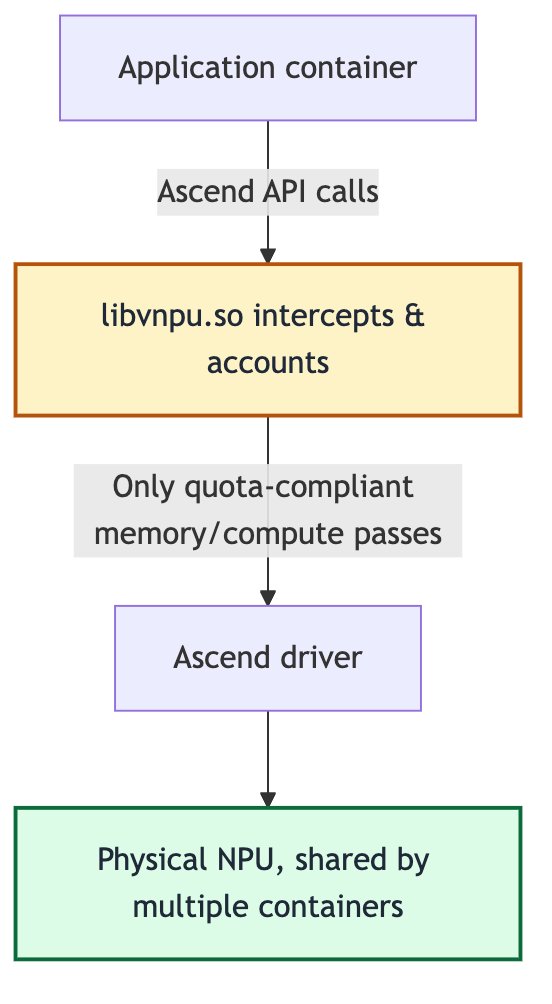
Take an 8192 MiB quota: the application sees exactly 8192 MiB when querying the device, memory allocations are accounted by libvnpu.so, and requests beyond the quota are blocked by the runtime interception layer. Comparing the two:
| Hard slicing | Soft slicing | |
|---|---|---|
| Isolation boundary | Enforced at device virtualization layer, stronger | Software runtime interception, not an SR-IOV-class hardware boundary |
| Sizes | Vendor templates only, e.g. 8 GiB / 16 GiB tiers | Any MiB, any compute ratio |
| Slicing units | AI Core, AI CPU, memory, DVPP | Memory and compute quotas |
| Prerequisites | Chip/driver must support the template | Requires libvnpu.so injection and driver compatibility; ARM only for now |
A useful mental model: hard slicing builds real walls inside the house; soft slicing means everyone shares the house, but there's a strict accounting and rate-limiting steward at every door.
Note that the "soft-sliced vNPU" in this article is a logical slice from the Kubernetes/HAMi perspective — not an Ascend hardware vNPU created via npu-smi ... create-vnpu.
Two Ways Volcano Schedules Ascend vNPUs
Volcano can schedule Ascend virtual NPUs in two different ways, which are easy to confuse. Getting this straight up front will save you hours of debugging:
| MindCluster mode | HAMi mode | |
|---|---|---|
| Volcano flag | deviceshare.AscendMindClusterVNPUEnable | deviceshare.AscendHAMiVNPUEnable |
| Provider | Volcano's native Ascend plugin | Project-HAMi/ascend-device-plugin |
| Templates | vir04_3c_ndvpp (with a dvpp dimension) | vir05_1c_16g (only memory/aiCore/aiCPU fields) |
| Slicing | Driver templates (hard slicing) | Driver templates by default; soft slicing when the Pod sets huawei.com/vnpu-mode: hami-core |
| Resource names | huawei.com/npu-core | huawei.com/Ascend310P, -memory |
This article is about soft slicing via hami-vnpu-core in HAMi mode. One important caveat: HAMi mode does not equal soft-slicing mode — the same ascend-device-plugin supports both template hard slicing and hami-vnpu-core soft slicing, selected by the Pod's annotation. It is also the only one of the two Volcano modes that does runtime interception: instead of pre-slicing cards into fixed virtualization templates, it intercepts Ascend calls in user space and enforces per-container memory and compute ceilings at runtime. Volcano decides which Pod gets which slice; HAMi-core makes that decision actually stick.
What This Integration Actually Adds
First, a naming correction: HAMi-core is the umbrella term for this class of in-container runtime isolation technologies, originally referring mostly to NVIDIA's libvgpu.so; hami-vnpu-core is the Ascend NPU implementation, injecting libvnpu.so.
Ascend soft slicing itself isn't new: support landed in the code in April 2026 and the chain was already usable in HAMi 2.9. HAMi 2.10's Volcano integration didn't reinvent soft slicing — it swapped the "allocator" from HAMi Scheduler to Volcano, reusing the two lower layers as-is:
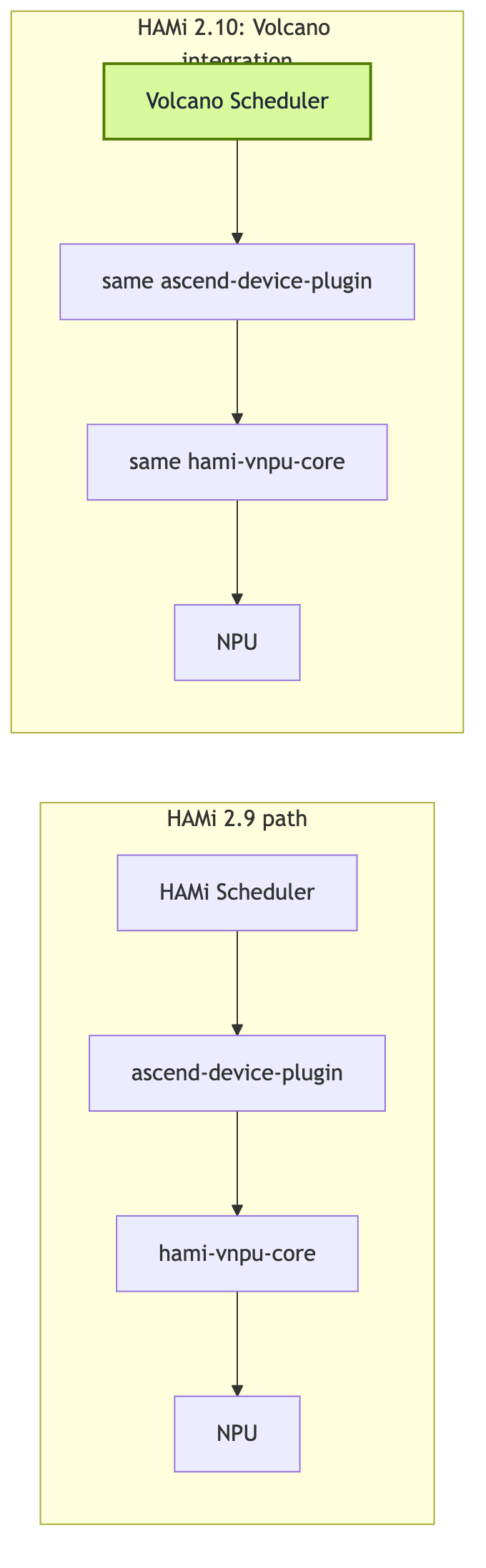
| Layer | HAMi 2.9 path | Volcano integration path |
|---|---|---|
| Scheduler | HAMi Scheduler | Volcano Scheduler |
| Device discovery/mounting | ascend-device-plugin | Same ascend-device-plugin |
| Soft slicing enforcement | hami-vnpu-core (libvnpu.so) | Same hami-vnpu-core |
| Memory/compute isolation | Supported | Reused as-is |
| Queues, gang scheduling | Not the focus | Provided by Volcano |
| binpack / spread | HAMi policies | Volcano deviceshare policies |
| Monitoring & mixed management | Early | Further completed in 2.10 |
Volcano can now understand these HAMi Ascend resources and decide: which physical NPU serves which Pod, whether multiple Pods binpack onto one card, whether a training group satisfies gang conditions, which queue, priority, and preemption policy apply. The accurate statement is: this integration delivers "Volcano scheduling of Ascend HAMi-core soft-sliced resources," plus monitoring and mixed hard/soft management; the Ascend soft-slicing capability itself long predates it.
How the Integration Chain Works
Three players divide the work:
- Volcano's
deviceshareplugin reads vNPU geometries from thehami-scheduler-deviceConfigMap (withAscendHAMiVNPUEnable: "true") and, per binpack or spread policy, decides which node and which card serves each Pod; - The
ascend-device-pluginDaemonSet registershuawei.com/Ascend310P(cards) andhuawei.com/Ascend310P-memory(MiB) extended resources on the node, and copies HAMi-core assets (libvnpu.soandld.so.preload) to/usr/local/hami-vnpu-core/on the host; - HAMi-core (
libvnpu.so) is injected into workload containers via the Ascend Docker Runtime's preload mechanism, enforcing the slice chosen by the scheduler.
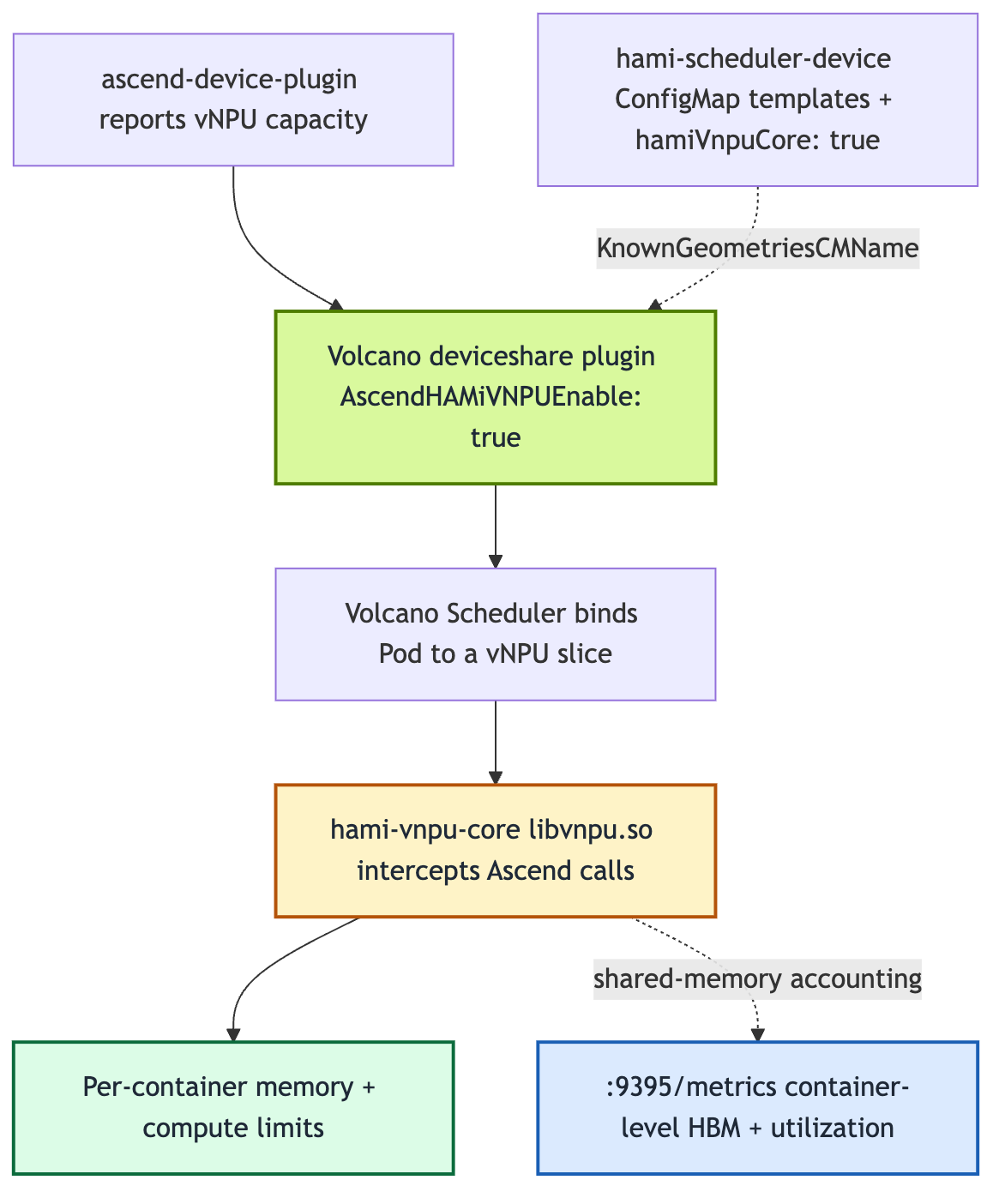
The Pod-side contract is compact — four things, none optional:
spec:
  schedulerName: volcano        # hand scheduling to Volcano
  runtimeClassName: ascend      # Ascend Docker Runtime
  containers:
    - name: npu
      resources:
        limits:
          huawei.com/Ascend310P: "1"          # 1 vNPU
          huawei.com/Ascend310P-memory: "8192" # 8192 MiB memory slice
Plus the annotation huawei.com/vnpu-mode: hami-core. Without this annotation the Pod falls back to the template path and may stay Pending forever on a pure soft-slicing node — the most common way to trip over this.
Real-Machine Validation: Container Sees Only Its Slice, Two Pods Share a Card
Test environment: Kylin V10 aarch64 single-node Kubernetes 1.28 cluster, 2× Ascend 310P3 (driver/npu-smi 25.5.1), containerd 1.7.1. Volcano was built from source per Lab 13 (at the time of writing, soft slicing requires 1.16 while the stable release was still v1.15.1); the plugin is the official ascend-device-plugin v1.4.0.
After registration, the node reported 14 vNPUs (2 cards × 7, matching vDeviceCount: 7) and 43054 MiB of allocatable memory.
Check 1: the container sees only its slice. npu-smi info inside the first Pod shows a 0 / 8192 MB device, while the host sees 1848 / 21525 MB on the same card:
$ kubectl exec ascend-vnpu-check -- npu-smi info
[INFO limiter::manager] [Manager] Registered as Global Manager #0 (PID: 10).
  Compute limit: 1, Memory limit: 8192, FixedShare: false
| 0  0 | 0000:81:00.0 | 0  0 / 8192 |
The injected environment variables confirm the wiring: NPU_MEM_QUOTA=8192, ASCEND_VISIBLE_DEVICES=0. libvnpu.so has rewritten the device query to the container's quota.
Check 2: binpack puts two Pods on one physical card. A second identically-sized Pod landed on the same Bus-Id 0000:81:00.0, each with an independent 8192 MiB window, registered as Global Manager #1 into the same shared registry as Pod 1's #0. The node's allocated resources tell the same story: huawei.com/Ascend310P 2 (of 14), Ascend310P-memory 16384 (of 43054) — two 8192 MiB slices packed into one 21.5 GiB card rather than spread across two.
Check 3: container-level metrics export works. The plugin (not the workload Pod) serves Prometheus metrics on :9395:
hami_vgpu_memory_limit_bytes{...,pod="ascend-vnpu-check",vdevice_index="0"} 8.589934592e+09
hami_vgpu_memory_limit_bytes{...,pod="ascend-vnpu-check-2",vdevice_index="0"} 8.589934592e+09
8.589934592e+09 bytes is exactly 8192 MiB, matching both Pods' requests. The endpoint also exports live usage and utilization metrics across host/container/vdevice layers.
| Check | Result | Evidence |
|---|---|---|
| Memory slice isolation | Pass | Container 0 / 8192, host 1848 / 21525 |
| binpack onto one card | Pass | Both Pods on Bus-Id 0000:81:00.0, Global Manager #0/#1 |
| Resource accounting | Pass | Node allocated 2 vNPUs, 16384 MiB |
| Monitoring | Pass | :9395 exports host/container/vdevice metrics |
Pitfalls Worth Knowing Before You Try
Nothing teaches like running it on real hardware:
libvnpu.somust match the NPU driver. A mismatch doesn't error out;npu-smiinside the container just hangs forever atInitialize SchedulerClient.... Copy assets from the official image version matching your driver and verify md5.- Docker and containerd image stores are isolated. Import with
ctr -n k8s.io images import, or get ready forErrImageNeverPull. - The Helm key for image pull policy is
basic.image_pull_policy(underscore), notscheduler.imagePullPolicy. - v1.4.0 does not register
-coreresources. The Pod spec needs onlyhuawei.com/Ascend310P(cards) andhuawei.com/Ascend310P-memory(MiB). - Metrics live on the plugin Pod. Curling
:9395in a workload Pod gets nothing; select the DaemonSet Pod by label. - After uninstalling Volcano,
volcano-systemmay stick in Terminating (after the webhooks are gone); clearing the namespace's finalizers resolves it.
One last restatement of the boundary: soft slicing here is runtime API-layer enforcement (libvnpu.so software interception), not an SR-IOV-style hardware security boundary — same characterization as HAMi-core on GPUs. It's plenty for trusted intra-team sharing and inference co-location; for untrusted multi-tenancy, evaluate hard slicing instead.
Summary
- Ascend vNPUs come in two flavors: driver-template hard slicing (building walls) and hami-vnpu-core soft slicing (shared house plus an accounting steward at each door); the latter supports arbitrary MiB and compute ratios;
- HAMi 2.10's Volcano integration swaps the "allocator" (Volcano Scheduler takes over queues, gangs, binpack) while reusing the device-mounting and runtime-isolation layers, and completes monitoring and mixed hard/soft management;
- Validated on real hardware: the container sees only its 8192 MiB slice, two Pods binpack onto one physical card, container-level monitoring reports faithfully — on Ascend, too, "we agreed to split it, and nobody grabs more" holds.
With this, the HAMi 2.10 deep-dive series has covered both scheduler-integration paths: NVIDIA GPUs (KAI Scheduler) and Ascend NPUs (Volcano). The shared pattern: the scheduler allocates, HAMi-core makes the allocation stick.
Author: Jimmy Song (宋净超), Dynamia AI.
Series Reading
- Previous: HAMi 2.10 Deep Dive (Part 1): Tested — KAI Scheduler + HAMi GPU Memory Hard Isolation
- Next: HAMi 2.10 Deep Dive (Part 3): Exclusive, Binpacked, and NUMA-Aligned — Scheduling Policies Are Now Composable
- HAMi v2.10.0 Release: Flexible MIG, Composable Scheduling Policies, and a Broader Accelerator Ecosystem
- Reproduce the test: Lab 13: Soft-Slicing Ascend 310P3 vNPUs with Volcano + HAMi-core
References
- Original post on the HAMi website (full commands and real output): https://project-hami.io/blog/volcano-ascend-vnpu-soft-slicing
- HAMi v2.10.0 release announcement: https://project-hami.io/blog/hami-v2-10-0-release
- Lab 13 tutorial (full reproduction steps on real hardware): https://project-hami.io/tutorials/labs/volcano-ascend-vnpu
- User guide "Huawei Ascend Devices in Volcano": https://project-hami.io/docs/installation/how-to-use-volcano-ascend
- User guide "Enable Ascend Sharing": https://project-hami.io/docs/userguide/ascend-device/enable-ascend-sharing
- Ascend hard-slicing reference practice (Ascend community): https://www.hiascend.com/developer/techArticles/20251212-1
- Related repositories:
- ascend-device-plugin: https://github.com/Project-HAMi/ascend-device-plugin
- hami-vnpu-core: https://github.com/Project-HAMi/hami-vnpu-core
- Volcano: https://github.com/volcano-sh/volcano