HAMI vGPU Principle Analysis Part 3: hami-scheduler Workflow Analysis
In the last article, we analyzed the hami-webhook, which modifies the scheduler of Pods requesting vGPU resources to hami-scheduler, ensuring they are scheduled by it.
This is the third article in the HAMI principle analysis series, analyzing the hami-scheduler workflow.
The previous part mainly analyzed the hami-webhook, answering the question: How do Pods get to use the hami-scheduler, given that creating a Pod without specifying a SchedulerName should default to the default-scheduler?
This article begins the analysis of hami-scheduler, addressing another question: What is the logic of hami-scheduler, and how are advanced scheduling strategies like spread & binpack implemented?
After writing, I realized there's still a lot of content. The analysis of the spread & binpack scheduling strategies will be in the next article. This one will focus on the scheduling workflow.
The following analysis is based on HAMI v2.4.0.
TL;DR:
The HAMI Webhook and Scheduler workflow is as follows:
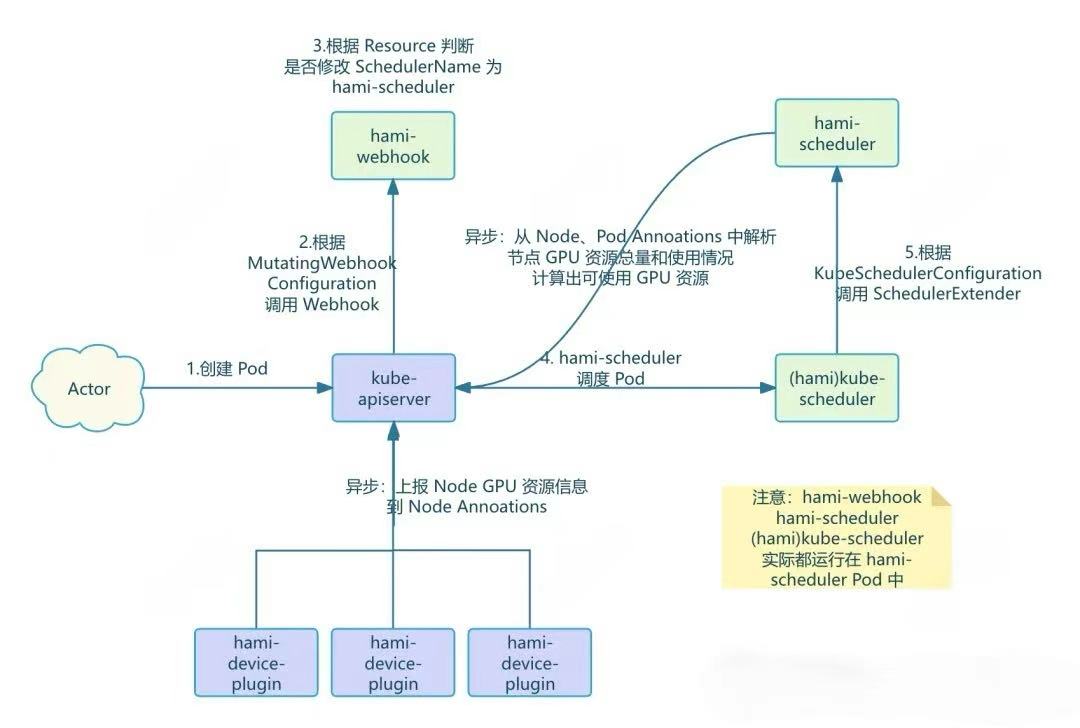
- A user creates a Pod and requests vGPU resources in it.
- The kube-apiserver, based on the
MutatingWebhookConfiguration, sends a request to the HAMI-Webhook. - The HAMI-Webhook inspects the Pod's
Resourcefield. If it requests a vGPU resource managed by HAMI, it changes the Pod'sSchedulerNametohami-scheduler, directing the Pod to be scheduled byhami-scheduler.- For privileged Pods, the Webhook skips processing.
- For Pods using vGPU resources but with a specified
nodeName, the Webhook rejects them.
- The
hami-schedulerthen schedules the Pod. However, it uses the defaultkube-schedulerimage from Kubernetes, so its basic scheduling logic is the same as thedefault-scheduler. But, thiskube-scheduleris configured viaKubeSchedulerConfigurationto call an Extender Scheduler plugin.- This Extender Scheduler is another container within the
hami-schedulerPod, which provides both the Webhook and Scheduler APIs. - When a Pod requests vGPU resources, the
kube-schedulercalls the Extender Scheduler plugin via HTTP as configured, thus implementing custom scheduling logic.
- This Extender Scheduler is another container within the
- The Extender Scheduler plugin contains the actual HAMI scheduling logic. It scores nodes based on their remaining resources to select a node.
- This is where advanced scheduling strategies like
spread&binpackare implemented.
- This is where advanced scheduling strategies like
- Asynchronous tasks, including GPU perception logic:
- A background Goroutine in the devicePlugin periodically reports GPU resources on the Node and writes them to the Node's Annotations.
- In addition to the DevicePlugin, asynchronous tasks also submit more information by patching annotations.
- The Extender Scheduler plugin parses the total GPU resources from Node annotations and the used GPU resources from the annotations of running Pods on the Node. It then calculates the remaining available resources for each Node and stores them in memory for scheduling.
1. Overview
Hami-scheduler is primarily responsible for the Pod scheduling logic, selecting the most suitable node from the cluster for the current Pod.
Hami-scheduler is also implemented using the Scheduler Extender mechanism.
However, HAMI does not directly extend the default-scheduler. Instead, it starts an additional scheduler using the default kube-scheduler image but renames it to hami-scheduler through configuration.
This hami-scheduler is then configured with an Extender, and the Extender service is an HTTP service started by another container in the same Pod.
PS: When we refer to
hami-schedulerlater, we generally mean the scheduling plugin implemented by this Extender.
2. Specific Deployment
Deployment
Hami-scheduler is deployed using a Deployment that contains two containers. One is the native kube-scheduler, and the other is HAMI's Scheduler service.
The complete YAML is as follows:
apiVersion: apps/v1
kind: Deployment
metadata:
  name: vgpu-hami-scheduler
  namespace: kube-system
spec:
  template:
    spec:
      containers:
      # vanilla kube-scheduler (patched to load our config)
      - command:
        - kube-scheduler
        - --config=/config/config.yaml
        - -v=4
        - --leader-elect=true
        - --leader-elect-resource-name=hami-scheduler
        - --leader-elect-resource-namespace=kube-system
        image: 192.168.116.54:5000/kube-scheduler:v1.23.17
        imagePullPolicy: IfNotPresent
        name: kube-scheduler
        resources: {}
        terminationMessagePath: /dev/termination-log
        terminationMessagePolicy: File
        volumeMounts:
        - mountPath: /config
          name: scheduler-config

      # HAMI scheduler-extender (implements filter & bind)
      - command:
        - scheduler
        - --resource-name=nvidia.com/vgpu
        - --resource-mem=nvidia.com/gpumem
        - --resource-cores=nvidia.com/gpucores
        - --resource-mem-percentage=nvidia.com/gpumem-percentage
        - --resource-priority=nvidia.com/priority
        - --http_bind=0.0.0.0:443
        - --cert_file=/tls/tls.crt
        - --key_file=/tls/tls.key
        - --scheduler-name=hami-scheduler
        - --metrics-bind-address=:9395
        - --default-mem=0
        - --default-gpu=1
        - --default-cores=0
        - --iluvatar-memory=iluvatar.ai/vcuda-memory
        - --iluvatar-cores=iluvatar.ai/vcuda-core
        - --cambricon-mlu-name=cambricon.com/vmlu
        - --cambricon-mlu-memory=cambricon.com/mlu.smlu.vmemory
        - --cambricon-mlu-cores=cambricon.com/mlu.smlu.vcore
        - --ascend-name=huawei.com/Ascend910
        - --ascend-memory=huawei.com/Ascend910-memory
        - --ascend310p-name=huawei.com/Ascend310P
        - --ascend310p-memory=huawei.com/Ascend310P-memory
        - --overwrite-env=false
        - --node-scheduler-policy=binpack
        - --gpu-scheduler-policy=spread
        - --debug
        - -v=4
        image: projecthami/hami:v2.3.13
        imagePullPolicy: IfNotPresent
        name: vgpu-scheduler-extender
        ports:
        - containerPort: 443
          name: http
          protocol: TCP
        volumeMounts:
        - mountPath: /tls
          name: tls-config
      # ... other spec fields
KubeSchedulerConfiguration
The corresponding scheduler's configuration is stored in a ConfigMap, with the following content:
apiVersion: v1
data:
  config.yaml: |
    apiVersion: kubescheduler.config.k8s.io/v1beta2
    kind: KubeSchedulerConfiguration
    leaderElection:
      leaderElect: false
    profiles:
    - schedulerName: hami-scheduler
    extenders:
    - urlPrefix: "https://127.0.0.1:443"
      filterVerb: filter
      bindVerb: bind
      nodeCacheCapable: true
      weight: 1
      httpTimeout: 30s
      enableHTTPS: true
      tlsConfig:
        insecure: true
      managedResources:
      - name: nvidia.com/vgpu
        ignoredByScheduler: true
      - name: nvidia.com/gpumem
        ignoredByScheduler: true
      - name: nvidia.com/gpucores
        ignoredByScheduler: true
      # ... other managed resources
kind: ConfigMap
metadata:
  name: vgpu-hami-scheduler-newversion
  namespace: kube-system
SchedulerName
First, it specifies that the scheduler's name is hami-scheduler. The default Kubernetes scheduler is named default-scheduler.
profiles:
- schedulerName: hami-scheduler
When we create a Pod, we don't specify a schedulerName, so it defaults to using the default-scheduler.
The
SchedulerNamemodified by thehami-webhookneeds to correspond to the name configured here.
Extenders
The core configuration for the scheduler is as follows:
extenders:
- urlPrefix: "https://127.0.0.1:443"
  filterVerb: filter
  bindVerb: bind```
Parameter explanation:
- `urlPrefix: "https://127.0.0.1:443"`: This is the service address of a scheduler extender. The Kubernetes scheduler will call this address to request external scheduling logic. It can be accessed via HTTPS. (Since the External Scheduler is deployed in the same Pod as `kube-scheduler`, it can be accessed using `127.0.0.1`).
- `filterVerb: filter`: This verb indicates that the scheduler will call this extender service to filter nodes, i.e., decide which nodes are suitable for scheduling the Pod. (The Filter interface corresponds to the `/filter` URL of this HTTP service).
- `bindVerb: bind`: The scheduler extender can perform binding operations, i.e., bind a Pod to a specific node. (Similarly, `bind` corresponds to the `/bind` interface).

### managedResources

The `managedResources` section specifies the resources managed by this extender scheduler, `hami-scheduler`. The Scheduler will only request our configured Extender (`hami-scheduler`) if the Pod's `Resource` field requests one of the resources specified in `managedResources`.

> In other words, if a Pod doesn't request vGPU resources, even if it's designated to use the `hami-scheduler`, it will be scheduled by the `kube-scheduler` named `hami-scheduler` without calling the Extender. The true HAMI scheduling plugin will not be activated.

```yaml
managedResources:
- name: nvidia.com/vgpu
  ignoredByScheduler: true
- name: nvidia.com/gpumem
  ignoredByScheduler: true
- name: nvidia.com/gpucores
  ignoredByScheduler: true
- name: nvidia.com/gpumem-percentage
  ignoredByScheduler: true
# ... other managed resources
name: nvidia.com/vgpu: The resource name.
ignoredByScheduler: true: When set to true, the scheduler will ignore this resource during node resource matching and allocation. All these resources are to be scheduled by the extendedhami-scheduler.
With this configuration, for resources like nvidia.com/vgpu, nvidia.com/gpumem, etc., specified in managedResources, the scheduler will ignore them during node resource matching and allocation. This prevents scheduling failures just because a Node doesn't advertise these virtual resources.
When the scheduler requests the extended hami-scheduler for scheduling, hami-scheduler can then properly handle these resources and find a suitable node based on the Pod's requested resources.
Next, we will analyze the specific implementation of hami-scheduler, including two questions:
- How does
hami-schedulerperceive the GPU information on a Node, since, as mentioned earlier,gpucoreandgpumemare virtual resources not directly reported on the Node by the DevicePlugin? - How does
hami-schedulerchoose the most suitable node, and how are advanced scheduling strategies likespread&binpackimplemented?
3. How HAMI Perceives GPU Resource Status on Nodes
This is divided into two parts:
- Perceiving GPU resource information on the Node.
- Perceiving GPU resource usage on the Node.
Since gpucore and gpumem are virtual resources, they cannot be maintained directly by Kubernetes like standard third-party resources reported by a DevicePlugin. HAMI needs to maintain them itself.
Why Custom Perception Logic is Needed
At this point, you might wonder: The previous article introduced hami-device-plugin-nvidia. Didn't this devicePlugin already perceive and report the GPU on the node to the kube-apiserver? Why is another perception logic needed?
# Example node status (kubectl get node <node-name> -oyaml)
capacity:
  cpu: "64"
  memory: 256Gi
  nvidia.com/vgpu: "20"      # 20 vGPUs (amplified by device-split-count)
  nvidia.com/gpumem: "9437184"  # Total available VRAM in MB
  nvidia.com/gpucores: "2000"   # Total available cores
  pods: "110"
The reason is: hami-scheduler performs fine-grained splitting of gpucore and gpumem. Therefore, it needs to know the specific number of GPUs on a node, the VRAM size of each card, etc. Otherwise, if it allocates a Pod to a Node where all GPU VRAM is already consumed, problems will arise.
Perceiving GPU resources on the node
How does Hami perceive the GPU situation on a node? This is maintained by the Goroutine in the start method mentioned earlier. The core logic is in the RegisterFromNodeAnnotations method.
// Background goroutine: periodically reads GPU information from Node annotations and syncs it to the scheduler cache
go sher.RegisterFromNodeAnnotations()
The simplified code is as follows:
It calls the kube-apiserver to get a list of nodes, then parses the Device information from the node's Annotations and saves it to memory.
func (s *Scheduler) RegisterFromNodeAnnotations() {
 klog.V(5).Infoln("Scheduler into RegisterFromNodeAnnotations")

 ticker := time.NewTicker(15 * time.Second)
 defer ticker.Stop()

 for {
  select {
  case <-s.nodeNotify:
  case <-ticker.C:
  case <-s.stopCh:
   return
  }

  // 1. List nodes
  // ... list nodes logic

  // 2. Iterate through nodes and parse GPU info
  for _, n := range rawNodes {
   devInfos, err := devInstance.GetNodeDevices(*n)
   if err != nil {
    klog.Errorln("get node devices failed", err.Error())
    continue
   }

   // ... logic to update or add GPU info to s.nodes cache

   s.addNode(n.Name, nodeInfo)
  }
 }
}
It will store the latest Node data in memory for use during scheduling, specifically in the nodes map object within nodeManager.
type Scheduler struct {
 nodeManager
 podManager
    // ... other fields
}

type nodeManager struct {
 nodes map[string]*util.NodeInfo
 mutex sync.RWMutex
}
The important point is: the data source here is the node's Annotations, and these Annotations are maintained by a background goroutine in the hami-device-plugin-nvidia as mentioned in the previous article.
// getNodesUsage returns the VRAM/core usage of all nodes and their devices, filtering by nodeSelector / taints / nodeAffinity / unschedulable / nodeName
func (s *Scheduler) getNodesUsage(nodes *[]string, task *corev1.Pod) (*map[string]*NodeUsage, map[string]string, error) {
 // ...

 // 1. List all nodes
 // ...

 // 2. Initialize node device list
 // ...

 // 3. Aggregate usage from running Pods
 podsInfo := s.ListPodsInfo()
 for _, p := range podsInfo {
  node, ok := overall[p.NodeID]
  if !ok {
   continue
  }
  // ... logic to aggregate used memory and cores from pod's devices
 }

 // ...

 return &cache, failed, nil
}
It looks something like this:
apiVersion: v1
kind: Node
metadata:
  annotations:
    csi.volume.kubernetes.io/nodeid: >
      {"nfs.csi.k8s.io":"j99cloudvm","rbd.csi.ceph.com":"j99cloudvm"}
    hami.io/node-handshake: Requesting_2024.11.19 03:10:32
    hami.io/node-handshake-dcu: Deleted_2024.09.13 06:42:44
    hami.io/node-nvidia-register: >
      GPU-03f69c50-207a-2038-9b45-23cac89cb67d,10,46068,100,NVIDIA-NVIDIA A40,0,true:
      GPU-1afede84-4e70-2174-49af-f07ebb94d1ae,10,46068,100,NVIDIA-NVIDIA A40,0,true:
    kubeadm.alpha.kubernetes.io/cri-socket: /run/containerd/containerd.sock
The hami.io/node-nvidia-register annotation contains the specific GPU information, including ID, model, memory, etc.
Perceiving GPU usage on the node
In addition, hami needs to perceive GPU usage to calculate how much gpucore and gpumem are still available.
This is achieved using the Informer mechanism provided by client-go, which watches for changes in Pods and Nodes. It gets the running Pods on a Node and calculates the remaining resources based on the resources requested by the Pods and the total resources on the Node.
// pkg/scheduler/scheduler.go#L127
func (s *Scheduler) Start() {
    kubeClient, err := k8sutil.NewClient()
    check(err)
    s.kubeClient = kubeClient
    informerFactory := informers.NewSharedInformerFactoryWithOptions(s.kubeClient, time.Hour*1)
    s.podLister = informerFactory.Core().V1().Pods().Lister()
    s.nodeLister = informerFactory.Core().V1().Nodes().Lister()

    informer := informerFactory.Core().V1().Pods().Informer()
    informer.AddEventHandler(cache.ResourceEventHandlerFuncs{
        AddFunc:    s.onAddPod,
        UpdateFunc: s.onUpdatePod,
        DeleteFunc: s.onDelPod,
    })
    // ... node event handlers
    informerFactory.Start(s.stopCh)
    informerFactory.WaitForCacheSync(s.stopCh)
    s.addAllEventHandlers()
}
The onAddPod logic is triggered during Pod Create and Update:
// AssignedNodeAnnotations = "hami.io/vgpu-node"

// pkg/scheduler/scheduler.go#L92
func (s *Scheduler) onAddPod(obj interface{}) {
    pod, ok := obj.(*corev1.Pod)
    if !ok {
        klog.Errorf("unknown add object type")
        return
    }
    nodeID, ok := pod.Annotations[util.AssignedNodeAnnotations]
    if !ok {
        return
    }
    // ...
    podDev, _ := util.DecodePodDevices(util.SupportDevices, pod.Annotations)
    s.addPod(pod, nodeID, podDev)
}
This restricts processing to only Pods with the hami.io/vgpu-node annotation, filtering out others. It parses the GPU UUID, memory, and core information used by the Pod from its Annotations.
The Pod's Annotations look something like this:
$ k get po gpu-pod -oyaml
apiVersion: v1
kind: Pod
metadata:
  annotations:
    hami.io/bind-phase: success
    hami.io/bind-time: "1727251686"
    hami.io/vgpu-devices-allocated: GPU-03f69c50-207a-2038-9b45-23cac89cb67d,NVIDIA,3000,30:;
    hami.io/vgpu-devices-to-allocate: ;
    hami.io/vgpu-node: test
    hami.io/vgpu-time: "1727251686"
The value of hami.io/vgpu-devices-allocated is the GPU information. Formatted, it looks like:
GPU-03f69c50-207a-2038-9b45-23cac89cb67d,NVIDIA,3000,30:;
GPU-03f69c50-207a-2038-9b45-23cac89cb67d: Device UUIDNVIDIA: Device type3000: 3000M of memory used30: 30% of core used
When a Pod is deleted, the cached Pod information is simply removed from memory.
Node changes are simpler, just sending a notification to the nodeNotify channel, which immediately triggers the RegisterFromNodeAnnotations logic.
With this Informer, HAMI knows the following:
- The state of GPU nodes in the cluster, including device information on each node.
- The specific GPU usage by Pods, including memory and core usage.
With this information, it can complete the subsequent Scheduler logic.
4. Scheduling Implementation
After obtaining the GPU information in the cluster, scheduling can begin. The implementation is divided into two interfaces:
Filter: Filters nodes based on various conditions to select suitable nodes for the current Pod.Bind: Binds the Pod to a specific node, completing the scheduling.
Filter Interface
Let's look at how the Filter interface filters nodes.
// pkg/scheduler/scheduler.go#L444
func (s *Scheduler) Filter(args extenderv1.ExtenderArgs) (*extenderv1.ExtenderFilterResult, error) {
    klog.InfoS("begin schedule filter", "pod", args.Pod.Name, "uuid", args.Pod.UID, "namespaces", args.Pod.Namespace)

    // Check if the pod requests any managed resources
    // If not, return all nodes as eligible.
    // ...

    nodeUsage, failedNodes, err := s.getNodesUsage(args.NodeNames, args.Pod)
    // ...

    nodeScores, err := s.calcScore(nodeUsage, nums, annos, args.Pod)
    // ...

    // Sort nodes by score
    sort.Sort(nodeScores)

    // Select the best node (the last one after sorting)
    m := (*nodeScores).NodeList[len((*nodeScores).NodeList)-1]
    klog.Infof("schedule %v/%v to %v %v", args.Pod.Namespace, args.Pod.Name, m.NodeID, m.Devices)

    // Patch pod annotations with scheduling decision
    // ...

    res := extenderv1.ExtenderFilterResult{NodeNames: &[]string{m.NodeID}}
    return &res, nil
}
For Pods that don't request special resources, it returns all nodes as schedulable without further processing.
Otherwise, it scores the nodes based on the information obtained in the previous step. The scoring logic is based on the ratio of used GPU Core and GPU Memory to the total GPU Core and GPU Memory on each node, normalized by weights to get a final score.
In general: the less remaining GPU Core and GPU Memory on a node, the higher its score.
// pkg/scheduler/policy/node_policy.go#L52
func (ns *NodeScore) ComputeScore(devices DeviceUsageList) {
    // ... calculate used cores and memory

    // ... calculate total cores and memory

    useScore := float32(used) / float32(total)
    coreScore := float32(usedCore) / float32(totalCore)
    memScore := float32(usedMem) / float32(totalMem)
    ns.Score = float32(Weight) * (useScore + coreScore + memScore)
    klog.V(2).Infof("node %s computer score is %f", ns.NodeID, ns.Score)
}
After the calculation, it selects one node for scheduling.
// Calculate scores and get all suitable nodes
nodeScores, err := s.calcScore(nodeUsage, nums, annos, args.Pod)

// Sort
sort.Sort(nodeScores)
// Directly select the last node
m := (*nodeScores).NodeList[len((*nodeScores).NodeList)-1]

// Return the result
res := extenderv1.ExtenderFilterResult{NodeNames: &[]string{m.NodeID}}
return &res, nil
At this point, we have the final node to schedule to, and the scheduling logic is complete. You might wonder: Why does the Filter method return only one node and even incorporate the scoring logic within it?
If the Filter, Score, etc., methods were implemented according to the standard logic, the final Scheduler would aggregate the scores from multiple plugins and then select a node based on the final result. However, HAMI wants to completely control the scheduling result, so it combines the Filter and Score logic, ultimately returning only a single target node. This ensures that the Pod will definitely be scheduled to that node.
Bind Interface
This is very simple. It just binds the Pod to the Node based on the result returned by Filter to complete the scheduling.
func (s *Scheduler) Bind(args extenderv1.ExtenderBindingArgs) (*extenderv1.ExtenderBindingResult, error) {
    klog.InfoS("Bind", "pod", args.PodName, "namespace", args.PodNamespace, "podUID", args.PodUID, "node", args.Node)

    binding := &corev1.Binding{
        ObjectMeta: metav1.ObjectMeta{Name: args.PodName, UID: args.PodUID},
        Target:     corev1.ObjectReference{Kind: "Node", Name: args.Node},
    }

    // ... lock node, patch annotations

    if err = s.kubeClient.CoreV1().Pods(args.PodNamespace).Bind(context.Background(), binding, metav1.CreateOptions{}); err != nil {
        klog.ErrorS(err, "Failed to bind pod", "pod", args.PodName, "namespace", args.PodNamespace, "podUID", args.PodUID, "node", args.Node)
    }

    // ... handle success or failure

    return res, nil
}```
The core part:
```go
binding := &corev1.Binding{
    ObjectMeta: metav1.ObjectMeta{Name: args.PodName, UID: args.PodUID},
    Target:     corev1.ObjectReference{Kind: "Node", Name: args.Node},
}
if err = s.kubeClient.CoreV1().Pods(args.PodNamespace).Bind(context.Background(), binding, metav1.CreateOptions{}); err != nil {
    klog.ErrorS(err, "Failed to bind pod", "pod", args.PodName, "namespace", args.PodNamespace, "podUID", args.PodUID, "node", args.Node)
}
It calls the API to create a binding object, scheduling the Pod to the specified node.
At this point, we have finished analyzing the Scheduler's logic. After scheduling is complete, the Kubelet starts the Pod, and HAMI's device plugin begins to play its role.
Summary
HAMI starts an additional scheduler using the default kube-scheduler image, but renames it to hami-scheduler through configuration.
This hami-scheduler is then configured with an Extender, which is an HTTP service started by another container in the same Pod.
PS: When we talk about
hami-scheduler, we generally refer to the scheduling plugin implemented by this Extender.
The scheduling can be divided into two parts:
- Get GPU Information: (Gets GPU resource information on the node from Node Annotations) (Gets GPU usage from Pod Annotations).
- Node Selection and Scheduling based on configured policy: (Directly returns the most recommended node after sorting by score in the Filter interface to achieve complete control over the scheduling result).
- Scores are calculated based on the remaining GPU memory and cores; the more resources remaining, the lower the score.
5. Summary
This article has mainly analyzed the implementation principle of hami-scheduler, which includes two components:
- Webhook: Determines if a Pod uses HAMI vGPU based on the
ResourceNamein the Pod'sResourcefield. If so, it changes the Pod'sSchedulerNametohami-schedulerto be scheduled by it. - Scheduler: Starts a service using the
kube-schedulerimage and renames it tohami-scheduler. It then integrates the actualhami-schedulerlogic through extender configuration. (It parses GPU resource information from the Node's Annotations, calculates the actual available GPU resources on each Node by parsing the GPU resources consumed by running Pods from their Annotations) (It scores nodes based on remaining resources and then selects the highest or lowest scoring node according to the configured Spread or Binpack scheduling strategy to schedule the Pod.)
HAMI Webhook & Scheduler Workflow
- A user creates a Pod and requests vGPU resources in it.
- The kube-apiserver, based on the
MutatingWebhookConfiguration, sends a request to the HAMI-Webhook. - The HAMI-Webhook inspects the Pod's
Resourcefield. If it requests a vGPU resource managed by HAMI, it changes the Pod'sSchedulerNametohami-scheduler, directing the Pod to be scheduled byhami-scheduler.- For privileged Pods, the Webhook skips processing.
- For Pods using vGPU resources but with a specified
nodeName, the Webhook rejects them.
- The
hami-schedulerthen schedules the Pod. However, it uses the defaultkube-schedulerimage from Kubernetes, so its basic scheduling logic is the same as thedefault-scheduler. But, thiskube-scheduleris configured viaKubeSchedulerConfigurationto call an Extender Scheduler plugin.- This Extender Scheduler is another container within the
hami-schedulerPod, which provides both the Webhook and Scheduler APIs. - When a Pod requests vGPU resources, the
kube-schedulercalls the Extender Scheduler plugin via HTTP as configured, thus implementing custom scheduling logic.
- This Extender Scheduler is another container within the
- The Extender Scheduler plugin contains the actual HAMI scheduling logic. It scores nodes based on their remaining resources to select a node.
- This is where advanced scheduling strategies like
spread&binpackare implemented.
- This is where advanced scheduling strategies like
- Asynchronous tasks, including GPU perception logic:
- A background Goroutine in the devicePlugin periodically reports GPU resources on the Node and writes them to the Node's Annotations.
- In addition to the DevicePlugin, asynchronous tasks also submit more information by patching annotations.
- The Extender Scheduler plugin parses the total GPU resources from Node annotations and the used GPU resources from the annotations of running Pods on the Node. It then calculates the remaining available resources for each Node and stores them in memory for scheduling.
With this, the analysis of HAMI Webhook and Scheduler is complete. How advanced scheduling strategies like spread & binpack are implemented will be analyzed in the next article.