HAMi vGPU Solution: Fine-Grained GPU Partitioning
This article introduces an open-source GPU virtualization solution: HAMi, including installation, configuration, and usage.
This article is excerpted from:https://mp.weixin.qq.com/s/7L6NuSSP_iMwbtooQIJUjw
1. Why Do We Need GPU Sharing / Partitioning?
Before we start, let's consider a question: Why do we need GPU sharing and partitioning solutions?
Or, to put it another way: In bare-metal environments, multiple processes can share a GPU directly—so why is this not possible in Kubernetes environments?
Resource Awareness
First, in Kubernetes, resources are bound to nodes. For GPU resources, we use NVIDIA's device plugin for detection and reporting to the Kube-apiserver. This allows us to see the corresponding resources on the Node object.
For example:
Capacity:
  cpu:                128
  ephemeral-storage:  879000896Ki
  hugepages-1Gi:      0
  hugepages-2Mi:      0
  memory:             1056457696Ki
  nvidia.com/gpu:     8
  pods:               110
You can see that, in addition to basic cpu and memory, there is also nvidia.com/gpu: 8, indicating that there are 8 GPUs on this node.
Resource Request
We can then request the corresponding resources when creating a Pod, such as requesting a GPU:
apiVersion: v1
kind: Pod
metadata:
  name: gpu-pod
spec:
  containers:
  - name: gpu-container
    image: nvidia/cuda:11.0-base   # A GPU-enabled image
    resources:
      limits:
        nvidia.com/gpu: 1          # Request 1 GPU
    command: ["nvidia-smi"]        # Example command to show GPU info
  restartPolicy: OnFailure
After applying this yaml, the kube-scheduler will assign the Pod to a Node with sufficient GPU resources.
At the same time, the requested GPU resources for this Pod will be marked as used and will not be allocated to other Pods.
At this point, the answer to our question becomes clear:
-
The device-plugin detects the number of physical GPUs on the node and reports it to the kube-apiserver.
-
When scheduling Pods, the kube-scheduler will consume the corresponding resources based on the Pod's resource requests.
In other words: Once GPU resources on a Node are requested by a Pod, they are marked as consumed in Kubernetes, and subsequent Pods may fail to be scheduled due to insufficient resources.
In reality, a GPU may be powerful enough to support multiple Pods running simultaneously, but due to Kubernetes scheduling limitations, multiple Pods cannot share the GPU as expected.
Therefore, we need solutions for GPU sharing and partitioning.
Today, let's explore an open-source vGPU solution: HAMi[1].
2. What is HAMi?
HAMi stands for Heterogeneous AI Computing Virtualization Middleware. Its goal is to be a virtualization platform for heterogeneous computing resources.
Currently, the most mature part is the vGPU solution for NVIDIA GPUs, so you can simply think of it as a vGPU solution.
Overall architecture:
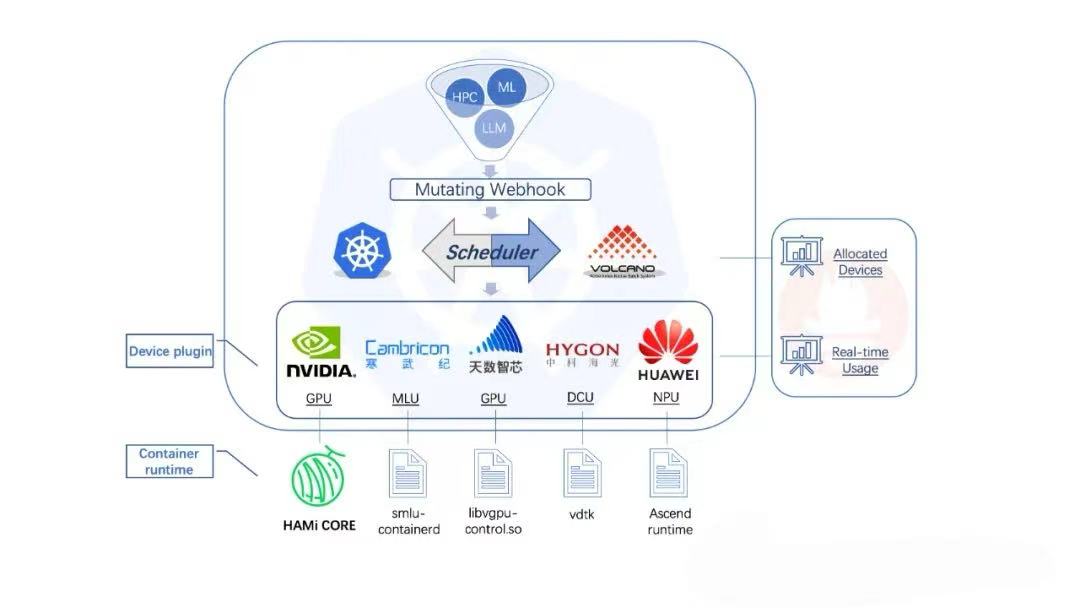
As you can see, there are several components involved, such as Webhook, Scheduler, Device Plugin, HAMi-Core, etc. This article focuses on usage, so the architecture and principles are briefly mentioned.
Features
The main feature of HAMi is fine-grained GPU isolation, allowing you to isolate core and memory usage at the 1% level.
For example:
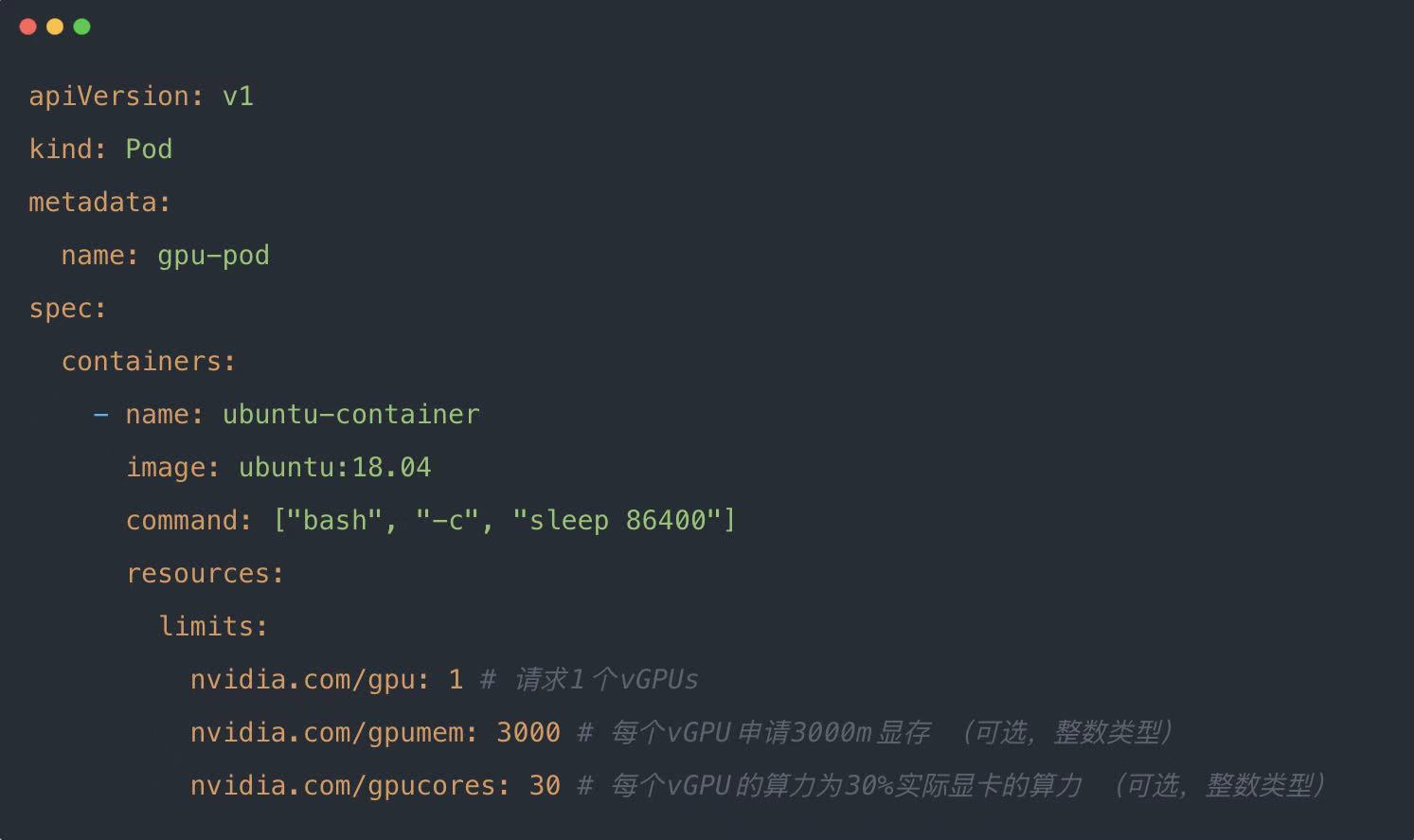
- nvidia.com/gpu: Request one GPU
- nvidia.com/gpumem: Request 3000M GPU memory
- nvidia.com/gpucores: Request 30% of GPU core, meaning the Pod can only use up to 30% of the GPU's compute power
Design
HAMi achieves GPU core and memory isolation using a vCUDA approach. The design is as follows:
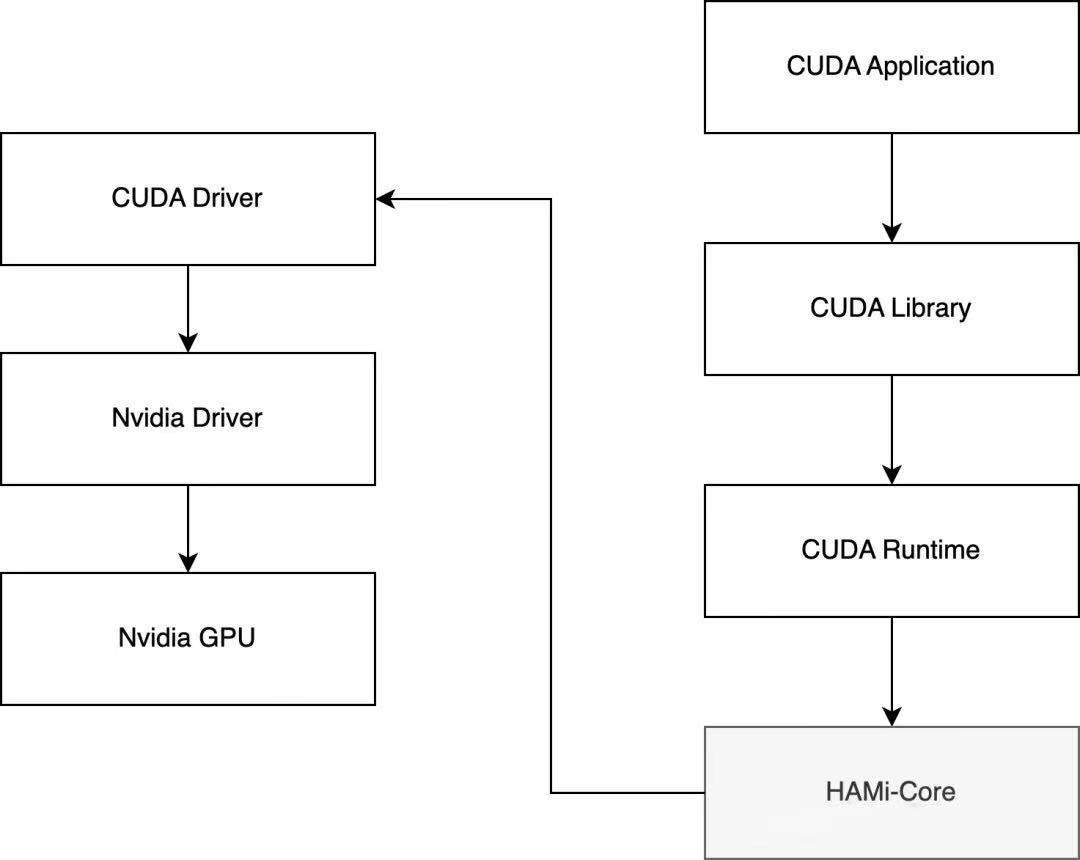
HAMi rewrites the native NVIDIA CUDA driver (libvgpu.so) at the software layer, mounts it into the Pod, and intercepts CUDA APIs to enforce resource isolation and limits.
For example: The native libvgpu.so only reports CUDA OOM when GPU memory is truly exhausted. HAMi's implementation returns OOM as soon as the Pod exceeds its requested memory, enforcing resource limits.
When running the nvidia-smi command inside the Pod, only the resources requested in the Pod's Resource spec are shown, achieving isolation at the monitoring level as well.
3. HAMi Feature Overview
HAMi provides a Helm Chart for easy installation.
Deploy GPU Operator
HAMi depends on NVIDIA's stack, so it's recommended to deploy GPU Operator first.
After deploying GPU Operator, deploy HAMi.
Deploy HAMi
First, add the HAMi Helm repo:
helm repo add hami-charts https://project-hami.github.io/HAMi/
Next, get your cluster server version:
kubectl version
During installation, specify the scheduler image version according to your cluster server version (from the previous command). For example, for v1.27.4, use:
helm install hami hami-charts/hami \
  --set scheduler.kubeScheduler.imageTag=v1.27.4 \
  -n kube-system
If you see both vgpu-device-plugin and vgpu-scheduler Pods running via kubectl get pods, installation is successful.
root@iZj6c5dnq07p1ic04ei9vwZ:~# kubectl get pods -n kube-system|grep hami
hami-device-plugin-b6mvj                          2/2     Running   0          42s
hami-scheduler-7f5c5ff968-26kjc                   2/2     Running   0          42s
Custom Configuration
📄 Official documentation: HAMi-config.cn.md
You can customize parameters during installation using -set, for example:
helm install vgpu vgpu-charts/vgpu \
  --set devicePlugin.deviceMemoryScaling=5 \
  ...
- devicePlugin.deviceSplitCount: Integer, default 10. Number of splits per GPU; each GPU cannot allocate more than this number of tasks.
- devicePlugin.deviceMemoryScaling: Float, default 1. NVIDIA device memory usage ratio; can be >1 (enables virtual memory, experimental).
- devicePlugin.migStrategy: String, supports "none" and "mixed". "none" ignores MIG devices, "mixed" uses special resource names for MIG devices. Default: "none".
- devicePlugin.disablecorelimit: String, "true" disables core limit, "false" enables it. Default: "false".
- scheduler.defaultMem: Integer, default 5000 (MB). Default memory if not specified.
- scheduler.defaultCores: Integer (0-100), default 0. Default percent of GPU core reserved per task.
- scheduler.defaultGPUNum: Integer, default 1. If set to 0, config is ignored. If a Pod doesn't specify nvidia.com/gpu, webhook adds this default value.
- resourceName: String, resource name for vGPU count. Default: "nvidia.com/gpu"
- resourceMem: String, resource name for vGPU memory. Default: "nvidia.com/gpumem"
- resourceMemPercentage: String, resource name for vGPU memory percentage. Default: "nvidia.com/gpumem-percentage"
- resourceCores: String, resource name for vGPU core. Default: "nvidia.com/cores"
- resourcePriority: String, resource name for task priority. Default: "nvidia.com/priority"
There are also container-level configs:
- GPU_CORE_UTILIZATION_POLICY: String, "default", "force", "disable" for core limit policy.
- ACTIVE_OOM_KILLER: String, "true" or "false" for whether the container is killed on OOM.
For a simple demo, you can deploy with default settings.
4. Validation
Check Node GPU Resources
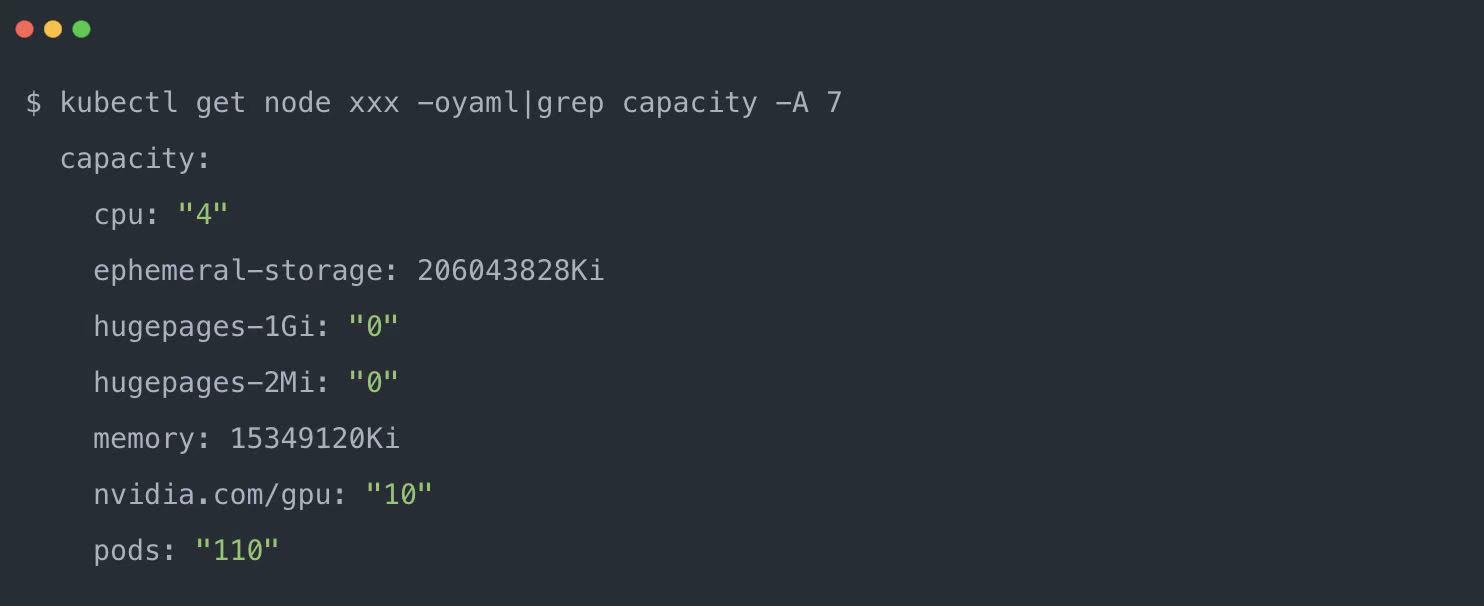
Similar to the TimeSlicing solution, after installation, the Node shows increased GPU resources. With one physical GPU, HAMi by default expands it 10x, so you see 1*10 = 10 GPUs on the Node.
Validate Memory and Core Limits
Use the following yaml to create a Pod. In addition to nvidia.com/gpu, resources.limit also includes nvidia.com/gpumem and nvidia.com/gpucores to specify memory and core limits.
- nvidia.com/gpu: Number of vGPUs requested, e.g. 1
- nvidia.com/gpumem: Requested memory, e.g. 3000M
- nvidia.com/gpumem-percentage: Memory percentage, e.g. 50 for 50% of GPU memory
- nvidia.com/priority: Priority, 0 is high, 1 is low, default is 1
High-priority tasks sharing a GPU node with other high-priority tasks are not limited by resourceCores and can use all available resources.
Similarly, low-priority tasks that exclusively use a GPU node are not limited by resourceCores.
Only when multiple tasks of different priorities run on the same GPU node does resourceCores take effect to ensure fairness and isolation.
Sample gpu-test.yaml:
apiVersion: v1
kind: Pod
metadata:
  name: gpu-pod
spec:
  containers:
    - name: ubuntu-container
      image: ubuntu:18.04
      command: ["bash", "-c", "sleep 86400"]
      resources:
        limits:
          nvidia.com/gpu: 1          # Request 1 vGPU
          nvidia.com/gpumem: 3000    # Allocate 3000 MiB of GPU memory per vGPU (optional)
          nvidia.com/gpucores: 30    # Use 30% of the physical GPU's compute capacity per vGPU (optional)
Pod starts successfully:
root@iZj6c5dnq07p1ic04ei9vwZ:~# kubectl get po
NAME      READY   STATUS    RESTARTS   AGE
gpu-pod   1/1     Running   0          48s
Inside the Pod, run nvidia-smi to check GPU info. The displayed limit matches the 3000M requested in Resources.
root@iZj6c5dnq07p1ic04ei9vwZ:~# kubectl exec -it gpu-pod -- bash
root@gpu-pod:/# nvidia-smi
[HAMI-core Msg(16:139711087368000:libvgpu.c:836)]: Initializing.....
Mon Apr 29 06:22:16 2024
+-----------------------------------------------------------------------------------------+
| NVIDIA-SMI 550.54.14       Driver Version: 550.54.14      CUDA Version: 12.4          |
|-----------------------------------------+------------------------+----------------------+
| GPU  Name                 Persistence-M | Bus-Id          Disp.A | Volatile Uncorr. ECC |
| Fan  Temp   Perf         Pwr:Usage/Cap |        Memory-Usage   | GPU-Util  Compute M. |
|                                         |                        |              MIG M. |
|=========================================+========================+======================|
|   0  Tesla T4                       On |  00000000:00:07.0 Off |                   0 |
| N/A   33C    P8              15W /  70W |      0MiB /   3000MiB |      0%      Default |
|                                         |                        |                 N/A |
+-----------------------------------------+------------------------+----------------------+

+-----------------------------------------------------------------------------------------+
| Processes:                                                                               |
|  GPU   GI   CI        PID   Type   Process name                             GPU Memory |
|        ID   ID                                                              Usage      |
|=========================================================================================|
|  No running processes found                                                             |
+-----------------------------------------------------------------------------------------+
[HAMI-core Msg(16:139711087368000:multiprocess_memory_limit.c:434)]: Calling exit handler 16
The final log is printed by HAMi's CUDA driver.
[HAMI-core Msg(...multiprocess_memory_limit.c:434)]: Calling exit handler 16
5. Summary
This article introduced the open-source vGPU solution HAMi and validated it with a simple demo.
Why do we need GPU sharing and partitioning?
With the default device plugin in k8s, GPU resources are mapped one-to-one to physical GPUs. Once a Pod requests a physical GPU, other Pods cannot use it.
To improve resource utilization, we need solutions for GPU sharing and partitioning.
HAMi Implementation Principle
By replacing the libvgpu.so library in the container, HAMi intercepts CUDA APIs to isolate and limit GPU core and memory usage.
References
For more information about HAMi, visit the GitHub repository or join our Slack community.